OpenTypeless vs Google Docs Voice Typing
Google Docs Voice Typing হলো a free browser-based dictation feature that only works inside Google Docs in Chrome। OpenTypeless ফ্রি, ওপেন-সোর্স, এবং Windows, macOS, ও Linux-এ চলে — ৬টি STT প্রোভাইডার, ১১টি LLM প্রোভাইডার, এবং AI টেক্সট পলিশিং সহ।
“Google Docs voice typing is fine for docs but I need to dictate into Slack, email, and VS Code. OpenTypeless works everywhere.”
— Product Hunt reviewer
OpenTypeless product UI
Before comparing feature lists, see the product UI states users touch when switching from Google Docs Voice Typing.


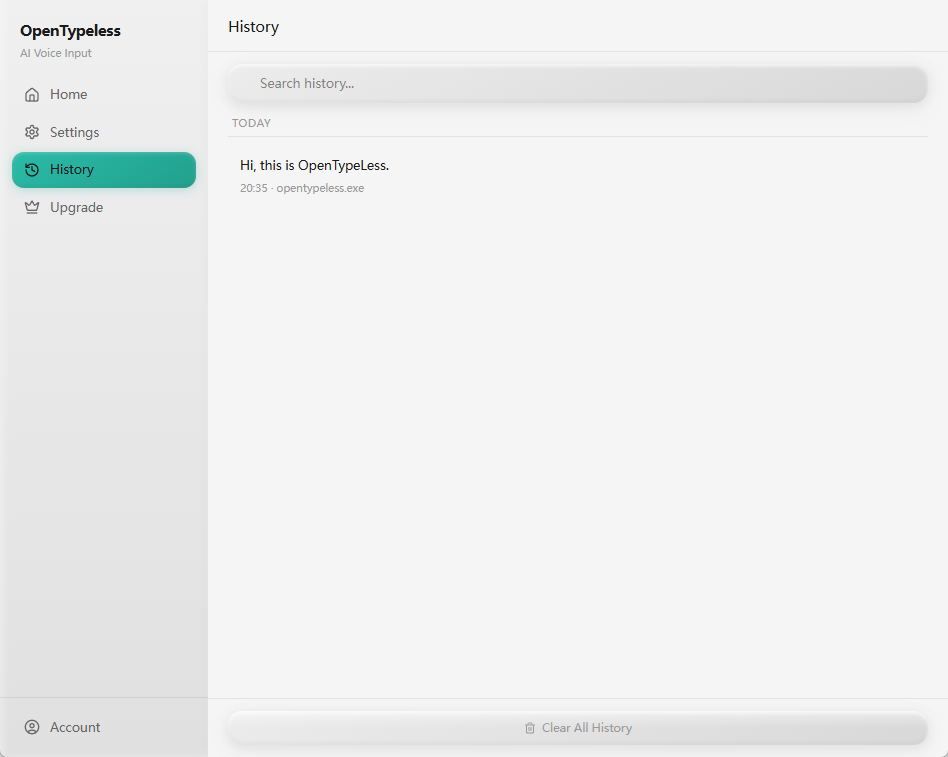
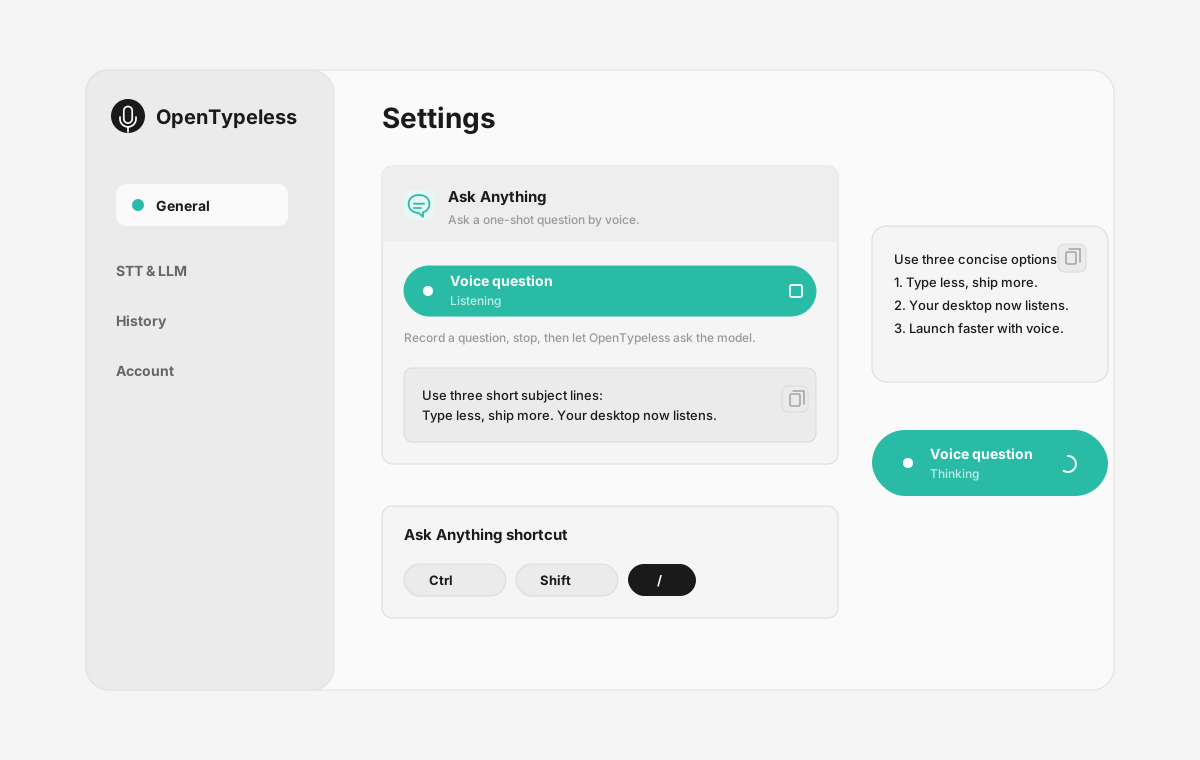
| Stage | Evidence | Why it matters |
|---|---|---|
| Desktop capture | A visible recording surface instead of a generic feature claim. | Users comparing Google Docs Voice Typing can see where OpenTypeless fits into daily typing. |
| Provider control | Settings expose STT and LLM choices in one place. | The page shows the concrete control behind BYOK, local, and cloud workflows. |
| Output review | History gives users a place to check previous voice input results. | This makes the workflow feel inspectable instead of a one-shot black box. |
| Ask Anything | A small floating answer note handles voice questions without opening a chat app. | Users can compare not only dictation, but the second workflow: ask by voice and read the result. |
ফিচার তুলনা
OpenTypeless vs Google Docs Voice Typing
| ফিচার | OpenTypeless | Google Docs Voice Typing |
|---|---|---|
| মূল্য | চিরকাল ফ্রি | Free (requires Google account) |
| প্ল্যাটফর্ম | Windows / macOS / Linux | Chrome (Google Docs only) |
| ওপেন সোর্স | MIT লাইসেন্স | ক্লোজড সোর্স |
| STT প্রোভাইডার | 6 প্রোভাইডার (BYOK) | 1 প্রোভাইডার |
| LLM প্রোভাইডার | 11 প্রোভাইডার (BYOK) | কোনোটি নয় |
| ভাষা | 99 languages | Limited |
| কাস্টম ডিকশনারি | হ্যাঁ | না |
| অফলাইন মোড | Ollama এর মাধ্যমে সম্পূর্ণ অফলাইন | না |
| AI টেক্সট পলিশিং | ১১টি LLM প্রোভাইডার | না |
Google Docs Voice Typing এর পরিবর্তে OpenTypeless কেন বেছে নেবেন
প্রধান সুবিধাসমূহ
প্রোভাইডার স্বাধীনতা
Google Docs Voice Typing এ 1টি STT প্রোভাইডার আছে। OpenTypeless ৬টি সাপোর্ট করে — আপনার প্রয়োজনীয় গতি, নির্ভুলতা এবং খরচের ভারসাম্য বেছে নিন।
AI টেক্সট পলিশিং
Google Docs Voice Typing এ AI পলিশিং নেই। OpenTypeless ১১টি LLM প্রোভাইডার ব্যবহার করে আপনার কথা পরিষ্কার করে — ফিলার সরায়, ব্যাকরণ ঠিক করে, এবং টেক্সট ফরম্যাট করে।
সম্পূর্ণ ওপেন সোর্স
MIT লাইসেন্স। GitHub এ প্রতিটি লাইন অডিটেবল। আপনার ভয়েস ইনপুট ওয়ার্কফ্লোতে কোনো ব্ল্যাক বক্স নেই।
ক্রস-প্ল্যাটফর্ম
Windows, macOS, এবং Linux-এ কাজ করে। Google Docs Voice Typing শুধুমাত্র Chrome (Google Docs only) সাপোর্ট করে।
Google Docs Voice Typing থেকে পরিবর্তন
দ্রুত মাইগ্রেশন
Install OpenTypeless and use the same voice typing habit — press hotkey, speak, get polished text. It works in Google Docs too, plus every other app on your desktop.
Google Docs Voice Typing সম্পর্কে মানুষ কী বলে
আমরা প্রতিযোগিতাকে সম্মান করি
Free with a Google account
No installation needed
Good accuracy for English
Convenient for Google Docs users
Only works inside Google Docs in Chrome browser
No AI text polishing — raw transcription only
Requires internet connection
No custom dictionary for technical terms
সাধারণ জিজ্ঞাসা
OpenTypeless কি Google Docs Voice Typing এর জন্য ভালো বিকল্প?
হ্যাঁ। OpenTypeless Google Docs Voice Typing এর মূল ভয়েস ইনপুট ফিচারগুলো কভার করে এবং ক্রস-প্ল্যাটফর্ম সাপোর্ট (Windows, macOS, Linux), ৬টি STT প্রোভাইডার, ১১টি LLM প্রোভাইডার, কাস্টম ডিকশনারি, এবং সম্পূর্ণ লোকাল অফলাইন মোড যোগ করে — সবকিছু MIT লাইসেন্সে ফ্রি।
OpenTypeless এর খরচ Google Docs Voice Typing এর তুলনায় কত?
OpenTypeless MIT লাইসেন্সে চিরকাল ফ্রি। নিজের API কী আনুন — সাধারণ ব্যবহার $১/মাসের কম। ঐচ্ছিক Pro প্ল্যান ($৪.৯৯/মাস) পূর্ব-কনফিগার ক্লাউড ক্রেডিট অন্তর্ভুক্ত করে। Google Docs Voice Typing Free (requires Google account) চার্জ করে।
OpenTypeless কি Google Docs Voice Typing এর মতো সব প্ল্যাটফর্মে কাজ করে?
OpenTypeless Windows, macOS, এবং Linux-এ চলে। Google Docs Voice Typing Chrome (Google Docs only) এ চলে। OpenTypeless বৃহত্তর ডেস্কটপ কভারেজ প্রদান করে।
আমি কি অফলাইনে OpenTypeless ব্যবহার করতে পারি?
হ্যাঁ। STT (লোকাল Whisper) এবং LLM পলিশিং উভয়ের জন্য স্থানীয়ভাবে Ollama ইনস্টল করুন। আপনার অডিও কখনোই আপনার মেশিন ছাড়ে না। Google Docs Voice Typing অফলাইন ব্যবহার সাপোর্ট করে না — এটি ইন্টারনেট সংযোগ প্রয়োজন।
OpenTypeless চেষ্টা করতে প্রস্তুত?
ফ্রি, ওপেন-সোর্স, এবং Windows, macOS, Linux-এ কাজ করে। ৫ মিনিটের কম সময়ে সেটআপ।