OpenTypeless laban sa Voice Control Mac
Ang Voice Control Mac ay Apple's built-in voice control feature for macOS accessibility. Ang OpenTypeless ay libre, open-source, at tumatakbo sa Windows, macOS, at Linux — may 6 STT provider, 11 LLM provider, at AI text polishing.
Tingnan sa Aksyon
Ano ang Hitsura ng Voice Control Mac
Kinikilala namin ang kanilang gawa
Voice Control Mac Interface
support.apple.comSystem-level overlay integrated into macOS accessibility settings. Shows a small floating number grid overlay for clicking UI elements by voice commands. Invisible by default — only appears when activated through Accessibility settings. No visible dictation interface; text appears directly in the focused app with minimal formatting.
OpenTypeless
Libre magpakailanman“Voice Control is great for clicking buttons and navigating, but for actual dictation into documents, it leaves a lot to be desired. No punctuation, no formatting, no polishing.”
— Apple Support Community
OpenTypeless product UI
Before comparing feature lists, see the product UI states users touch when switching from Voice Control Mac.


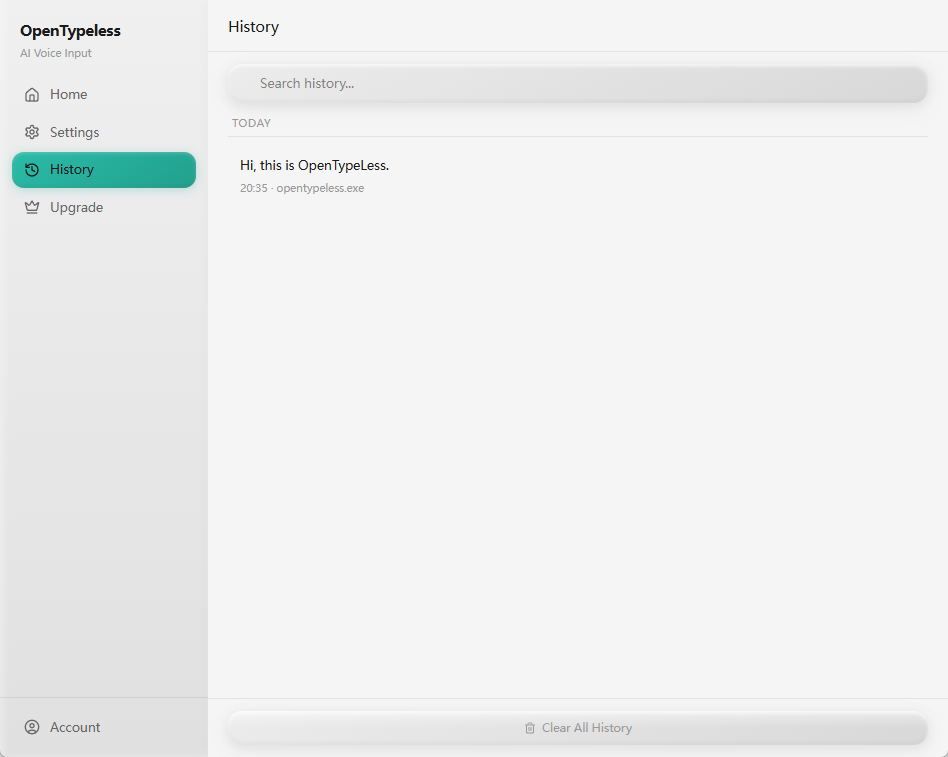
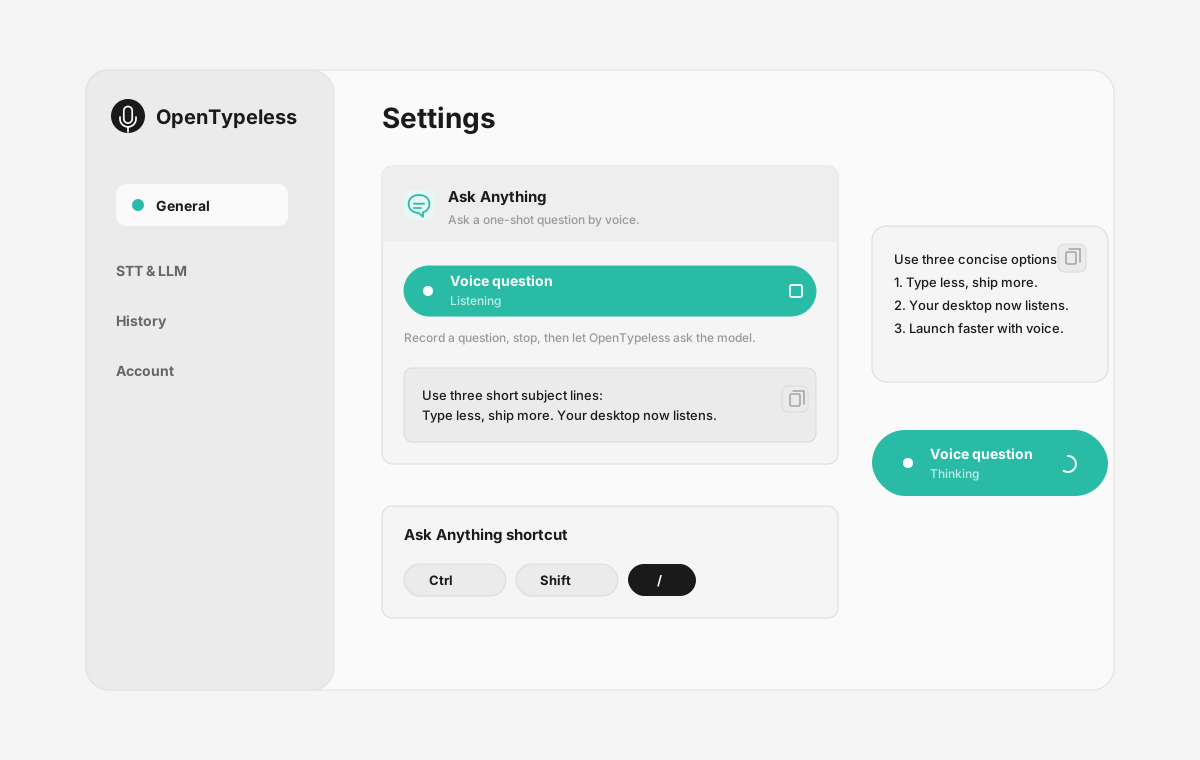
| Stage | Evidence | Why it matters |
|---|---|---|
| Desktop capture | A visible recording surface instead of a generic feature claim. | Users comparing Voice Control Mac can see where OpenTypeless fits into daily typing. |
| Provider control | Settings expose STT and LLM choices in one place. | The page shows the concrete control behind BYOK, local, and cloud workflows. |
| Output review | History gives users a place to check previous voice input results. | This makes the workflow feel inspectable instead of a one-shot black box. |
| Ask Anything | A small floating answer note handles voice questions without opening a chat app. | Users can compare not only dictation, but the second workflow: ask by voice and read the result. |
Paghahambing ng Feature
OpenTypeless laban sa Voice Control Mac
| Tampok | OpenTypeless | Voice Control Mac |
|---|---|---|
| Presyo | Libre magpakailanman | Free (included with macOS) |
| Platforma | Windows / macOS / Linux | macOS |
| Open Source | MIT Lisensya | Saradong source |
| STT Provider | 6 provider (BYOK) | 1 na provider |
| LLM Provider | 11 provider (BYOK) | Wala |
| Wika | 99 languages | Limited (Apple languages) |
| Custom na Diksyunaryo | Oo | Hindi |
| Offline na Mode | Buong offline sa Ollama | Oo |
| AI Pagpapakinis ng Teksto | 11 LLM provider | Hindi |
Bakit Piliin ang OpenTypeless kaysa sa Voice Control Mac
Pangunahing bentahe
Kalayaan sa Provider
Ang Voice Control Mac ay may 1 STT provider. Sinusuportahan ng OpenTypeless ang 6 — pumili ayon sa bilis, katumpakan, at gastos na kailangan mo.
AI Pagpapakinis
Walang AI polishing ang Voice Control Mac. Ginagamit ng OpenTypeless ang 11 LLM provider upang linisin ang iyong pananalita — tinatanggal ang mga filler, itinatama ang grammar, at inaayos ang format ng teksto.
Buong Open Source
MIT License. Maaring suriin ang bawat linya sa GitHub. Walang itinatagong proseso sa iyong voice input workflow.
Cross-Platform
Tumatakbo sa Windows, macOS, at Linux. Sinusuportahan lamang ng Voice Control Mac ang macOS.
Lumilipat mula sa Voice Control Mac
Mabilis na Paglipat
Voice Control is designed for accessibility navigation, not dictation. OpenTypeless focuses on high-quality voice-to-text with AI polishing — just press a hotkey and start speaking into any app.
Ano ang Sabi ng mga Tao tungkol sa Voice Control Mac
Kinikilala namin ang kompetisyon
Built into macOS — no installation needed
Free with macOS
Good for accessibility and hands-free control
Works offline
macOS only — no Windows or Linux support
Designed for accessibility, not productivity dictation
Single STT provider (Apple Speech) — no provider choice
No AI text polishing — raw transcription only
Mga Madalas Itanong
Magandang kapalit ba ang OpenTypeless sa Voice Control Mac?
Oo. Sinasaklaw ng OpenTypeless ang pangunahing voice input feature ng Voice Control Mac habang nagdaragdag ng cross-platform support (Windows, macOS, Linux), 6 STT provider, 11 LLM provider para sa AI text polishing, custom na diksyunaryo, at buong lokal na offline mode — lahat ng libre sa ilalim ng MIT License.
Magkano ang OpenTypeless kumpara sa Voice Control Mac?
Ang OpenTypeless ay libre magpakailanman sa ilalim ng MIT License. Magdala ng sarili mong API key — ang tipikal na paggamit ay mas mababa sa $1/buwan. Ang opsyonal na Pro plan ($4.99/buwan) ay may kasamang pre-configured cloud credits. Nagcha-charge ang Voice Control Mac ng Free (included with macOS).
Gumagana ba ang OpenTypeless sa lahat ng platform tulad ng Voice Control Mac?
Tumatakbo ang OpenTypeless sa Windows, macOS, at Linux. Tumatakbo lang ang Voice Control Mac sa macOS. Binibigyan ka ng OpenTypeless ng buong cross-platform coverage.
Pwedeng gamitin ba ang OpenTypeless offline?
Oo. I-install ang Ollama nang lokal para sa STT (local Whisper) at LLM polishing. Hindi umalis sa iyong makina ang audio mo. Sinusuportahan rin ng Voice Control Mac ang offline na paggamit, ngunit mas maraming provider na pipilian ang OpenTypeless para sa offline mode.
Handa nang Subukan ang OpenTypeless?
Libre, open-source, at gumagana sa Windows, macOS, at Linux. Maaring i-set up sa loob ng 5 minuto.