OpenTypeless vs Braina
A(z) Braina an AI voice assistant for Windows with annual subscription. Az OpenTypeless ingyenes, nyílt forráskódú, és Windows, macOS és Linux rendszereken fut — 6 STT szolgáltató, 11 LLM szolgáltató és AI szövegfinomítás segítségével.
Működés közben
Így néz ki a(z) Braina
Tiszteletben tartjuk, amit alkottak
Braina Interface
braina.comTraditional Windows desktop application with a chat-style interface. Shows a text input bar at the bottom with a microphone icon and mode selector tabs (Dictation, Command, Math, AI Chat). Dark blue theme with a persistent floating toolbar. Designed for general Windows automation rather than focused dictation.
OpenTypeless
Örökre ingyenes“Braina is decent for Windows automation, but the dictation quality isn't great and you're locked into their single speech engine.”
— AlternativeTo reviewer
OpenTypeless product UI
Before comparing feature lists, see the product UI states users touch when switching from Braina.


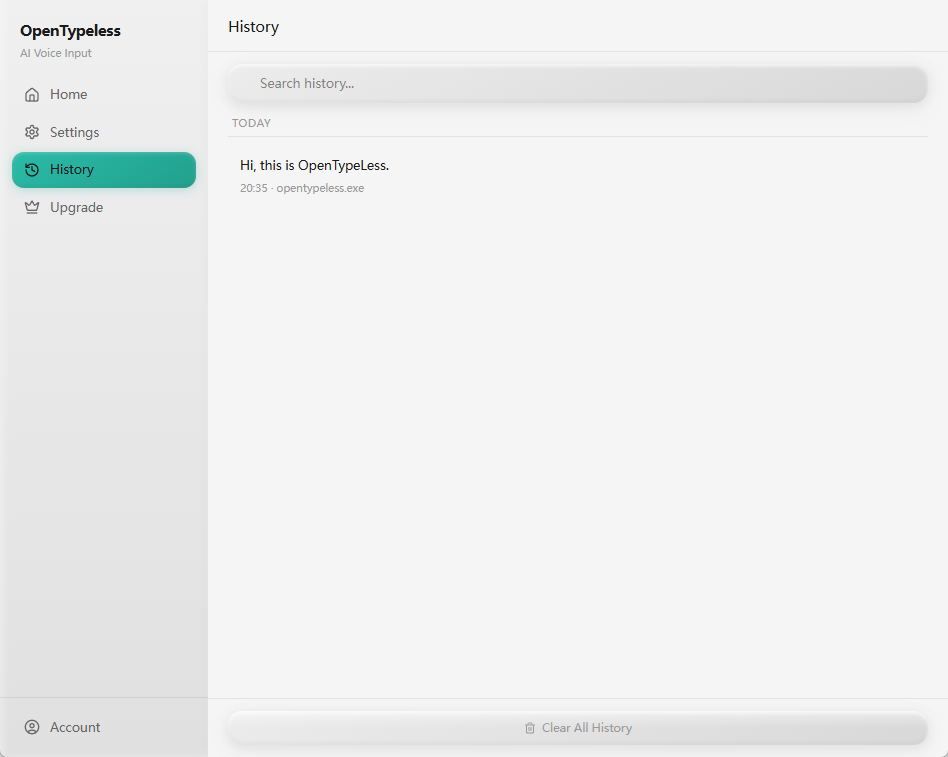
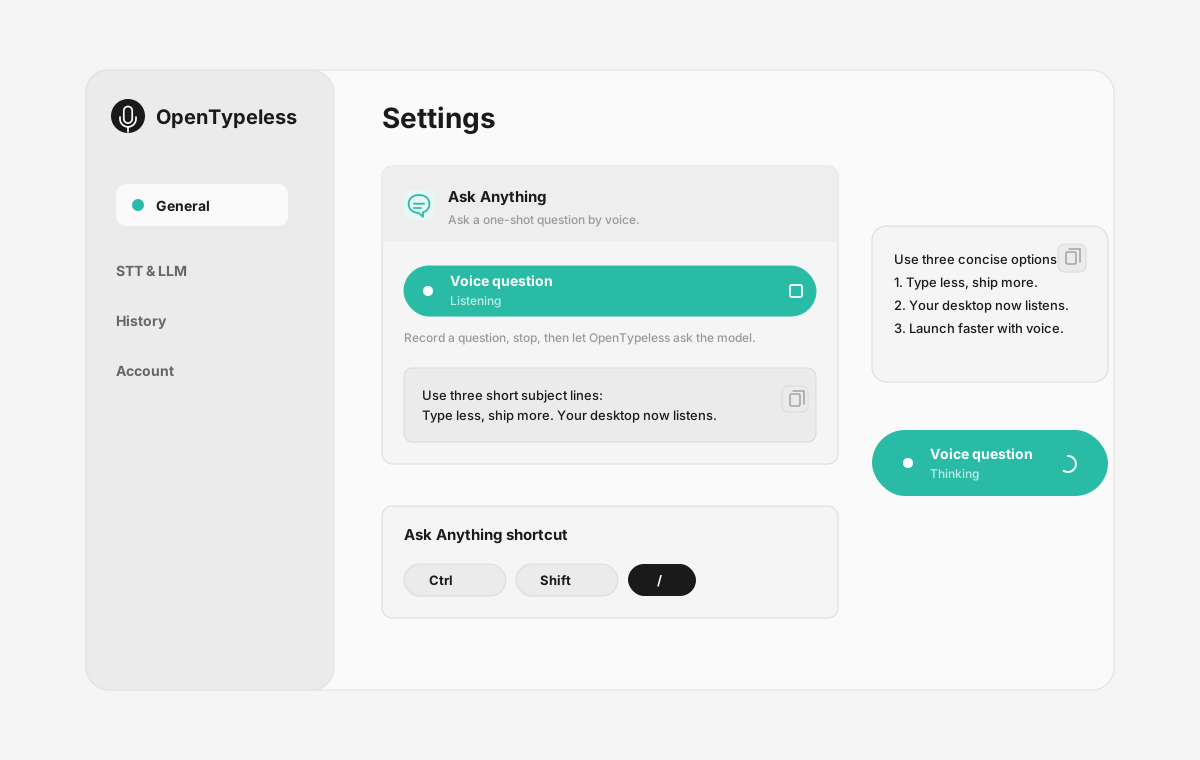
| Stage | Evidence | Why it matters |
|---|---|---|
| Desktop capture | A visible recording surface instead of a generic feature claim. | Users comparing Braina can see where OpenTypeless fits into daily typing. |
| Provider control | Settings expose STT and LLM choices in one place. | The page shows the concrete control behind BYOK, local, and cloud workflows. |
| Output review | History gives users a place to check previous voice input results. | This makes the workflow feel inspectable instead of a one-shot black box. |
| Ask Anything | A small floating answer note handles voice questions without opening a chat app. | Users can compare not only dictation, but the second workflow: ask by voice and read the result. |
Funkció-összehasonlítás
OpenTypeless vs Braina
| Funkció | OpenTypeless | Braina |
|---|---|---|
| Ár | Örökre ingyenes | Free (limited) / Pro $49/year |
| Platform | Windows / macOS / Linux | Windows / Android |
| Nyílt forráskód | MIT Licenc | Zárt forráskód |
| STT szolgáltatók | 6 szolgáltató (BYOK) | 1 szolgáltató |
| LLM szolgáltatók | 11 szolgáltató (BYOK) | Nincs |
| Nyelvek | 99 languages | Limited |
| Egyedi szótár | Igen | Nem |
| Offline mód | Teljes offline Ollamán keresztül | Nem |
| AI szövegfinomítás | 11 LLM szolgáltató | Nem |
Miért válassza az OpenTypeless-t a(z) Braina helyett
A legfontosabb előnyök
Szolgáltatói szabadság
A(z) Braina 1 STT szolgáltatóval rendelkezik. Az OpenTypeless 6-ot támogat — válassza az Önnek megfelelő sebesség, pontosság és költség kombinációt.
AI szövegfinomítás
A(z) Braina nem rendelkezik AI finomítással. Az OpenTypeless 11 LLM szolgáltatót használ a beszéd tisztításához — töltelékszavak eltávolítása, nyelvtan javítása és szöveg formázása.
Teljesen nyílt forráskód
MIT Licenc. Minden sor ellenőrizhető a GitHub-on. Nincs fekete doboz a hangbeviteli munkafolyamatában.
Többplatformos
Windows, macOS és Linux rendszereken működik. A(z) Braina csak Windows and Android rendszert támogat.
Váltás a(z) Braina rendszerről
Gyors migráció
OpenTypeless works on macOS and Linux too, not just Windows. Your Braina Pro subscription costs $49/year — OpenTypeless is free forever. Just install, add your API key, and start dictating.
Mit mondanak a(z) Braina rendszerről
Tisztelettel tekintünk a versenytársakra
Built-in AI chatbot features
Voice commands for Windows automation
Math and dictation modes
Android companion app
Windows and Android only — no macOS or Linux
Annual subscription for Pro ($49/year)
Single STT provider — no provider choice
No AI text polishing with multiple LLM providers
Gyakran Ismételt Kérdések
Jó alternatíva az OpenTypeless a(z) Braina helyett?
Igen. Az OpenTypeless lefedi a(z) Braina alapvető hangbeviteli funkcióit, miközben többplatformos támogatást (Windows, macOS, Linux), 6 STT szolgáltatót, AI szövegfinomításhoz 11 LLM szolgáltatót, egyedi szótárt és teljesen helyi offline módot biztosít — mindezt ingyenesen, MIT Licenc alatt.
Mennyibe kerül az OpenTypeless a(z) Braina rendszerekhez képest?
Az OpenTypeless MIT Licenc alatt örökre ingyenes. Saját API-kulcsokat hoz — a tipikus használat kevesebbe kerül, mint 1 $/hó. Egy opcionális Pro csomag (4,99 $/hó) előre beállított felhős kreditet tartalmaz. A(z) Braina Free (limited) / Pro $49/year összeget számít fel.
Működik az OpenTypeless minden platformon, mint a(z) Braina?
Az OpenTypeless Windows, macOS és Linux rendszereken fut. A(z) Braina Windows, Android rendszeren fut. Az OpenTypeless szélesebb asztali lefedettséget nyújt.
Használhatom az OpenTypeless-t offline?
Igen. Telepítse helyileg az Ollamát STT (helyi Whisper) és LLM finomítás céljából. Az Ön hangja sosem hagyja el a gépét. A(z) Braina nem támogatja az offline használatot — internetkapcsolatot igényel.
Készen áll kipróbálni az OpenTypeless-t?
Ingyenes, nyílt forráskódú, és Windows, macOS és Linux rendszereken működik. 5 percen belül beállítható.