OpenTypeless vs Braina
Braina an AI voice assistant for Windows with annual subscription. OpenTypeless percuma, sumber terbuka, dan berfungsi di Windows, macOS, dan Linux — dengan 6 penyedia STT, 11 penyedia LLM, dan penggilangan teks AI.
Lihat Tindakan
Rupa Braina
Kami menghormati apa yang mereka bina
Braina Interface
braina.comTraditional Windows desktop application with a chat-style interface. Shows a text input bar at the bottom with a microphone icon and mode selector tabs (Dictation, Command, Math, AI Chat). Dark blue theme with a persistent floating toolbar. Designed for general Windows automation rather than focused dictation.
OpenTypeless
Percuma selamanya“Braina is decent for Windows automation, but the dictation quality isn't great and you're locked into their single speech engine.”
— AlternativeTo reviewer
OpenTypeless product UI
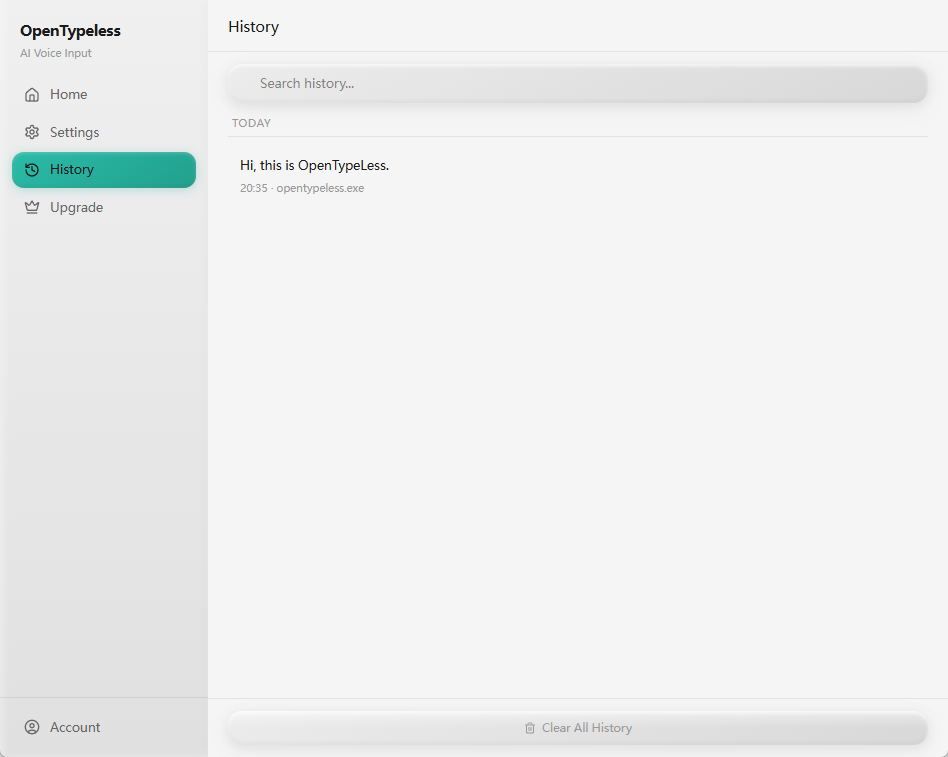
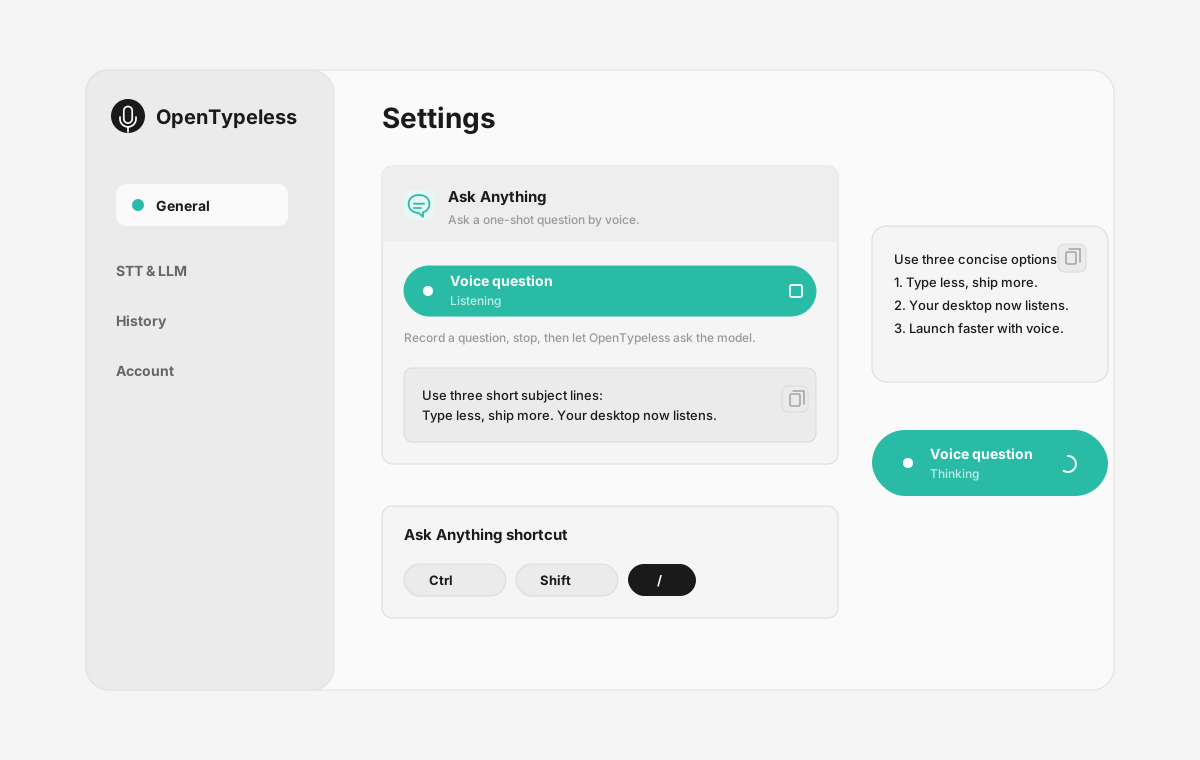
Before comparing feature lists, see the product UI states users touch when switching from Braina.


| Stage | Evidence | Why it matters |
|---|---|---|
| Desktop capture | A visible recording surface instead of a generic feature claim. | Users comparing Braina can see where OpenTypeless fits into daily typing. |
| Provider control | Settings expose STT and LLM choices in one place. | The page shows the concrete control behind BYOK, local, and cloud workflows. |
| Output review | History gives users a place to check previous voice input results. | This makes the workflow feel inspectable instead of a one-shot black box. |
| Ask Anything | A small floating answer note handles voice questions without opening a chat app. | Users can compare not only dictation, but the second workflow: ask by voice and read the result. |
Perbandingan Ciri
OpenTypeless vs Braina
| Ciri | OpenTypeless | Braina |
|---|---|---|
| Harga | Percuma selamanya | Free (limited) / Pro $49/year |
| Platform | Windows / macOS / Linux | Windows / Android |
| Sumber Terbuka | Lesen MIT | Sumber tertutup |
| Penyedia STT | 6 penyedia (BYOK) | 1 penyedia |
| Penyedia LLM | 11 penyedia (BYOK) | Tiada |
| Bahasa | 99 languages | Limited |
| Kamus Tersuai | Ya | Tidak |
| Mod Luar Talian | Sepenuhnya luar talian melalui Ollama | Tidak |
| Penggilangan Teks AI | 11 penyedia LLM | Tidak |
Mengapa Pilih OpenTypeless Daripada Braina
Kelebihan utama
Kebebasan Penyedia
Braina mempunyai 1 penyedia STT. OpenTypeless menyokong 6 — pilih keseimbangan kelajuan, ketepatan, dan kos yang anda perlukan.
Penggilangan Teks AI
Braina tiada penggilangan AI. OpenTypeless menggunakan 11 penyedia LLM untuk membersihkan pertuturan anda — mengalih kata pengisi, membetulkan tatabahasa, dan memformat teks.
Sepenuhnya Sumber Terbuka
Lesen MIT. Setiap baris boleh diaudit di GitHub. Tiada kotak hitam dalam aliran kerja input suara anda.
Lintas Platform
Berfungsi di Windows, macOS, dan Linux. Braina hanya menyokong Windows and Android.
Bertukar daripada Braina
Penghijrahan Pantas
OpenTypeless works on macOS and Linux too, not just Windows. Your Braina Pro subscription costs $49/year — OpenTypeless is free forever. Just install, add your API key, and start dictating.
Apa Kata Orang Tentang Braina
Kami menghormati persaingan
Built-in AI chatbot features
Voice commands for Windows automation
Math and dictation modes
Android companion app
Windows and Android only — no macOS or Linux
Annual subscription for Pro ($49/year)
Single STT provider — no provider choice
No AI text polishing with multiple LLM providers
Soalan Lazim
Adakah OpenTypeless pengganti yang baik untuk Braina?
Ya. OpenTypeless merangkumi ciri input suara teras Braina sambil menambah sokongan lintas platform (Windows, macOS, Linux), 6 penyedia STT, 11 penyedia LLM untuk penggilangan teks AI, kamus tersuai, dan mod luar talian sepenuhnya — semuanya percuma di bawah Lesen MIT.
Berapa kos OpenTypeless berbanding Braina?
OpenTypeless percuma selamanya di bawah Lesen MIT. Bawa kunci API anda sendiri — penggunaan biasa kurang daripada $1/sebulan. Pelan Pro pilihan ($4.99/sebulan) termasuk kredit awan pra-konfigurasi. Braina mengenakan bayaran Free (limited) / Pro $49/year.
Adakah OpenTypeless berfungsi di semua platform seperti Braina?
OpenTypeless berjalan di Windows, macOS, dan Linux. Braina berjalan di Windows, Android. OpenTypeless menyediakan liputan desktop yang lebih luas.
Bolehkah saya menggunakan OpenTypeless secara luar talian?
Ya. Pasang Ollama secara tempatan untuk STT (Whisper tempatan) dan penggilangan LLM. Audio anda tidak akan meninggalkan peranti anda. Braina tidak menyokong penggunaan luar talian — ia memerlukan sambungan internet.
Bersedia Mencuba OpenTypeless?
Percuma, sumber terbuka, dan berfungsi di Windows, macOS, dan Linux. Siap dalam masa kurang 5 minit.