OpenTypeless vs Typeless
Typeless is a voice typing app for macOS with AI features. OpenTypeless is gratis, open-source en werkt op Windows, macOS en Linux — met 6 STT-providers, 11 LLM-providers en AI-tekstverbetering.
Hoe Typeless eruitziet
We respecteren wat zij hebben gebouwd
Typeless Interface
typeless.appA clean macOS-native floating window with a minimalist design. Shows a recording indicator and transcribed text in a small overlay panel. Integrates with macOS menu bar. Has a settings panel with basic STT and AI configuration options. Limited to macOS — no cross-platform support.
OpenTypeless
Voor altijd gratis“Typeless works great on my Mac, but I switched when I needed Windows support too. Having the same tool on both platforms makes a huge difference.”
— Product Hunt reviewer
OpenTypeless product UI
Before comparing feature lists, see the product UI states users touch when switching from Typeless.


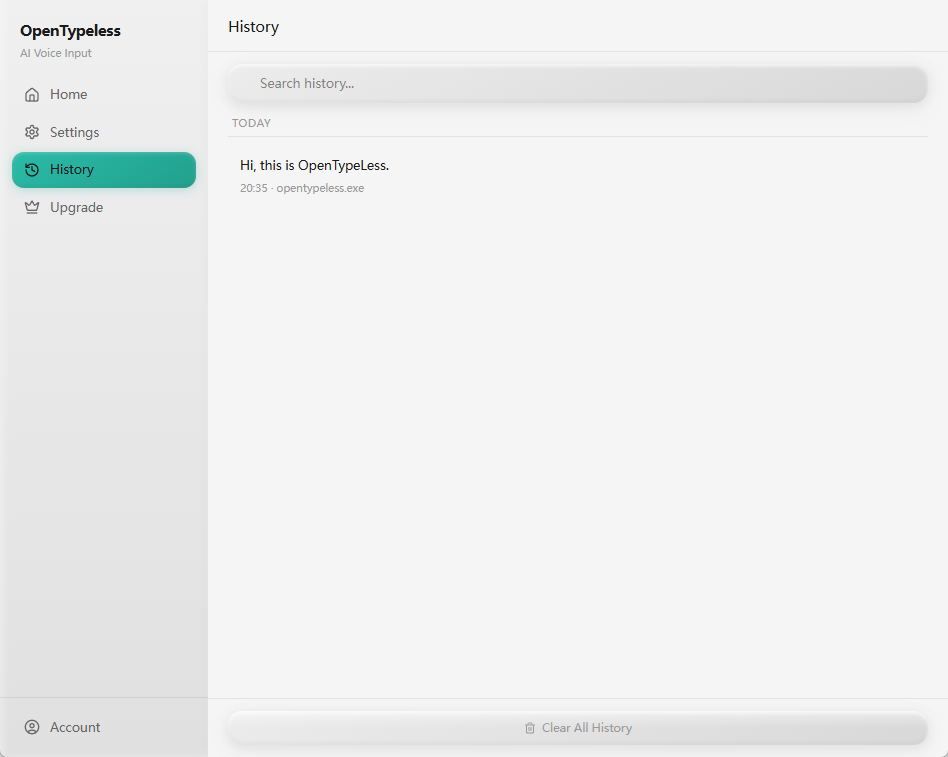
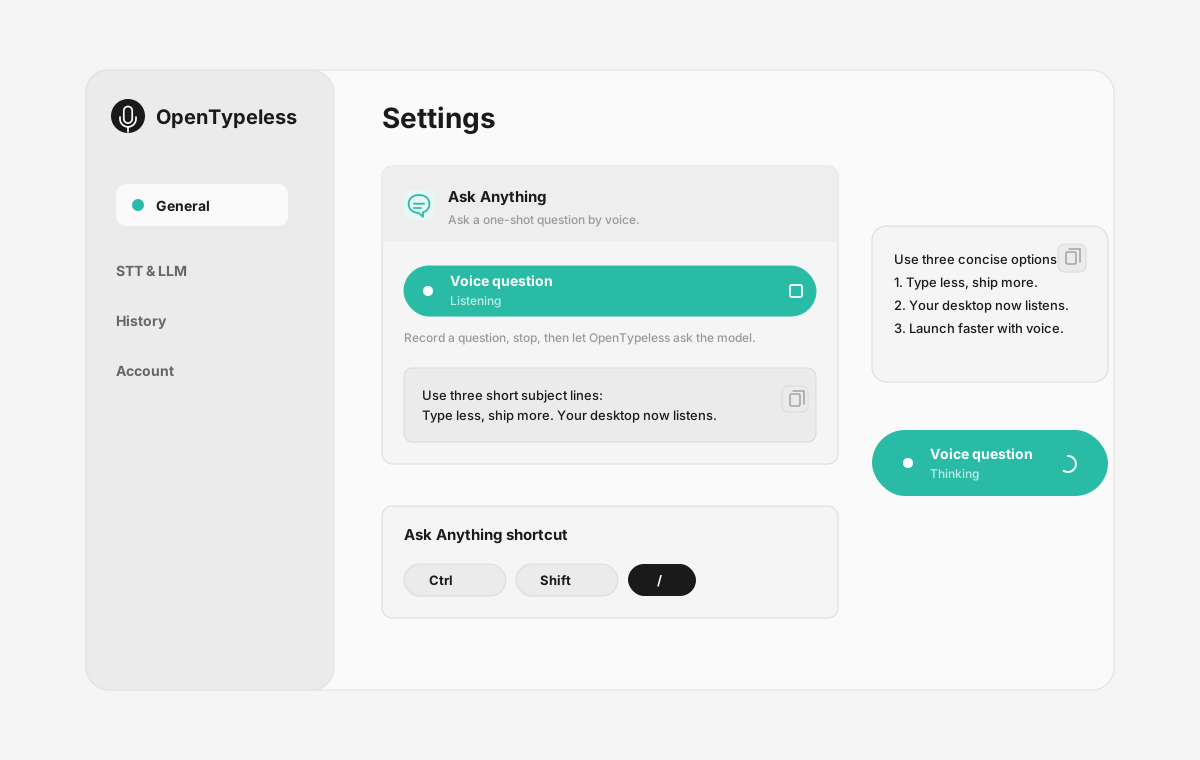
| Stage | Evidence | Why it matters |
|---|---|---|
| Desktop capture | A visible recording surface instead of a generic feature claim. | Users comparing Typeless can see where OpenTypeless fits into daily typing. |
| Provider control | Settings expose STT and LLM choices in one place. | The page shows the concrete control behind BYOK, local, and cloud workflows. |
| Output review | History gives users a place to check previous voice input results. | This makes the workflow feel inspectable instead of a one-shot black box. |
| Ask Anything | A small floating answer note handles voice questions without opening a chat app. | Users can compare not only dictation, but the second workflow: ask by voice and read the result. |
Functievergelijking
OpenTypeless vs Typeless
| Functie | OpenTypeless | Typeless |
|---|---|---|
| Prijs | Voor altijd gratis | Free tier / Pro $9.99/month |
| Platform | Windows / macOS / Linux | macOS |
| Open source | MIT-licentie | Gesloten bron |
| STT-providers | 6 aanbieders (BYOK) | 1 aanbieder(s) |
| LLM-providers | 11 aanbieders (BYOK) | 1 aanbieder(s) |
| Talen | 99 languages | 58 |
| Eigen woordenboek | Ja | Nee |
| Offlinemodus | Volledig offline via Ollama | Nee |
| AI-tekstverbetering | 11 LLM-providers | 1 aanbieder(s) |
Waarom kiezen voor OpenTypeless boven Typeless
De belangrijkste voordelen
Providervrijheid
Typeless heeft 1 STT-provider(s). OpenTypeless ondersteunt er 6 — kies de snelheid, nauwkeurigheid en kostenbalans die u nodig hebt.
AI-tekstverbetering
Typeless heeft beperkte verbetering. OpenTypeless gebruikt 11 LLM-providers om uw spraak op te schonen — stopwoorden verwijderen, grammatica corrigeren en tekst opmaken.
Volledig open source
MIT-licentie. Elke regel controleerbaar op GitHub. Geen black boxes in uw spraakinvoerworkflow.
Cross-platform
Werkt op Windows, macOS en Linux. Typeless ondersteunt alleen macOS.
Overstappen van Typeless
Snelle migratie
OpenTypeless runs on Windows, macOS, and Linux — not just Mac. It supports 6 STT providers and 11 LLM providers, so you can choose the best engine for your language and use case. Your Typeless workflow translates directly.
Wat mensen zeggen over Typeless
We respecteren de concurrentie
Clean macOS-native UI
Good AI text polishing quality
Integrates with macOS system features
Simple setup for Mac users
macOS only — no Windows or Linux support
Single STT provider — no choice of engine
Single LLM provider — limited AI polishing options
Closed source — no community auditing
Veelgestelde vragen
Is OpenTypeless een goed alternatief voor Typeless?
Ja. OpenTypeless dekt de kernspraakfuncties van Typeless en voegt cross-platformondersteuning toe (Windows, macOS, Linux), 6 STT-providers, 11 LLM-providers voor AI-tekstverbetering, een eigen woordenboek en een volledig lokale offlinemodus — alles gratis onder de MIT-licentie.
Hoeveel kost OpenTypeless vergeleken met Typeless?
OpenTypeless is voor altijd gratis onder de MIT-licentie. U gebruikt eigen API-sleutels — gemiddeld gebruik kost minder dan $1/maand. Een optioneel Pro-abonnement ($4,99/maand) bevat vooraf geconfigureerde cloudkredieten. Typeless rekent Free tier / Pro $9.99/month.
Werkt OpenTypeless op alle platforms zoals Typeless?
OpenTypeless draait op Windows, macOS en Linux. Typeless draait alleen op macOS. OpenTypeless biedt volledige cross-platformdekking.
Kan ik OpenTypeless offline gebruiken?
Ja. Installeer Ollama lokaal voor zowel STT (lokale Whisper) als LLM-verbetering. Uw audio verlaat nooit uw apparaat. Typeless ondersteunt geen offline gebruik — een internetverbinding is vereist.
Klaar om OpenTypeless te proberen?
Gratis, open-source en werkt op Windows, macOS en Linux. Installeer in minder dan 5 minuten.