OpenTypeless vs Voice Control Mac
Voice Control Mac er Apple's built-in voice control feature for macOS accessibility. OpenTypeless er gratis, har åpen kildekode, og kjører på Windows, macOS og Linux — med 6 STT-leverandører, 11 LLM-leverandører og AI-tekstforbedring.
Se det i praksis
Slik ser Voice Control Mac ut
Vi respekterer det de har bygget
Voice Control Mac Interface
support.apple.comSystem-level overlay integrated into macOS accessibility settings. Shows a small floating number grid overlay for clicking UI elements by voice commands. Invisible by default — only appears when activated through Accessibility settings. No visible dictation interface; text appears directly in the focused app with minimal formatting.
OpenTypeless
Gratis for alltid“Voice Control is great for clicking buttons and navigating, but for actual dictation into documents, it leaves a lot to be desired. No punctuation, no formatting, no polishing.”
— Apple Support Community
OpenTypeless product UI
Before comparing feature lists, see the product UI states users touch when switching from Voice Control Mac.


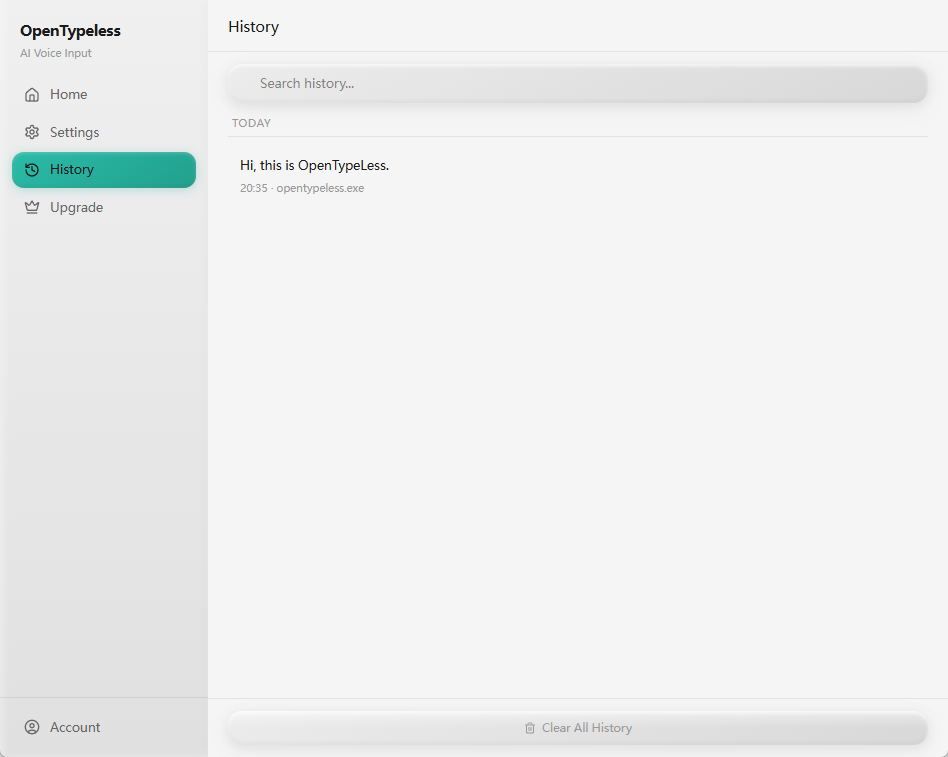
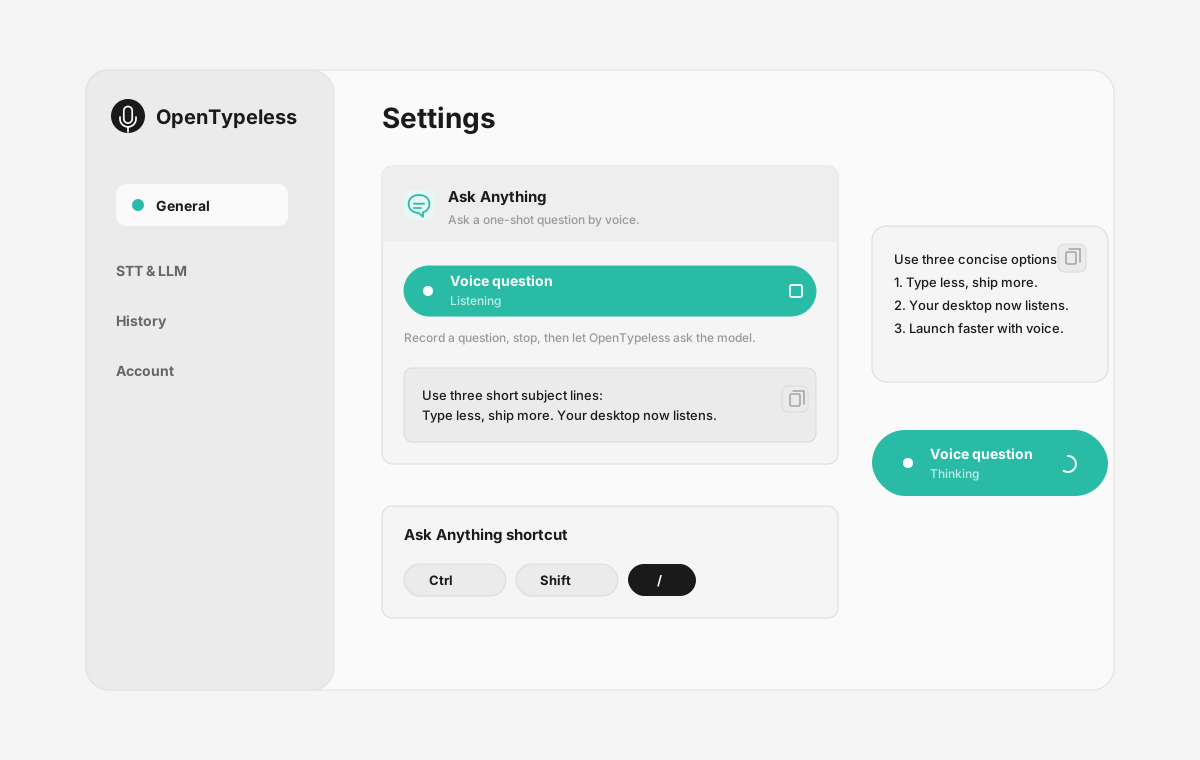
| Stage | Evidence | Why it matters |
|---|---|---|
| Desktop capture | A visible recording surface instead of a generic feature claim. | Users comparing Voice Control Mac can see where OpenTypeless fits into daily typing. |
| Provider control | Settings expose STT and LLM choices in one place. | The page shows the concrete control behind BYOK, local, and cloud workflows. |
| Output review | History gives users a place to check previous voice input results. | This makes the workflow feel inspectable instead of a one-shot black box. |
| Ask Anything | A small floating answer note handles voice questions without opening a chat app. | Users can compare not only dictation, but the second workflow: ask by voice and read the result. |
Funksjonssammenligning
OpenTypeless vs Voice Control Mac
| Funksjon | OpenTypeless | Voice Control Mac |
|---|---|---|
| Pris | Gratis for alltid | Free (included with macOS) |
| Plattform | Windows / macOS / Linux | macOS |
| Åpen kildekode | MIT-lisens | Lukket kildekode |
| STT-leverandører | 6 leverandører (BYOK) | 1 leverandør(er) |
| LLM-leverandører | 11 leverandører (BYOK) | Ingen |
| Språk | 99 languages | Limited (Apple languages) |
| Egen ordliste | Ja | Nei |
| Frakoblet modus | Fullt frakoblet via Ollama | Ja |
| AI-tekstforbedring | 11 LLM-leverandører | Nei |
Hvorfor velge OpenTypeless fremfor Voice Control Mac
De viktigste fordelene
Leverandørfrihet
Voice Control Mac har 1 STT-leverandør(er). OpenTypeless støtter 6 — velg den balansen mellom hastighet, nøyaktighet og kostnad du trenger.
AI-tekstforbedring
Voice Control Mac har ingen AI-forbedring. OpenTypeless bruker 11 LLM-leverandører for å rydde opp i talen din — fjerner fyllord, retter grammatikk og formaterer teksten.
Helt åpen kildekode
MIT-lisens. Hver linje kan revideres på GitHub. Ingen svarte bokser i arbeidsflyten for stemmeinndata.
Plattformuavhengig
Fungerer på Windows, macOS og Linux. Voice Control Mac støtter kun macOS.
Bytte fra Voice Control Mac
Rask migrering
Voice Control is designed for accessibility navigation, not dictation. OpenTypeless focuses on high-quality voice-to-text with AI polishing — just press a hotkey and start speaking into any app.
Hva folk sier om Voice Control Mac
Vi respekterer konkurransen
Built into macOS — no installation needed
Free with macOS
Good for accessibility and hands-free control
Works offline
macOS only — no Windows or Linux support
Designed for accessibility, not productivity dictation
Single STT provider (Apple Speech) — no provider choice
No AI text polishing — raw transcription only
Ofte stilte spørsmål
Er OpenTypeless et godt alternativ til Voice Control Mac?
Ja. OpenTypeless dekker kjernefunksjonene for stemmeinndata i Voice Control Mac, og legger til plattformuavhengighet (Windows, macOS, Linux), 6 STT-leverandører, 11 LLM-leverandører for AI-tekstforbedring, egen ordliste og fullstendig lokal frakoblet modus — alt gratis under MIT-lisensen.
Hvor mye koster OpenTypeless sammenlignet med Voice Control Mac?
OpenTypeless er gratis for alltid under MIT-lisensen. Du bruker egne API-nøkler — typisk bruk koster under $1/måned. En valgfri Pro-plan ($4,99/måned) inkluderer forhåndskonfigurerte skykreditter. Voice Control Mac koster Free (included with macOS).
Fungerer OpenTypeless på alle plattformer som Voice Control Mac?
OpenTypeless kjører på Windows, macOS og Linux. Voice Control Mac kjører kun på macOS. OpenTypeless gir deg full plattformdekning.
Kan jeg bruke OpenTypeless frakoblet?
Ja. Installer Ollama lokalt for både STT (lokal Whisper) og LLM-forbedring. Lyden din forlater aldri maskinen. Voice Control Mac støtter også frakoblet bruk, men OpenTypeless gir deg flere leverandørvalg for frakoblet modus.
Klar til å prøve OpenTypeless?
Gratis, åpen kildekode, og fungerer på Windows, macOS og Linux. Sett opp på under 5 minutter.