OpenTypeless vs Voice Control Mac
Voice Control Mac är Apple's built-in voice control feature for macOS accessibility. OpenTypeless är gratis, har öppen källkod och körs på Windows, macOS och Linux — med 6 STT-leverantörer, 11 LLM-leverantörer och AI-textförbättring.
Se det i praktiken
Så här ser Voice Control Mac ut
Vi respekterar det de har byggt
Voice Control Mac Interface
support.apple.comSystem-level overlay integrated into macOS accessibility settings. Shows a small floating number grid overlay for clicking UI elements by voice commands. Invisible by default — only appears when activated through Accessibility settings. No visible dictation interface; text appears directly in the focused app with minimal formatting.
OpenTypeless
Gratis för alltid“Voice Control is great for clicking buttons and navigating, but for actual dictation into documents, it leaves a lot to be desired. No punctuation, no formatting, no polishing.”
— Apple Support Community
OpenTypeless product UI
Before comparing feature lists, see the product UI states users touch when switching from Voice Control Mac.


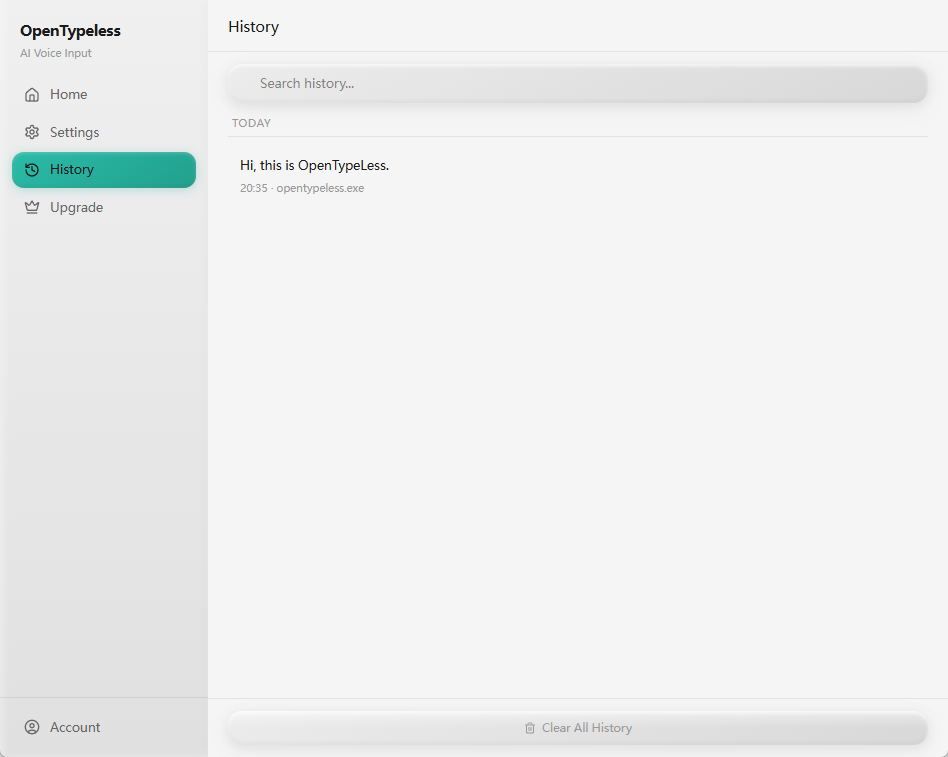
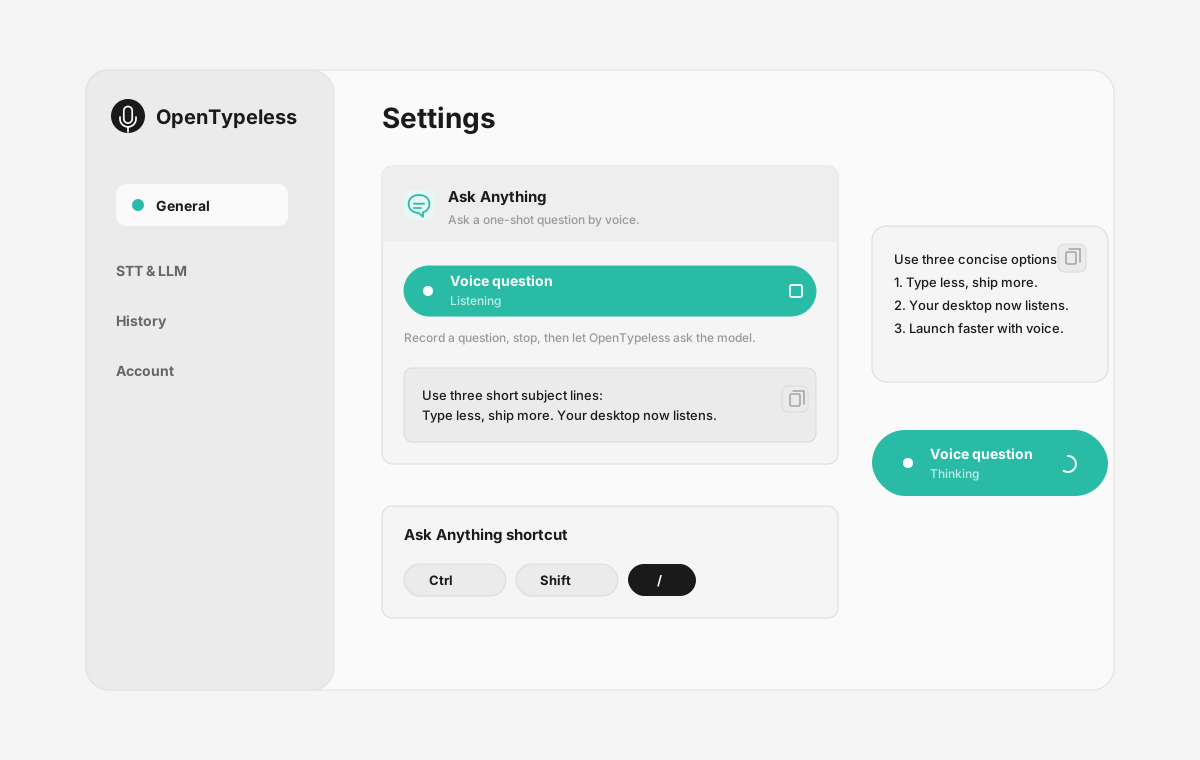
| Stage | Evidence | Why it matters |
|---|---|---|
| Desktop capture | A visible recording surface instead of a generic feature claim. | Users comparing Voice Control Mac can see where OpenTypeless fits into daily typing. |
| Provider control | Settings expose STT and LLM choices in one place. | The page shows the concrete control behind BYOK, local, and cloud workflows. |
| Output review | History gives users a place to check previous voice input results. | This makes the workflow feel inspectable instead of a one-shot black box. |
| Ask Anything | A small floating answer note handles voice questions without opening a chat app. | Users can compare not only dictation, but the second workflow: ask by voice and read the result. |
Jämförelse av funktioner
OpenTypeless vs Voice Control Mac
| Funktion | OpenTypeless | Voice Control Mac |
|---|---|---|
| Pris | Gratis för alltid | Free (included with macOS) |
| Plattform | Windows / macOS / Linux | macOS |
| Öppen källkod | MIT-licens | Sluten källkod |
| STT-leverantörer | 6 leverantörer (BYOK) | 1 leverantör(er) |
| LLM-leverantörer | 11 leverantörer (BYOK) | Inga |
| Språk | 99 languages | Limited (Apple languages) |
| Egen ordlista | Ja | Nej |
| Offlineläge | Fullständig offline via Ollama | Ja |
| AI-textförbättring | 11 LLM-leverantörer | Nej |
Varför välja OpenTypeless framför Voice Control Mac
De viktigaste fördelarna
Leverantörsfrihet
Voice Control Mac har 1 STT-leverantör(er). OpenTypeless stöder 6 — välj den balans av hastighet, noggrannhet och kostnad du behöver.
AI-textförbättring
Voice Control Mac saknar AI-förbättring. OpenTypeless använder 11 LLM-leverantörer för att städa upp ditt tal — tar bort utfyllnadsord, rättar grammatik och formaterar texten.
Helt öppen källkod
MIT-licens. Varje rad granskningsbar på GitHub. Inga svarta lådor i din röstinmatning.
Plattformsoberoende
Fungerar på Windows, macOS och Linux. Voice Control Mac stöder bara macOS.
Byt från Voice Control Mac
Snabb migrering
Voice Control is designed for accessibility navigation, not dictation. OpenTypeless focuses on high-quality voice-to-text with AI polishing — just press a hotkey and start speaking into any app.
Vad folk säger om Voice Control Mac
Vi respekterar konkurrensen
Built into macOS — no installation needed
Free with macOS
Good for accessibility and hands-free control
Works offline
macOS only — no Windows or Linux support
Designed for accessibility, not productivity dictation
Single STT provider (Apple Speech) — no provider choice
No AI text polishing — raw transcription only
Vanliga frågor
Är OpenTypeless ett bra alternativ till Voice Control Mac?
Ja. OpenTypeless täcker Voice Control Macs kärnfunktioner för röstinmatning och lägger till plattformsoberoende (Windows, macOS, Linux), 6 STT-leverantörer, 11 LLM-leverantörer för AI-textförbättring, egen ordlista och fullständigt lokalt offlineläge — allt gratis under MIT-licensen.
Vad kostar OpenTypeless jämfört med Voice Control Mac?
OpenTypeless är gratis för alltid under MIT-licensen. Du använder dina egna API-nycklar — typisk användning kostar mindre än $1/månad. Ett tillval Pro-paket ($4.99/månad) inkluderar förkonfigurerade molnkrediter. Voice Control Mac tar Free (included with macOS).
Fungerar OpenTypeless på alla plattformar som Voice Control Mac?
OpenTypeless körs på Windows, macOS och Linux. Voice Control Mac körs bara på macOS. OpenTypeless ger dig full plattformstäckning.
Kan jag använda OpenTypeless offline?
Ja. Installera Ollama lokalt för både STT (lokal Whisper) och LLM-förbättring. Ditt ljud lämnar aldrig din maskin. Voice Control Mac stöder också offline, men OpenTypeless ger fler leverantörsval för offlineläge.
Redo att prova OpenTypeless?
Gratis, öppen källkod och fungerar på Windows, macOS och Linux. Kom igång på under 5 minuter.