OpenTypeless vs Braina
Braina คือ an AI voice assistant for Windows with annual subscription OpenTypeless ฟรี โอเพ่นซอร์ส ทำงานบน Windows, macOS และ Linux — พร้อมผู้ให้บริการ STT 6 ราย, ผู้ให้บริการ LLM 11 ราย และ AI ปรับปรุงข้อความ
ดูการทำงานจริง
หน้าตาของ Braina
เราเคารพสิ่งที่พวกเขาสร้าง
Braina Interface
braina.comTraditional Windows desktop application with a chat-style interface. Shows a text input bar at the bottom with a microphone icon and mode selector tabs (Dictation, Command, Math, AI Chat). Dark blue theme with a persistent floating toolbar. Designed for general Windows automation rather than focused dictation.
OpenTypeless
ฟรีตลอดไป“Braina is decent for Windows automation, but the dictation quality isn't great and you're locked into their single speech engine.”
— AlternativeTo reviewer
OpenTypeless product UI
Before comparing feature lists, see the product UI states users touch when switching from Braina.


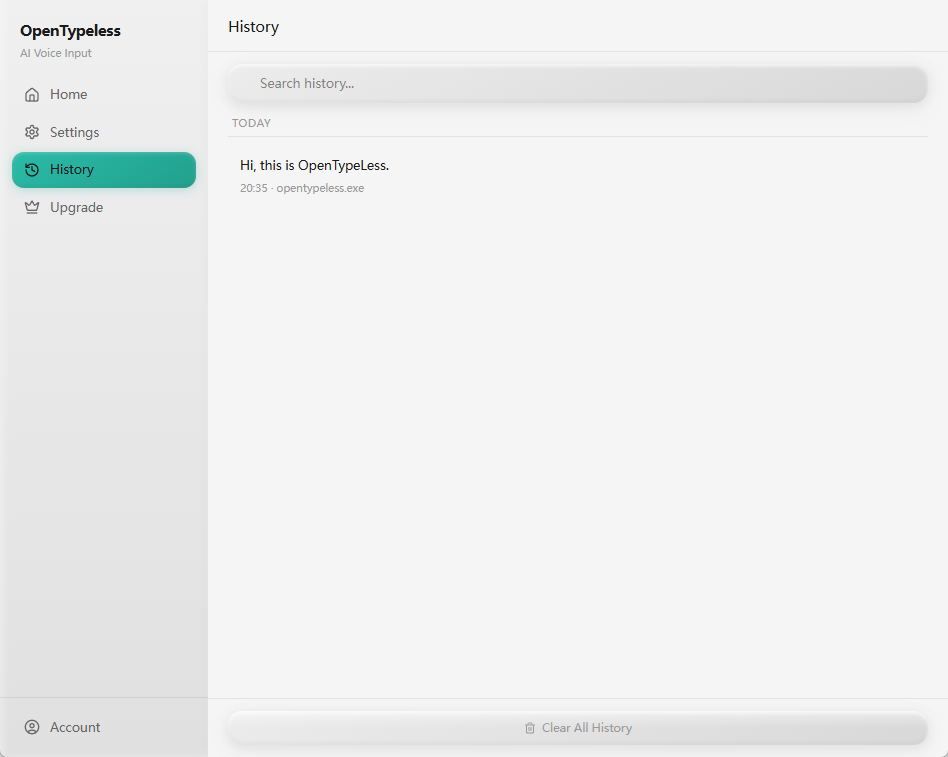
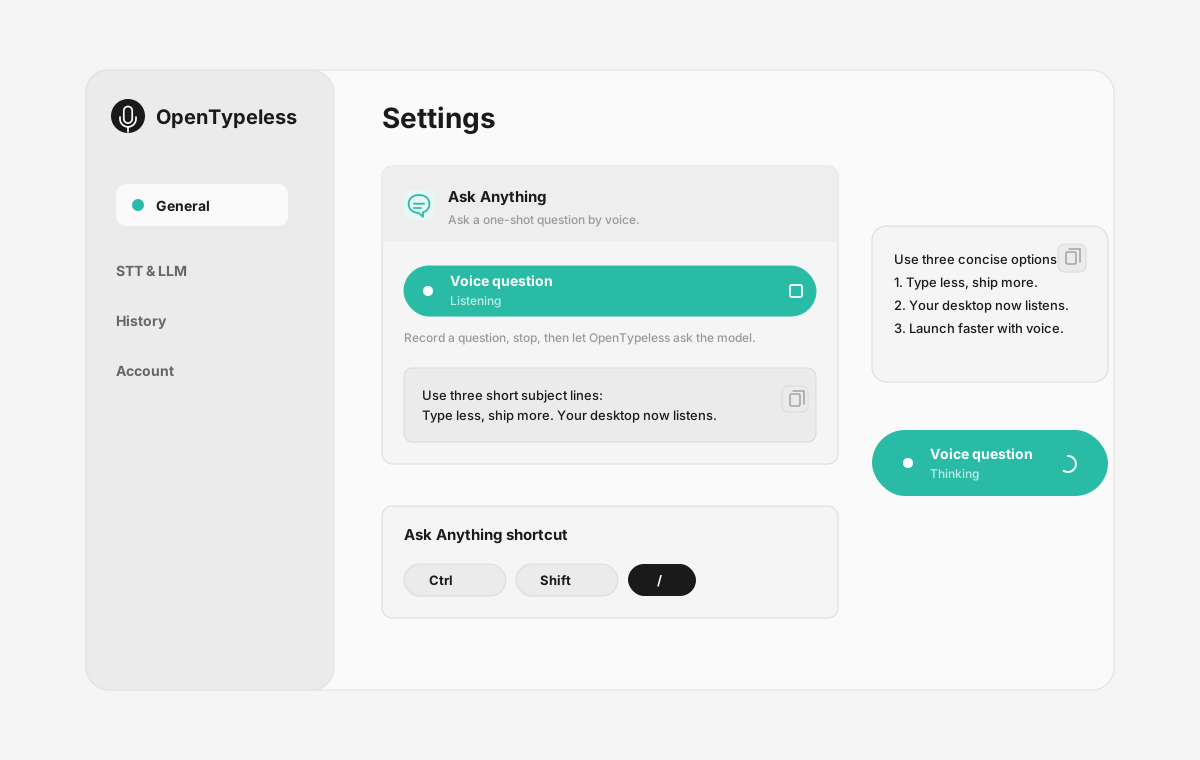
| Stage | Evidence | Why it matters |
|---|---|---|
| Desktop capture | A visible recording surface instead of a generic feature claim. | Users comparing Braina can see where OpenTypeless fits into daily typing. |
| Provider control | Settings expose STT and LLM choices in one place. | The page shows the concrete control behind BYOK, local, and cloud workflows. |
| Output review | History gives users a place to check previous voice input results. | This makes the workflow feel inspectable instead of a one-shot black box. |
| Ask Anything | A small floating answer note handles voice questions without opening a chat app. | Users can compare not only dictation, but the second workflow: ask by voice and read the result. |
เปรียบเทียบฟีเจอร์
OpenTypeless vs Braina
| ฟีเจอร์ | OpenTypeless | Braina |
|---|---|---|
| ราคา | ฟรีตลอดไป | Free (limited) / Pro $49/year |
| แพลตฟอร์ม | Windows / macOS / Linux | Windows / Android |
| โอเพ่นซอร์ส | สัญญาอนุญาต MIT | ปิดซอร์ส |
| ผู้ให้บริการ STT | ผู้ให้บริการ 6 ราย (BYOK) | ผู้ให้บริการ 1 ราย |
| ผู้ให้บริการ LLM | ผู้ให้บริการ 11 ราย (BYOK) | ไม่มี |
| ภาษา | 99 languages | Limited |
| พจนานุกรมแบบกำหนดเอง | ใช่ | ไม่ |
| โหมดออฟไลน์ | ออฟไลน์เต็มรูปแบบผ่าน Ollama | ไม่ |
| AI ปรับปรุงข้อความ | ผู้ให้บริการ LLM 11 ราย | ไม่ |
ทำไมถึงเลือก OpenTypeless แทน Braina
ข้อได้เปรียบหลัก
อิสระเลือกผู้ให้บริการ
Braina มีผู้ให้บริการ STT 1 ราย OpenTypeless รองรับ 6 ราย — เลือกสมดุลระหว่างความเร็ว ความแม่นยำ และราคาตามที่คุณต้องการ
AI ปรับปรุงข้อความ
Braina ไม่มี AI ปรับปรุงข้อความ OpenTypeless ใช้ผู้ให้บริการ LLM 11 รายในการขัดเกลาคำพูด — ลบคำเติม แก้ไขไวยากรณ์ และจัดรูปแบบข้อความ
โอเพ่นซอร์สเต็มรูปแบบ
สัญญาอนุญาต MIT ตรวจสอบโค้ดทุกบรรทัดได้บน GitHub ไม่มีกล่องดำในกระบวนการป้อนข้อมูลด้วยเสียงของคุณ
ข้ามแพลตฟอร์ม
ทำงานบน Windows, macOS และ Linux Braina รองรับเฉพาะ Windows and Android
เปลี่ยนจาก Braina
ย้ายรวดเร็ว
OpenTypeless works on macOS and Linux too, not just Windows. Your Braina Pro subscription costs $49/year — OpenTypeless is free forever. Just install, add your API key, and start dictating.
คนพูดถึง Braina อย่างไร
เราเคารพคู่แข่ง
Built-in AI chatbot features
Voice commands for Windows automation
Math and dictation modes
Android companion app
Windows and Android only — no macOS or Linux
Annual subscription for Pro ($49/year)
Single STT provider — no provider choice
No AI text polishing with multiple LLM providers
คำถามที่พบบ่อย
OpenTypeless เป็นตัวแทนที่ดีของ Braina หรือไม่?
ใช่ OpenTypeless ครอบคลุมฟีเจอร์หลักของการป้อนข้อมูลด้วยเสียงของ Braina และเพิ่มการรองรับข้ามแพลตฟอร์ม (Windows, macOS, Linux) ผู้ให้บริการ STT 6 ราย ผู้ให้บริการ LLM 11 รายสำหรับ AI ปรับปรุงข้อความ พจนานุกรมแบบกำหนดเอง และโหมดออฟไลน์ในเครื่องเต็มรูปแบบ — ทั้งหมดฟรีภายใต้สัญญาอนุญาต MIT
OpenTypeless ราคาเท่าไหร่เมื่อเทียบกับ Braina?
OpenTypeless ฟรีตลอดไปภายใต้สัญญาอนุญาต MIT คุณใช้ API key ของคุณเอง — ค่าใช้จ่ายทั่วไปน้อยกว่า $1/เดือน แพ็กเกจ Pro ที่เลือกได้ ($4.99/เดือน) มีเครดิตคลาวด์ Braina เรียกเก็บ Free (limited) / Pro $49/year
OpenTypeless ทำงานบนทุกแพลตฟอร์มเหมือน Braina หรือไม่?
OpenTypeless ทำงานบน Windows, macOS และ Linux Braina ทำงานบน Windows, Android OpenTypeless ให้การครอบคลุมเดสก์ท็อปที่กว้างกว่า
ใช้ OpenTypeless แบบออฟไลน์ได้หรือไม่?
ได้ ติดตั้ง Ollama ในเครื่องสำหรับทั้ง STT (Whisper ในเครื่อง) และ LLM ปรับปรุงข้อความ เสียงของคุณไม่ออกจากเครื่อง Braina ไม่รองรับออฟไลน์ — ต้องใช้การเชื่อมต่ออินเทอร์เน็ต
พร้อมลอง OpenTypeless หรือยัง?
ฟรี โอเพ่นซอร์ส ทำงานบน Windows, macOS และ Linux ตั้งค่าใน 5 นาที