OpenTypeless vs Google Docs Voice Typing
Google Docs Voice Typing a free browser-based dictation feature that only works inside Google Docs in Chrome. OpenTypeless miễn phí, mã nguồn mở, chạy trên Windows, macOS và Linux — với 6 nhà cung cấp STT, 11 nhà cung cấp LLM và AI tinh chỉnh văn bản.
“Google Docs voice typing is fine for docs but I need to dictate into Slack, email, and VS Code. OpenTypeless works everywhere.”
— Product Hunt reviewer
OpenTypeless product UI
Before comparing feature lists, see the product UI states users touch when switching from Google Docs Voice Typing.


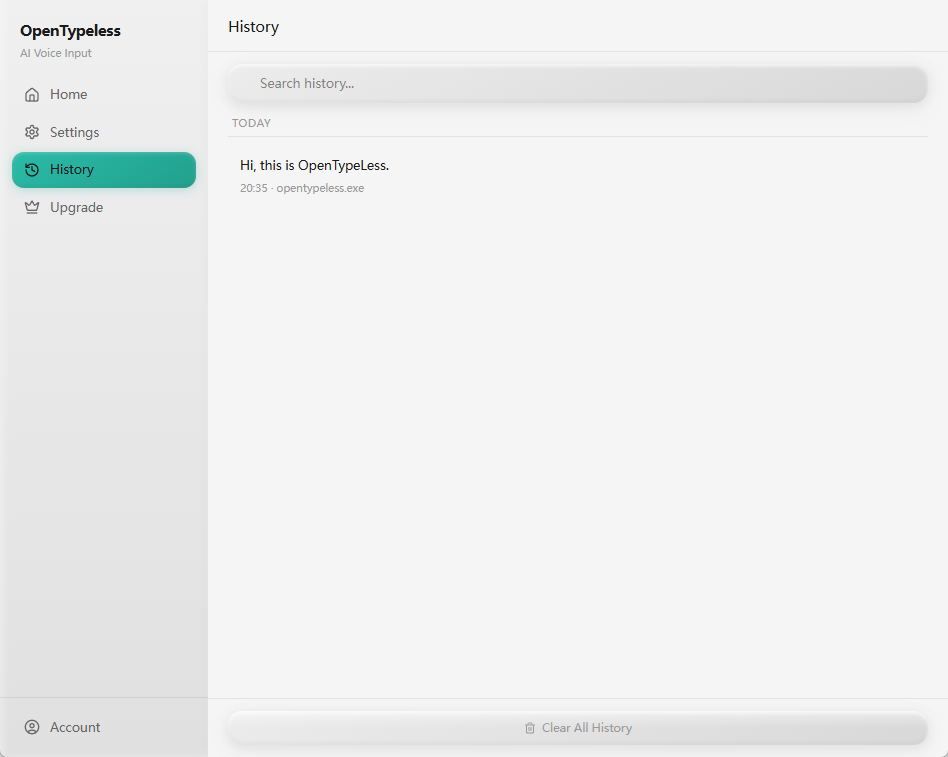
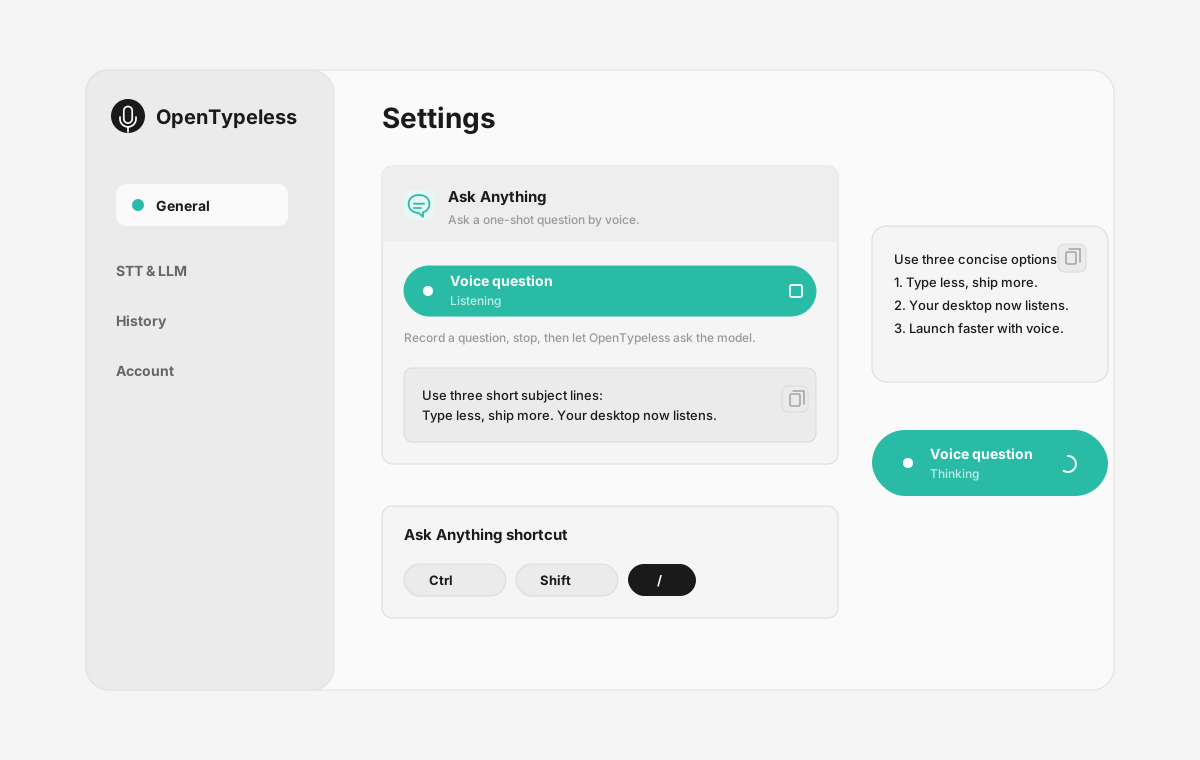
| Stage | Evidence | Why it matters |
|---|---|---|
| Desktop capture | A visible recording surface instead of a generic feature claim. | Users comparing Google Docs Voice Typing can see where OpenTypeless fits into daily typing. |
| Provider control | Settings expose STT and LLM choices in one place. | The page shows the concrete control behind BYOK, local, and cloud workflows. |
| Output review | History gives users a place to check previous voice input results. | This makes the workflow feel inspectable instead of a one-shot black box. |
| Ask Anything | A small floating answer note handles voice questions without opening a chat app. | Users can compare not only dictation, but the second workflow: ask by voice and read the result. |
So Sánh Tính Năng
OpenTypeless vs Google Docs Voice Typing
| Tính năng | OpenTypeless | Google Docs Voice Typing |
|---|---|---|
| Giá | Miễn phí mãi mãi | Free (requires Google account) |
| Nền tảng | Windows / macOS / Linux | Chrome (Google Docs only) |
| Mã Nguồn Mở | Giấy Phép MIT | Mã nguồn đóng |
| Nhà Cung Cấp STT | 6 nhà cung cấp (BYOK) | 1 nhà cung cấp |
| Nhà Cung Cấp LLM | 11 nhà cung cấp (BYOK) | Không |
| Ngôn ngữ | 99 languages | Limited |
| Từ Điển Tùy Chỉnh | Có | Không |
| Chế Độ Ngoại Tuyến | Ngoại tuyến hoàn toàn qua Ollama | Không |
| AI Tinh Chỉnh Văn Bản | 11 nhà cung cấp LLM | Không |
Tại Sao Chọn OpenTypeless Thay Vì Google Docs Voice Typing
Những ưu điểm chính
Tự Do Nhà Cung Cấp
Google Docs Voice Typing có 1 nhà cung cấp STT. OpenTypeless hỗ trợ 6 — chọn cân bằng tốc độ, độ chính xác và chi phí phù hợp với bạn.
AI Tinh Chỉnh Văn Bản
Google Docs Voice Typing không có AI tinh chỉnh. OpenTypeless sử dụng 11 nhà cung cấp LLM để làm sạch lời nói của bạn — loại bỏ từ thừa, sửa ngữ pháp và định dạng văn bản.
Mã Nguồn Mở Hoàn Toàn
Giấy Phép MIT. Mọi dòng mã có thể kiểm tra trên GitHub. Không có hộp đen trong quy trình nhập liệu giọng nói của bạn.
Đa Nền Tảng
Hoạt động trên Windows, macOS và Linux. Google Docs Voice Typing chỉ hỗ trợ Chrome (Google Docs only).
Chuyển từ Google Docs Voice Typing
Di Chuyển Nhanh
Install OpenTypeless and use the same voice typing habit — press hotkey, speak, get polished text. It works in Google Docs too, plus every other app on your desktop.
Mọi Người Nói Gì Về Google Docs Voice Typing
Chúng tôi tôn trọng đối thủ cạnh tranh
Free with a Google account
No installation needed
Good accuracy for English
Convenient for Google Docs users
Only works inside Google Docs in Chrome browser
No AI text polishing — raw transcription only
Requires internet connection
No custom dictionary for technical terms
Câu Hỏi Thường Gặp
OpenTypeless có phải là sự thay thế tốt cho Google Docs Voice Typing không?
Có. OpenTypeless bao gồm các tính năng nhập liệu giọng nói cốt lõi của Google Docs Voice Typing, đồng thời bổ sung hỗ trợ đa nền tảng (Windows, macOS, Linux), 6 nhà cung cấp STT, 11 nhà cung cấp LLM cho AI tinh chỉnh văn bản, từ điển tùy chỉnh và chế độ ngoại tuyến hoàn toàn cục bộ — tất cả miễn phí theo Giấy Phép MIT.
OpenTypeless chi phí bao nhiêu so với Google Docs Voice Typing?
OpenTypeless miễn phí mãi mãi theo Giấy Phép MIT. Bạn sử dụng API key của mình — chi phí sử dụng điển hình dưới $1/tháng. Gói Pro tùy chọn ($4.99/tháng) bao gồm tín dụng đám mây được cấu hình sẵn. Google Docs Voice Typing thu phí Free (requires Google account).
OpenTypeless có hoạt động trên mọi nền tảng như Google Docs Voice Typing không?
OpenTypeless chạy trên Windows, macOS và Linux. Google Docs Voice Typing chạy trên Chrome (Google Docs only). OpenTypeless cung cấp độ phủ máy tính để bàn rộng hơn.
Tôi có thể sử dụng OpenTypeless ngoại tuyến không?
Có. Cài đặt Ollama cục bộ cho cả STT (Whisper cục bộ) và LLM tinh chỉnh. Âm thanh của bạn không bao giờ rời khỏi máy. Google Docs Voice Typing không hỗ trợ sử dụng ngoại tuyến — nó yêu cầu kết nối internet.
Sẵn Sàng Thử OpenTypeless?
Miễn phí, mã nguồn mở, hoạt động trên Windows, macOS và Linux. Cài đặt trong chưa đầy 5 phút.