OpenTypeless مقابل Google Docs Voice Typing
Google Docs Voice Typing هو a free browser-based dictation feature that only works inside Google Docs in Chrome. OpenTypeless مجاني ومفتوح المصدر ويعمل على Windows وmacOS وLinux — مع 6 مزودي STT و11 مزود LLM وتلميع نصوص بالذكاء الاصطناعي.
“Google Docs voice typing is fine for docs but I need to dictate into Slack, email, and VS Code. OpenTypeless works everywhere.”
— Product Hunt reviewer
OpenTypeless product UI
Before comparing feature lists, see the product UI states users touch when switching from Google Docs Voice Typing.


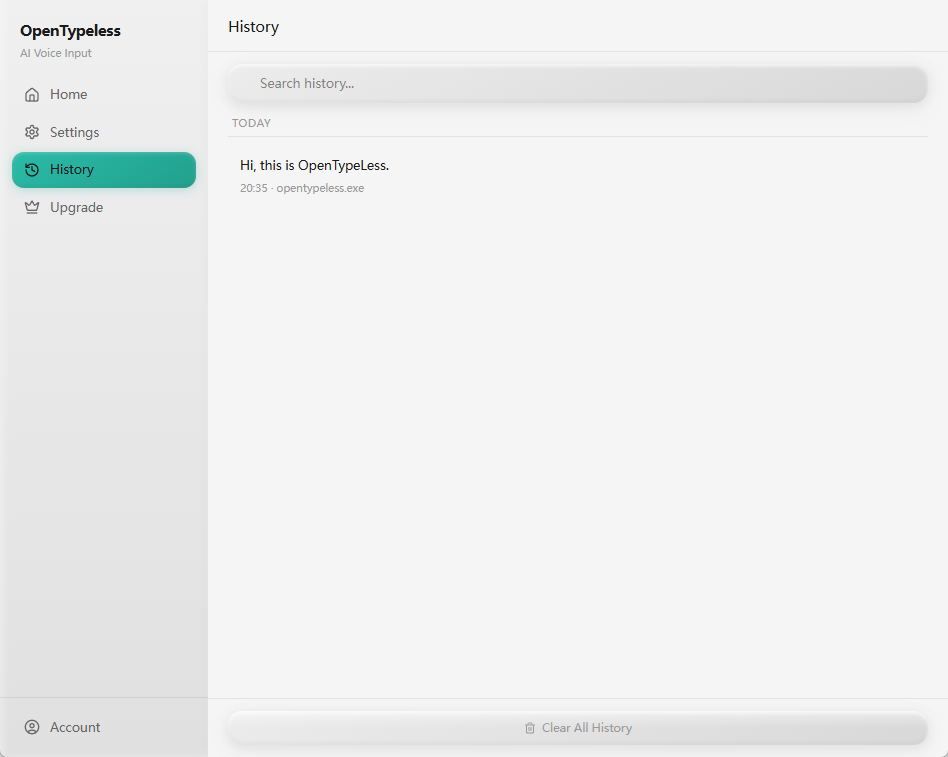
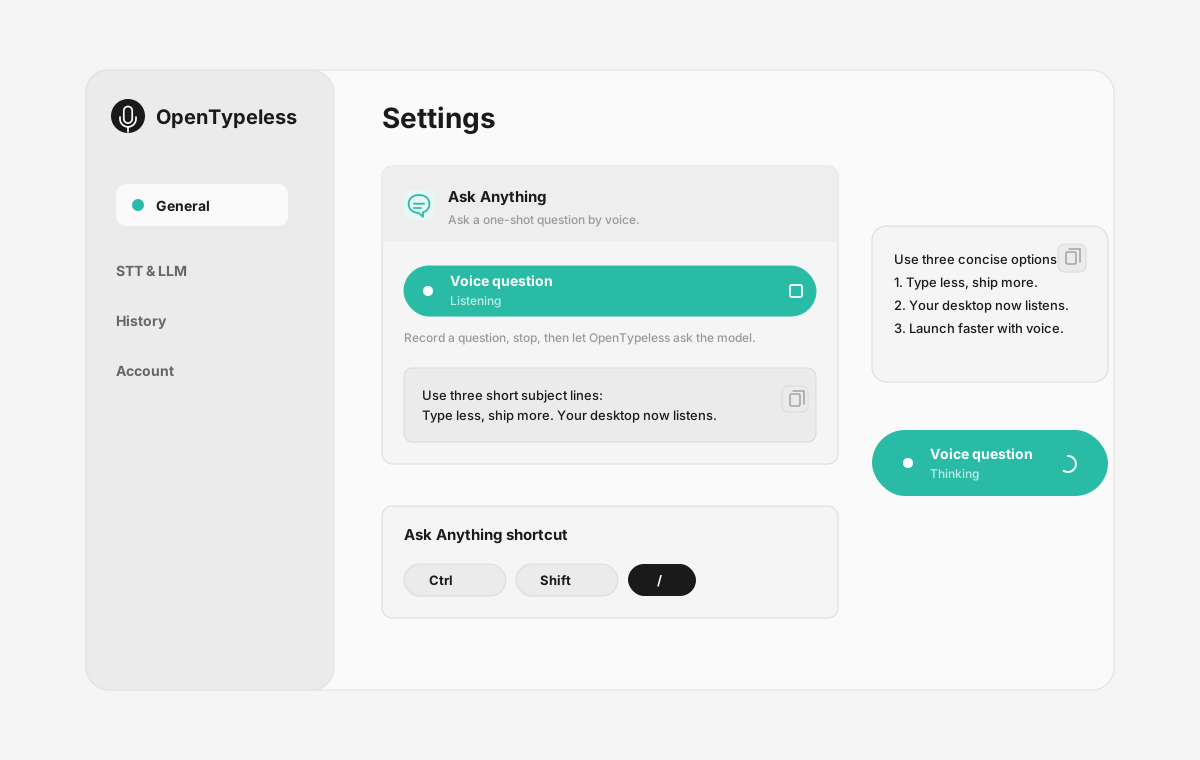
| Stage | Evidence | Why it matters |
|---|---|---|
| Desktop capture | A visible recording surface instead of a generic feature claim. | Users comparing Google Docs Voice Typing can see where OpenTypeless fits into daily typing. |
| Provider control | Settings expose STT and LLM choices in one place. | The page shows the concrete control behind BYOK, local, and cloud workflows. |
| Output review | History gives users a place to check previous voice input results. | This makes the workflow feel inspectable instead of a one-shot black box. |
| Ask Anything | A small floating answer note handles voice questions without opening a chat app. | Users can compare not only dictation, but the second workflow: ask by voice and read the result. |
مقارنة الميزات
OpenTypeless مقابل Google Docs Voice Typing
| الميزة | OpenTypeless | Google Docs Voice Typing |
|---|---|---|
| السعر | مجاني للأبد | Free (requires Google account) |
| المنصة | Windows / macOS / Linux | Chrome (Google Docs only) |
| مفتوح المصدر | رخصة MIT | مصدر مغلق |
| مزودو STT | 6 مزودين (BYOK) | 1 مزود(ين) |
| مزودو LLM | 11 مزودين (BYOK) | لا يوجد |
| اللغات | 99 languages | Limited |
| قاموس مخصص | نعم | لا |
| وضع عدم الاتصال | يعمل بدون اتصال عبر Ollama | لا |
| تلميع النصوص بالذكاء الاصطناعي | 11 مزود LLM | لا |
لماذا تختار OpenTypeless بدلاً من Google Docs Voice Typing
المزايا الرئيسية
حرية المزودين
Google Docs Voice Typing لديه 1 مزود STT. OpenTypeless يدعم 6 — اختر توازن السرعة والدقة والتكلفة الذي تحتاجه.
تلميع النصوص بالذكاء الاصطناعي
Google Docs Voice Typing ليس لديه تلميع بالذكاء الاصطناعي. OpenTypeless يستخدم 11 مزود LLM لتنظيم كلامك — إزالة الحشو، إصلاح القواعد، وتنسيق النص.
مفتوح المصدر بالكامل
رخصة MIT. كل سطر قابل للتدقيق على GitHub. لا صناديق سوداء في سير عمل إدخال الصوت لديك.
متعدد المنصات
يعمل على Windows وmacOS وLinux. Google Docs Voice Typing يدعم Chrome (Google Docs only) فقط.
الانتقال من Google Docs Voice Typing
انتقال سريع
Install OpenTypeless and use the same voice typing habit — press hotkey, speak, get polished text. It works in Google Docs too, plus every other app on your desktop.
ما يقوله الناس عن Google Docs Voice Typing
نحترم المنافسة
Free with a Google account
No installation needed
Good accuracy for English
Convenient for Google Docs users
Only works inside Google Docs in Chrome browser
No AI text polishing — raw transcription only
Requires internet connection
No custom dictionary for technical terms
الأسئلة الشائعة
هل OpenTypeless بديل جيد لـ Google Docs Voice Typing؟
نعم. OpenTypeless يغطي ميزات إدخال الصوت الأساسية لـ Google Docs Voice Typing مع إضافة دعم متعدد المنصات (Windows، macOS، Linux)، 6 مزودي STT، 11 مزود LLM لتلميع النصوص بالذكاء الاصطناعي، قاموس مخصص، ووضع عدم اتصال محلي بالكامل — كلها مجانية بموجب رخصة MIT.
كم تكلفة OpenTypeless مقارنة بـ Google Docs Voice Typing؟
OpenTypeless مجاني للأبد بموجب رخصة MIT. أحضر مفاتيح API الخاصة بك — الاستخدام النموذجي يكلف أقل من $1/شهر. خطة Pro اختيارية ($4.99/شهر) تتضمن أرصدة سحابية مُعدة مسبقاً. Google Docs Voice Typing يفرض رسوم Free (requires Google account).
هل يعمل OpenTypeless على جميع المنصات مثل Google Docs Voice Typing؟
OpenTypeless يعمل على Windows وmacOS وLinux. Google Docs Voice Typing يعمل على Chrome (Google Docs only). OpenTypeless يوفر تغطية سطح مكتب أوسع.
هل يمكنني استخدام OpenTypeless بدون اتصال؟
نعم. ثبّت Ollama محلياً لكل من STT (Whisper المحلي) وتلميع LLM. صوتك لا يغادر جهازك أبدًا. Google Docs Voice Typing لا يدعم عدم الاتصال — يتطلب اتصال إنترنت.
هل أنت مستعد لتجربة OpenTypeless؟
مجاني ومفتوح المصدر ويعمل على Windows وmacOS وLinux. الإعداد في أقل من 5 دقائق.