OpenTypeless vs Braina
Braina er an AI voice assistant for Windows with annual subscription. OpenTypeless er gratis, open-source og kører på Windows, macOS og Linux — med 6 STT-udbydere, 11 LLM-udbydere og AI-tekstforbedring.
Se det i aktion
Hvordan Braina ser ud
Vi respekterer, hvad de har bygget
Braina Interface
braina.comTraditional Windows desktop application with a chat-style interface. Shows a text input bar at the bottom with a microphone icon and mode selector tabs (Dictation, Command, Math, AI Chat). Dark blue theme with a persistent floating toolbar. Designed for general Windows automation rather than focused dictation.
OpenTypeless
Gratis for evigt“Braina is decent for Windows automation, but the dictation quality isn't great and you're locked into their single speech engine.”
— AlternativeTo reviewer
OpenTypeless product UI
Before comparing feature lists, see the product UI states users touch when switching from Braina.


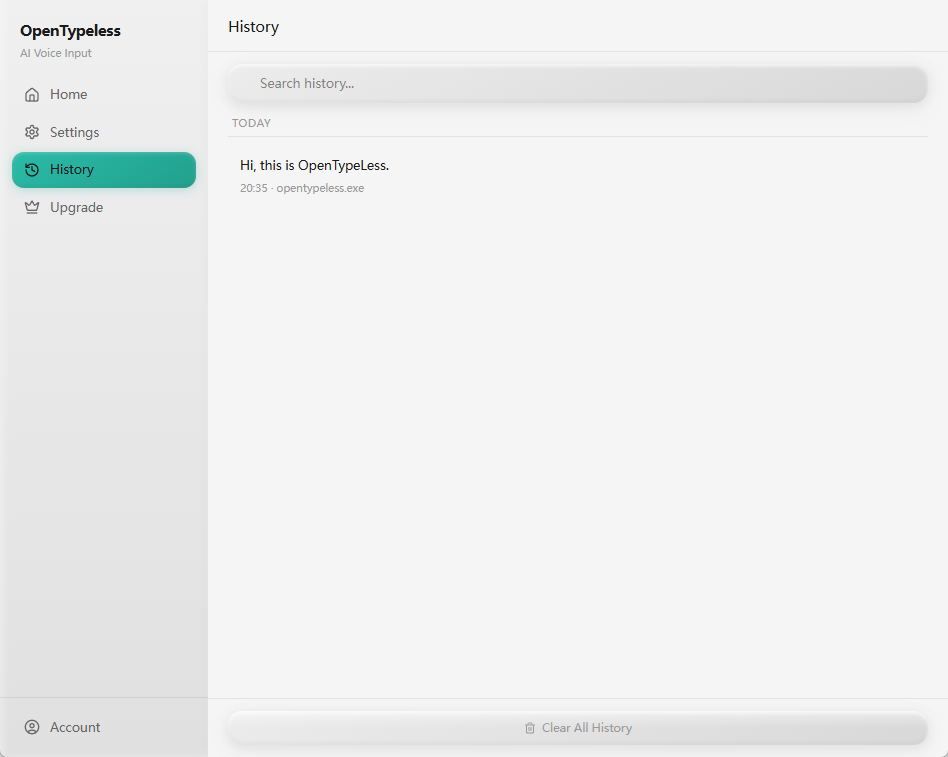
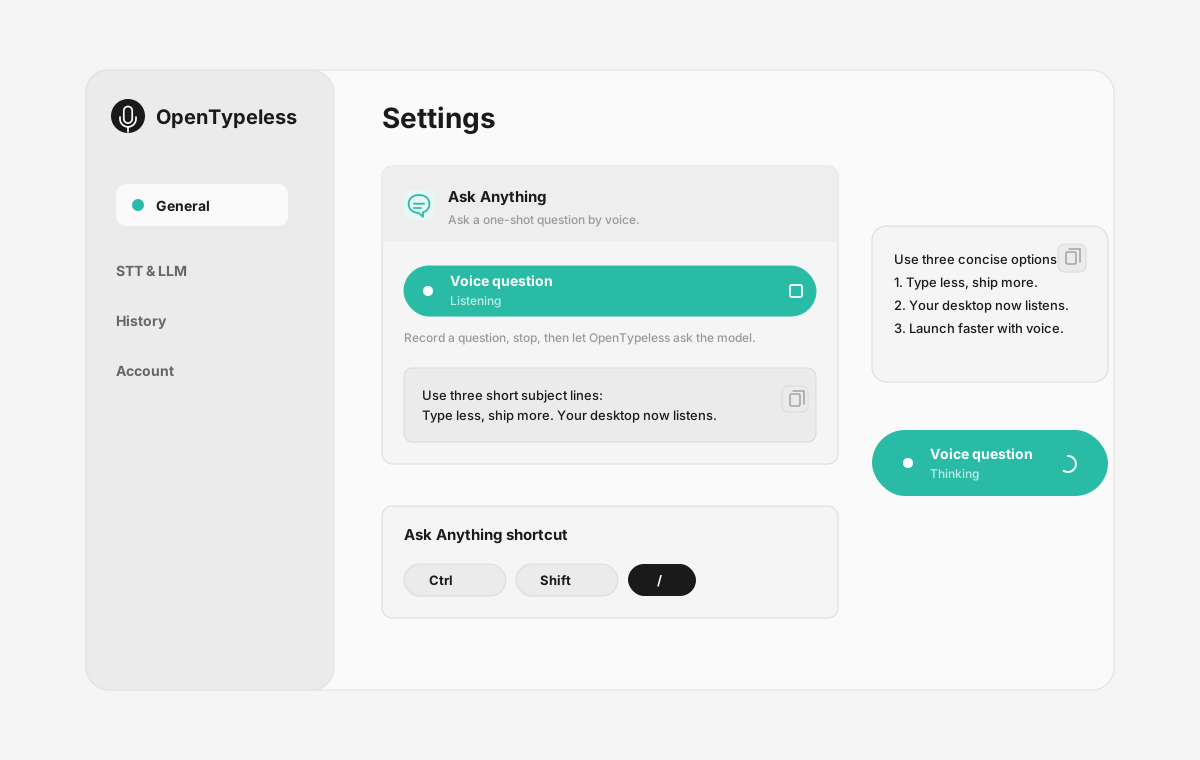
| Stage | Evidence | Why it matters |
|---|---|---|
| Desktop capture | A visible recording surface instead of a generic feature claim. | Users comparing Braina can see where OpenTypeless fits into daily typing. |
| Provider control | Settings expose STT and LLM choices in one place. | The page shows the concrete control behind BYOK, local, and cloud workflows. |
| Output review | History gives users a place to check previous voice input results. | This makes the workflow feel inspectable instead of a one-shot black box. |
| Ask Anything | A small floating answer note handles voice questions without opening a chat app. | Users can compare not only dictation, but the second workflow: ask by voice and read the result. |
Funktionssammenligning
OpenTypeless vs Braina
| Funktion | OpenTypeless | Braina |
|---|---|---|
| Pris | Gratis for evigt | Free (limited) / Pro $49/year |
| Platform | Windows / macOS / Linux | Windows / Android |
| Open Source | MIT-licens | Lukket kilde |
| STT-udbydere | 6 udbydere (BYOK) | 1 udbyder(e) |
| LLM-udbydere | 11 udbydere (BYOK) | Ingen |
| Sprog | 99 languages | Limited |
| Brugerdefineret ordbog | Ja | Nej |
| Offlinetilstand | Fuld offline via Ollama | Nej |
| AI-tekstforbedring | 11 LLM-udbydere | Nej |
Hvorfor vælge OpenTypeless frem for Braina
De vigtigste fordele
Udbyderfrihed
Braina har 1 STT-udbyder(e). OpenTypeless understøtter 6 — vælg den hastighed, præcision og omkostningsbalance, du har brug for.
AI-tekstforbedring
Braina har ingen AI-forbedring. OpenTypeless bruger 11 LLM-udbydere til at rydde op i din tale — fjerner fyldord, retter grammatik og formaterer tekst.
Fuld Open Source
MIT-licens. Hver linje kan revideres på GitHub. Ingen sorte kasser i din stemmeindtastningsarbejdsgang.
Tværplatform
Virker på Windows, macOS og Linux. Braina understøtter kun Windows and Android.
Skifter fra Braina
Hurtig migration
OpenTypeless works on macOS and Linux too, not just Windows. Your Braina Pro subscription costs $49/year — OpenTypeless is free forever. Just install, add your API key, and start dictating.
Hvad folk siger om Braina
Vi respekterer konkurrencen
Built-in AI chatbot features
Voice commands for Windows automation
Math and dictation modes
Android companion app
Windows and Android only — no macOS or Linux
Annual subscription for Pro ($49/year)
Single STT provider — no provider choice
No AI text polishing with multiple LLM providers
Ofte stillede spørgsmål
Er OpenTypeless en god erstatning for Braina?
Ja. OpenTypeless dækker de grundlæggende stemmeindtastningsfunktioner i Braina og tilføjer tværplatform-understøttelse (Windows, macOS, Linux), 6 STT-udbydere, 11 LLM-udbydere til AI-tekstforbedring, en brugerdefineret ordbog og en fuldt lokal offlinetilstand — alt gratis under MIT-licensen.
Hvor meget koster OpenTypeless i forhold til Braina?
OpenTypeless er gratis for evigt under MIT-licensen. Du medbringer dine egne API-nøgler — typisk forbrug koster mindre end $1/måned. En valgfri Pro-plan ($4.99/måned) inkluderer forudkonfigurerede cloud-kreditter. Braina opkræver Free (limited) / Pro $49/year.
Virker OpenTypeless på alle platforme som Braina?
OpenTypeless kører på Windows, macOS og Linux. Braina kører på Windows, Android. OpenTypeless giver bredere skrivebordsdækning.
Kan jeg bruge OpenTypeless offline?
Ja. Installer Ollama lokalt til både STT (lokal Whisper) og LLM-forbedring. Din lyd forlader aldrig din maskine. Braina understøtter ikke offline brug — det kræver en internetforbindelse.
Klar til at prøve OpenTypeless?
Gratis, open-source og virker på Windows, macOS og Linux. Opsætning på under 5 minutter.