OpenTypeless vs Windows Voice Typing
Windows Voice Typing è a built-in Windows 10/11 feature (Win+H) that transcribes speech with no AI polishing. OpenTypeless è gratuito, open-source e funziona su Windows, macOS e Linux — con 6 provider STT, 11 provider LLM e rifinitura testo AI.
“Win+H is okay for quick stuff but the output always needs editing. OpenTypeless with Deepgram + Claude gives me text I can actually send without touching it.”
— Windows Insider community member
OpenTypeless product UI
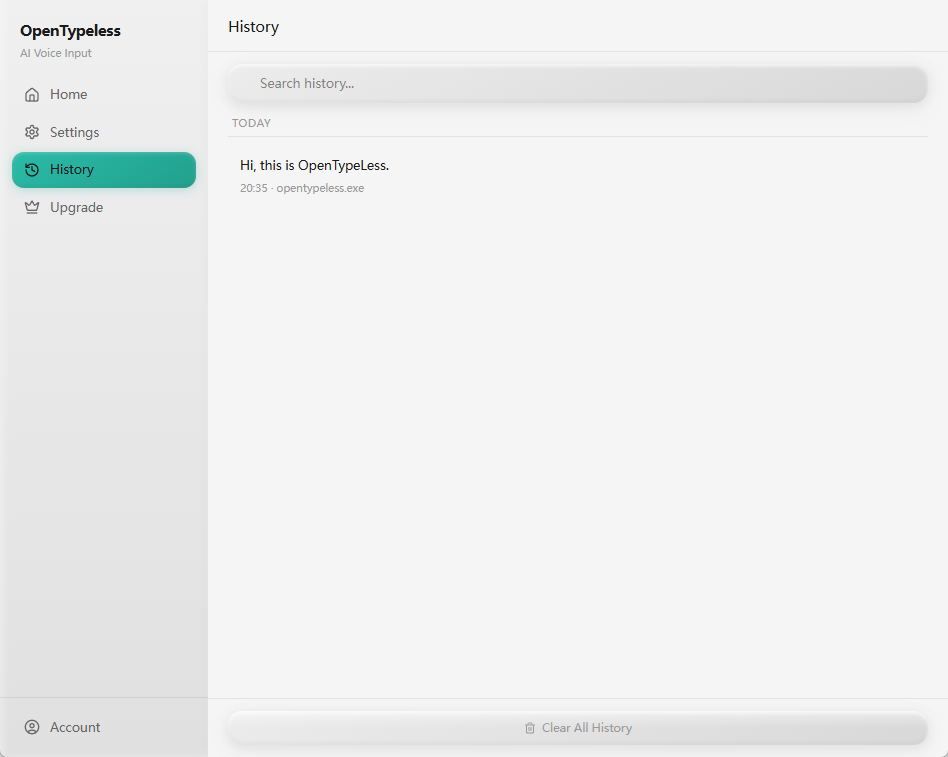
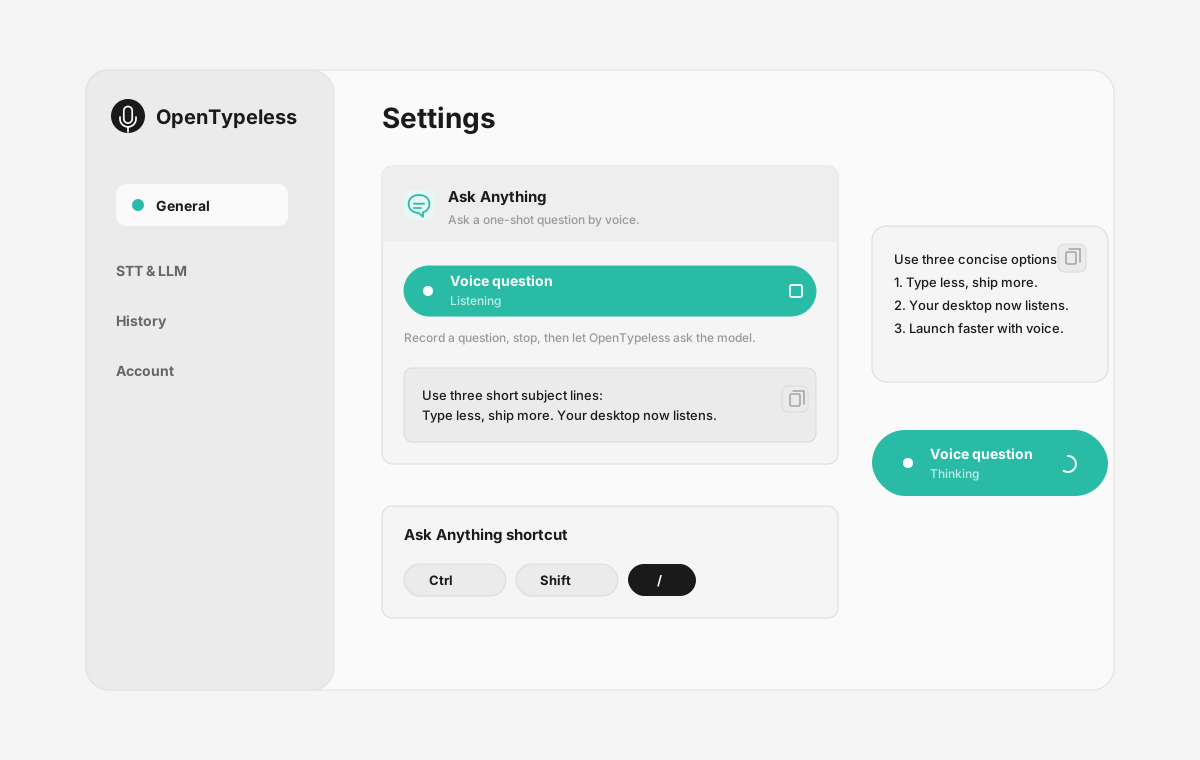
Before comparing feature lists, see the product UI states users touch when switching from Windows Voice Typing.


| Stage | Evidence | Why it matters |
|---|---|---|
| Desktop capture | A visible recording surface instead of a generic feature claim. | Users comparing Windows Voice Typing can see where OpenTypeless fits into daily typing. |
| Provider control | Settings expose STT and LLM choices in one place. | The page shows the concrete control behind BYOK, local, and cloud workflows. |
| Output review | History gives users a place to check previous voice input results. | This makes the workflow feel inspectable instead of a one-shot black box. |
| Ask Anything | A small floating answer note handles voice questions without opening a chat app. | Users can compare not only dictation, but the second workflow: ask by voice and read the result. |
Confronto funzionalità
OpenTypeless vs Windows Voice Typing
| Funzionalità | OpenTypeless | Windows Voice Typing |
|---|---|---|
| Prezzo | Gratuito per sempre | Free (built into Windows) |
| Piattaforma | Windows / macOS / Linux | Windows |
| Open source | Licenza MIT | Codice chiuso |
| Provider STT | 6 provider (BYOK) | 1 provider |
| Provider LLM | 11 provider (BYOK) | Nessuno |
| Lingue | 99 languages | Limited |
| Dizionario personalizzato | Sì | No |
| Modalità offline | Offline completo via Ollama | No |
| Rifinitura testo AI | 11 provider LLM | No |
Perché scegliere OpenTypeless invece di Windows Voice Typing
I vantaggi principali
Libertà di scelta del provider
Windows Voice Typing ha 1 provider STT. OpenTypeless ne supporta 6 — scegli il compromesso tra velocità, precisione e costo più adatto a te.
Rifinitura testo AI
Windows Voice Typing non ha rifinitura AI. OpenTypeless usa 11 provider LLM per pulire il tuo discorso — rimuovendo le pause, correggendo la grammatica e formattando il testo.
Completamente open source
Licenza MIT. Ogni riga verificabile su GitHub. Nessuna scatola nera nel tuo flusso di input vocale.
Multipiattaforma
Funziona su Windows, macOS e Linux. Windows Voice Typing supporta solo Windows.
Passare da Windows Voice Typing
Migrazione rapida
Install OpenTypeless and remap the hotkey to Win+H if you want the same muscle memory. Or keep both — use Win+H for quick notes and OpenTypeless for anything that needs to look professional.
Cosa dicono di Windows Voice Typing
Rispettiamo la concorrenza
Free and built into Windows 10/11
Zero setup — just press Win+H
Convenient for quick messages
No additional software needed
No AI text polishing — raw transcription only
Windows only — no macOS or Linux
Requires internet connection
Limited language support
Domande frequenti
OpenTypeless è un'alternativa valida a Windows Voice Typing?
Sì. OpenTypeless copre le funzionalità principali di input vocale di Windows Voice Typing, aggiungendo il supporto multipiattaforma (Windows, macOS, Linux), 6 provider STT, 11 provider LLM per la rifinitura testo AI, un dizionario personalizzato e una modalità offline completamente locale — tutto gratuito con licenza MIT.
Quanto costa OpenTypeless rispetto a Windows Voice Typing?
OpenTypeless è gratuito per sempre con licenza MIT. Porti le tue chiavi API — l'uso tipico costa meno di 1 $/mese. Un piano Pro opzionale (4,99 $/mese) include crediti cloud preconfigurati. Windows Voice Typing applica un costo di Free (built into Windows).
OpenTypeless funziona su tutte le piattaforme come Windows Voice Typing?
OpenTypeless funziona su Windows, macOS e Linux. Windows Voice Typing funziona su Windows. OpenTypeless offre una copertura desktop più ampia.
Posso usare OpenTypeless offline?
Sì. Installa Ollama localmente per STT (Whisper locale) e rifinitura LLM. Il tuo audio non lascia mai il tuo dispositivo. Windows Voice Typing non supporta l'uso offline — richiede una connessione internet.
Pronto a provare OpenTypeless?
Gratuito, open-source e funziona su Windows, macOS e Linux. Configurazione in meno di 5 minuti.