OpenTypeless vs Microsoft Dictate
Use Dictate when Office integration is the priority. OpenTypeless offers an external input workflow across supported editable fields. An Office subscription, Copilot entitlement, and a third-party provider key are different costs and controls.
OpenTypeless product UI
Before comparing feature lists, see the product UI states users touch when switching from Microsoft Dictate.


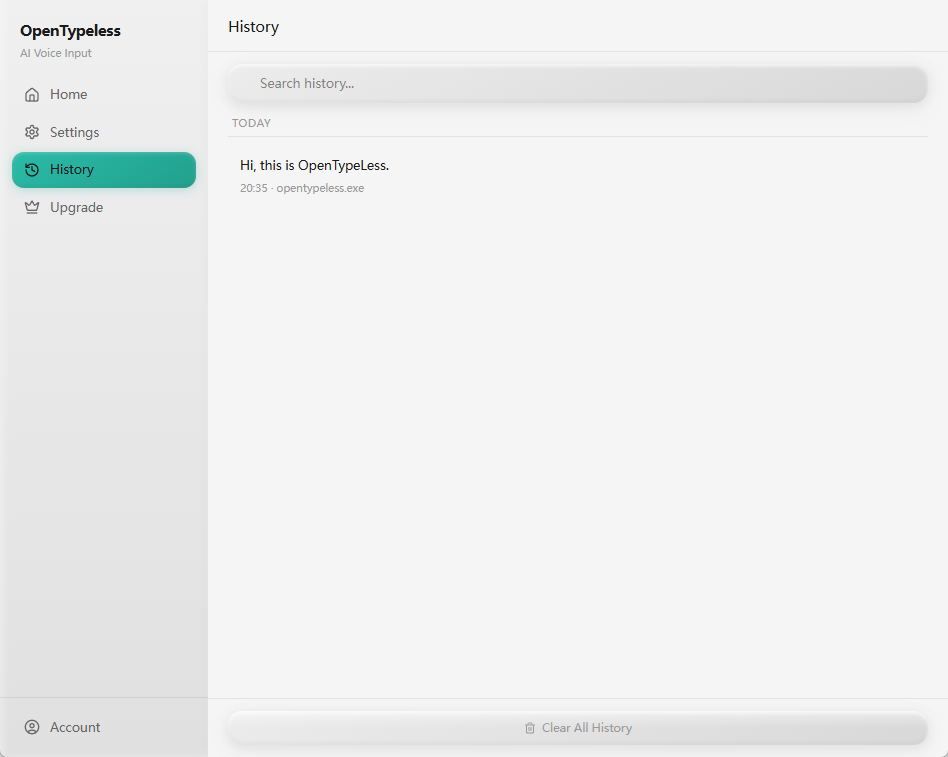
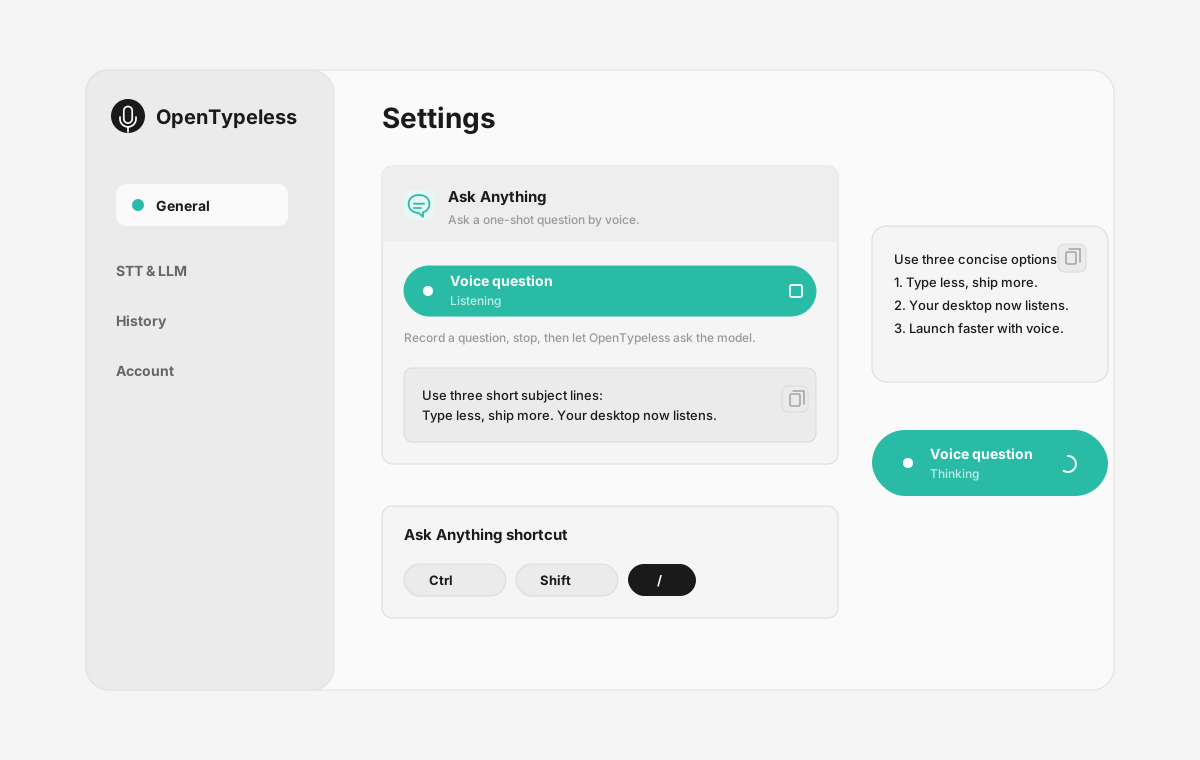
| Stage | Evidence | Why it matters |
|---|---|---|
| Desktop capture | A visible recording surface instead of a generic feature claim. | Users comparing Microsoft Dictate can see where OpenTypeless fits into daily typing. |
| Provider control | Settings expose STT and LLM choices in one place. | The page shows the concrete control behind BYOK, local, and cloud workflows. |
| Output review | History gives users a place to check previous voice input results. | This makes the workflow feel inspectable instead of a one-shot black box. |
| Ask Anything | A small floating answer note handles voice questions without opening a chat app. | Users can compare not only dictation, but the second workflow: ask by voice and read the result. |
Compare the same writing task
Match your platform, transcript, correction time, and data requirements before choosing.
- Use the same device, microphone, passage, language, and editable field in both products.
- Compare the usable final transcript after punctuation, terminology, and correction work; raw recognition speed alone is insufficient.
- Record the models and plans used. Include provider charges, setup time, and any required network or local-model configuration.
- Check where audio and transcript text are sent separately, and choose the workflow that meets your requirements.
Official documentation checked 2026-10-08. Edition and configuration limits are stated per row. No controlled speed or accuracy winner is claimed.
Feature Comparison
OpenTypeless vs Microsoft Dictate
| Feature | OpenTypeless | Microsoft Dictate |
|---|---|---|
| Price and plan | MIT desktop app; provider and managed-service costs are separate | Entitlement depends on the Microsoft 365 application and accountSource |
| Platform | Windows / macOS / Linux | Microsoft 365 apps including Word, Outlook, and PowerPoint on supported devicesSource |
| Source and license | MIT License | An Office feature; this guide does not publish a selectable source licenseSource |
| Speech recognition | 7 named BYOK STT providers | Microsoft 365 Dictate within supported Office applicationsSource |
| Text processing | 11 providers (BYOK) | Office speech-to-text; Copilot and arbitrary LLM provider selection are separate capabilitiesSource |
| Languages | 99 languages | Language availability depends on the application and current support documentationSource |
| Custom vocabulary | Yes | Application-specific dictation controls; custom vocabulary is not established by this overviewSource |
| Data and processing route | A Custom Whisper-compatible endpoint is the local or self-hosted STT path; whether audio leaves the machine depends on the configured endpoint and network. Ollama is a local LLM provider for text polishing and other LLM work. | A microphone and reliable internet connection are requiredSource |
| Primary workflow | Desktop dictation, optional transcript polishing, insertion, and one-off voice questions | Authoring documents, emails, notes, and presentations inside OfficeSource |
Choose by workflow
Use Dictate when Office integration is the priority. OpenTypeless offers an external input workflow across supported editable fields. An Office subscription, Copilot entitlement, and a third-party provider key are different costs and controls.
Speech recognition route
Microsoft 365 Dictate within supported Office applications
Text processing
Office speech-to-text; Copilot and arbitrary LLM provider selection are separate capabilities
Source and license
An Office feature; this guide does not publish a selectable source license
Platform fit
Microsoft 365 apps including Word, Outlook, and PowerPoint on supported devices
Switching from Microsoft Dictate
Quick Migration
Use Dictate when Office integration is the priority. OpenTypeless offers an external input workflow across supported editable fields. An Office subscription, Copilot entitlement, and a third-party provider key are different costs and controls.
When Microsoft 365 Dictate fits
We respect the competition
Authoring documents, emails, notes, and presentations inside Office
Microsoft 365 Dictate within supported Office applications
Use Dictate when Office integration is the priority. OpenTypeless offers an external input workflow across supported editable fields. An Office subscription, Copilot entitlement, and a third-party provider key are different costs and controls.
Frequently Asked Questions
When should I choose Microsoft 365 Dictate?
Use Dictate when Office integration is the priority. OpenTypeless offers an external input workflow across supported editable fields. An Office subscription, Copilot entitlement, and a third-party provider key are different costs and controls.
What does Microsoft 365 Dictate cost?
Entitlement depends on the Microsoft 365 application and account
Where can I use Microsoft 365 Dictate?
Microsoft 365 apps including Word, Outlook, and PowerPoint on supported devices
How should I compare the data path?
A microphone and reliable internet connection are required. A Custom Whisper-compatible endpoint is the local or self-hosted STT path; whether audio leaves the machine depends on the configured endpoint and network. Ollama is a local LLM provider for text polishing and other LLM work.
Ready to Try OpenTypeless?
Free, open-source, and works on Windows, macOS, and Linux. Set up in under 5 minutes.