OpenTypeless מול Apple Dictation
Apple Dictation הוא a built-in macOS/iOS feature that transcribes speech to text with no AI polishing. OpenTypeless הוא חינמי, קוד פתוח ופועל על Windows, macOS ו-Linux — עם 6 ספקי STT, 11 ספקי LLM וליטוש טקסט באמצעות AI.
“Apple Dictation is fine for quick messages but the lack of polishing means I always have to edit. OpenTypeless with Claude gives me ready-to-send text.”
— Mac Power Users podcast listener
OpenTypeless product UI
Before comparing feature lists, see the product UI states users touch when switching from Apple Dictation.


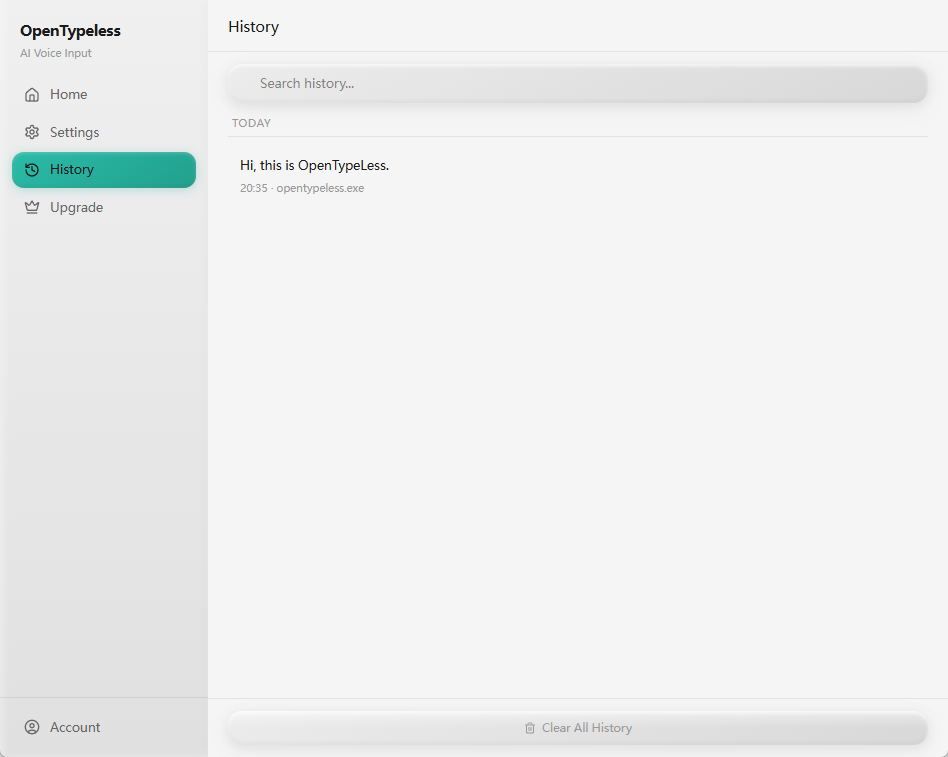
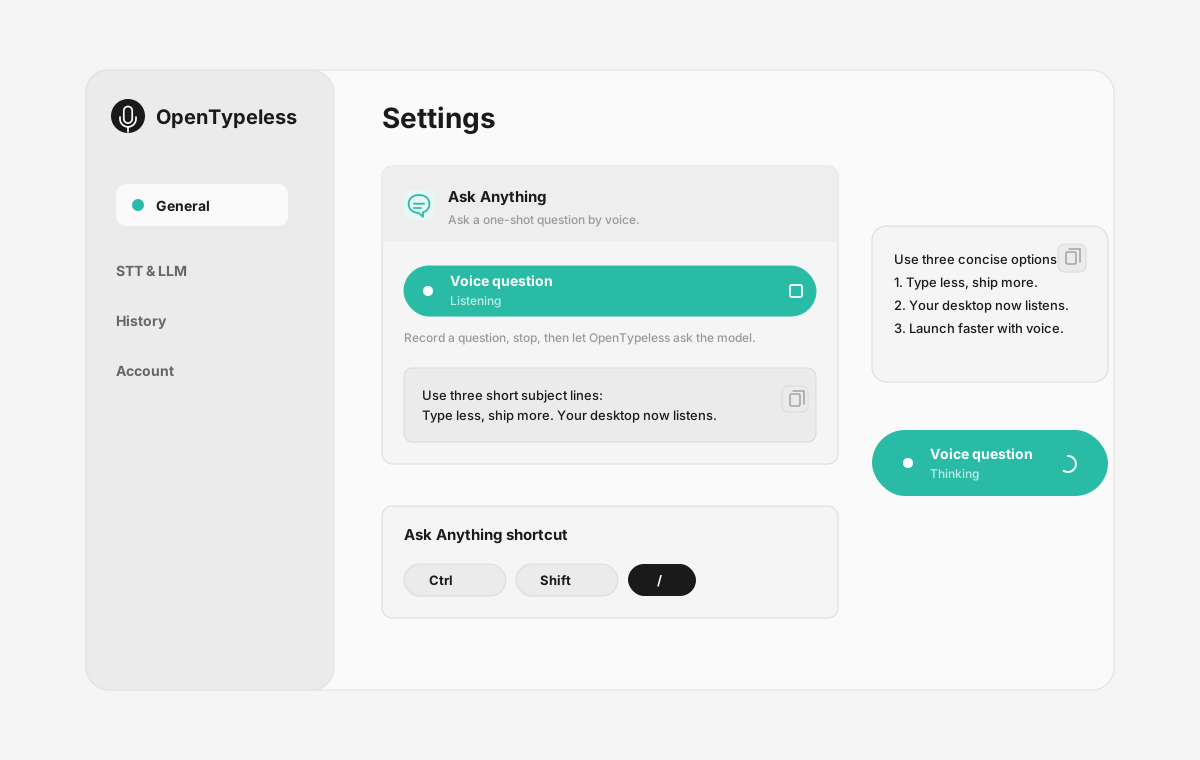
| Stage | Evidence | Why it matters |
|---|---|---|
| Desktop capture | A visible recording surface instead of a generic feature claim. | Users comparing Apple Dictation can see where OpenTypeless fits into daily typing. |
| Provider control | Settings expose STT and LLM choices in one place. | The page shows the concrete control behind BYOK, local, and cloud workflows. |
| Output review | History gives users a place to check previous voice input results. | This makes the workflow feel inspectable instead of a one-shot black box. |
| Ask Anything | A small floating answer note handles voice questions without opening a chat app. | Users can compare not only dictation, but the second workflow: ask by voice and read the result. |
השוואת יכולות
OpenTypeless מול Apple Dictation
| יכולת | OpenTypeless | Apple Dictation |
|---|---|---|
| מחיר | חינמי לתמיד | Free (built into macOS/iOS) |
| פלטפורמה | Windows / macOS / Linux | macOS |
| קוד פתוח | רישיון MIT | קוד סגור |
| ספקי STT | 6 ספקים (BYOK) | 1 ספק(ים) |
| ספקי LLM | 11 ספקים (BYOK) | ללא |
| שפות | 99 languages | Limited |
| מילון מותאם אישית | כן | לא |
| מצב לא מקוון | לא מקוון לחלוטין דרך Ollama | כן |
| ליטוש טקסט ב-AI | 11 ספקי LLM | לא |
למה לבחור ב-OpenTypeless על פני Apple Dictation
היתרונות העיקריים
חופש בחירת ספקים
ל-Apple Dictation יש 1 ספק(ים) STT. OpenTypeless תומך ב-6 — בחרו את האיזון בין מהירות, דיוק ועלות שנוכין לכם.
ליטוש טקסט ב-AI
ל-Apple Dictation אין ליטוש AI. OpenTypeless משתמש ב-11 ספקי LLM לניקוי הדיבור שלכם — הסרת מילות מילוי, תיקון דקדוק ועיצוב הטקסט.
קוד פתוח לחלוטין
רישיון MIT. כל שורה ניתנת לביקורה ב-GitHub. אין תיבות שחורות בזרימת הקלטת הקול שלכם.
רב-פלטפורמי
עובד על Windows, macOS ו-Linux. Apple Dictation תומך רק ב-macOS.
מעבר מ-Apple Dictation
מעבר מהיר
Just install OpenTypeless alongside Apple Dictation. Use the same hotkey habit — OpenTypeless replaces the raw transcription with AI-polished output. No need to disable Apple Dictation.
מה אומרים על Apple Dictation
אנחנו מכבדים את התחרות
Free and built into macOS
Zero setup — just enable in Settings
Good privacy with on-device processing
Works system-wide on Mac
No AI text polishing — raw transcription only
macOS/iOS only — no Windows or Linux
Limited language support
No custom dictionary for technical terms
שאלות נפוצות
האם OpenTypeless הוא תחליף טוב ל-Apple Dictation?
כן. OpenTypeless מכסה את יכולות הקלטה הקולית העיקריות של Apple Dictation ומוסיף תמיכה רב-פלטפורמית (Windows, macOS, Linux), 6 ספקי STT, 11 ספקי LLM לליטוש טקסט ב-AI, מילון מותאם אישית ומצב לא מקוון מקומי לחלוטין — הכל חינמי ברישיון MIT.
כמה עולה OpenTypeless לעומת ה-Apple Dictation?
OpenTypeless חינמי לתמיד ברישיון MIT. אתם מביאים את מפתחות ה-API שלכם — שימוש טיפוסי עולה פחות מ-1$/חודש. תוכנית Pro אופציונלית (4.99$/חודש) כוללת קרדיט ענן מוגדרים מראש. Apple Dictation גובה Free (built into macOS/iOS).
האם OpenTypeless עובד על כל הפלטפורמות כמו Apple Dictation?
OpenTypeless פועל על Windows, macOS ו-Linux. Apple Dictation פועל רק על macOS. OpenTypeless מספק כיסוי רב-פלטפורמי מלא.
האו אפשר להשתמש ב-OpenTypeless לא מקוון?
כן. התקינו את Ollama מקומית ל- STT (Whisper מקומי) ולליטוש LLM. השמע שלכם לעולם לא עוזב את המכשיר שלכם. גם Apple Dictation תומך בשימוש לא מקוון, אך ל-OpenTypeless יש יותר אפשרויות ספקים למצב לא מקוון.
מוכנים לנסות את OpenTypeless?
חינמי, קוד פתוח ועובד על Windows, macOS ו-Linux. התקנה בפחות מ-5 דקות.