“Google Docs voice typing is fine for docs but I need to dictate into Slack, email, and VS Code. OpenTypeless works everywhere.”
— Product Hunt reviewer
OpenTypeless の製品 UI
機能一覧を比べる前に、Google Docs Voice Typing から移行したユーザーが触れる UI と音声フローを確認できます。


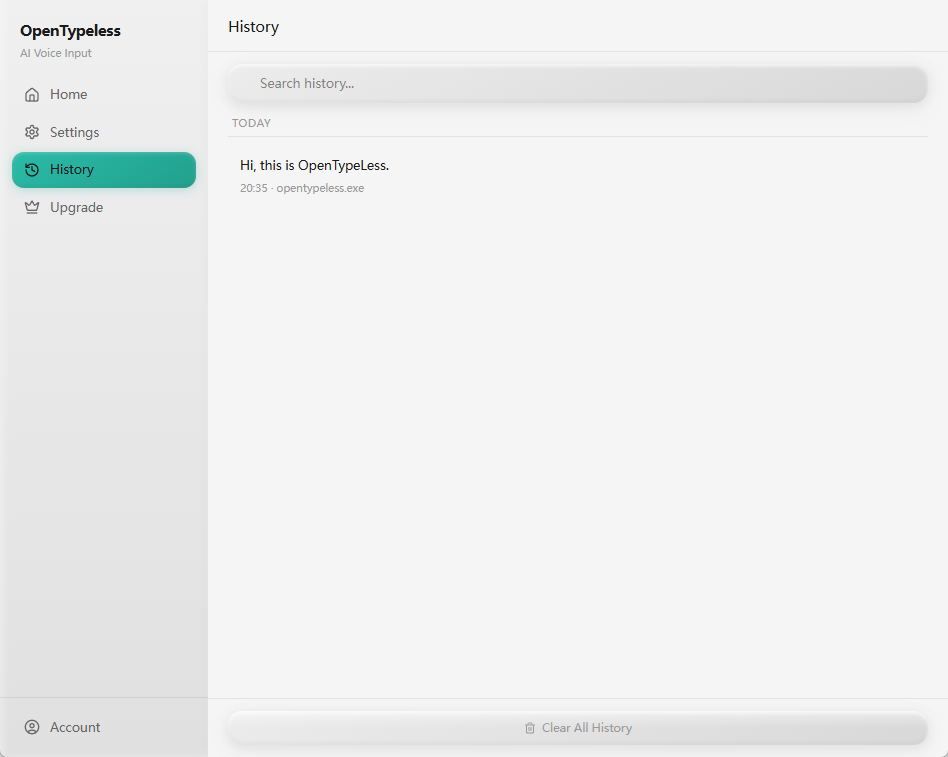
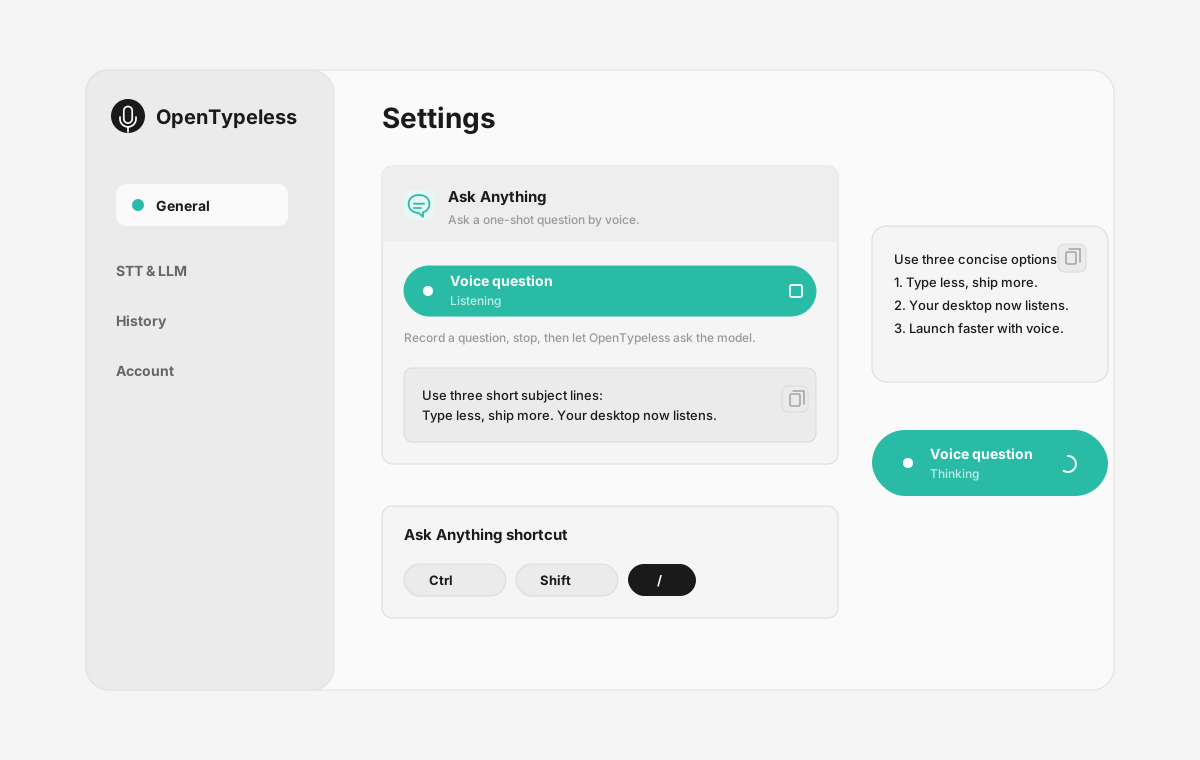
| 段階 | 製品上の根拠 | 重要な理由 |
|---|---|---|
| デスクトップ入力 | 抽象的な説明ではなく、実際の録音画面を表示します。 | Google Docs Voice Typing と比較するユーザーが、OpenTypeless の日常利用シーンを把握できます。 |
| プロバイダー管理 | STT と LLM の設定を同じ場所で確認できます。 | BYOK、ローカル、クラウドの各ワークフローを画面上で理解できます。 |
| 出力確認 | 履歴画面で過去の音声入力結果を確認できます。 | 一度きりの処理ではなく、結果を見直せるワークフローとして伝わります。 |
| Ask Anything | 音声で質問し、チャットアプリを開かずに回答パネルで確認できます。 | 単なる音声入力だけでなく、声で質問して答えを読む流れも比較できます。 |
機能比較
OpenTypeless vs Google Docs Voice Typing
| 機能 | OpenTypeless | Google Docs Voice Typing |
|---|---|---|
| 料金 | 永久無料 | Free (requires Google account) |
| プラットフォーム | Windows / macOS / Linux | Chrome (Google Docs only) |
| オープンソース | MITライセンス | クローズドソース |
| STTプロバイダー | 6プロバイダー(BYOK) | 1プロバイダー |
| LLMプロバイダー | 11プロバイダー(BYOK) | なし |
| 対応言語 | 99 languages | Limited |
| カスタム辞書 | はい | いいえ |
| オフラインモード | Ollamaで完全オフライン | いいえ |
| AIテキスト整形 | 11のLLMプロバイダー | いいえ |
Google Docs Voice Typingの代わりにOpenTypelessを選ぶ理由
主な利点
プロバイダーの自由度
Google Docs Voice Typingには1つのSTTプロバイダーがあります。OpenTypelessは6つに対応——速度、精度、コストのバランスを自分で選べます。
AIテキスト整形
Google Docs Voice TypingにはAI整形機能がありません。OpenTypelessは11のLLMプロバイダーを使って音声を整形——フィラーワードの除去、文法修正、テキストのフォーマットを行います。
完全オープンソース
MITライセンス。すべてのコードがGitHubで監査可能。音声入力ワークフローにブラックボックスはありません。
クロスプラットフォーム
Windows、macOS、Linuxに対応。Google Docs Voice TypingはChrome (Google Docs only)のみ対応です。
Google Docs Voice Typingからの乗り換え
簡単移行
Install OpenTypeless and use the same voice typing habit — press hotkey, speak, get polished text. It works in Google Docs too, plus every other app on your desktop.
Google Docs Voice Typingについてのユーザーの声
競合を尊重します
Free with a Google account
No installation needed
Good accuracy for English
Convenient for Google Docs users
Only works inside Google Docs in Chrome browser
No AI text polishing — raw transcription only
Requires internet connection
No custom dictionary for technical terms
よくある質問
OpenTypelessはGoogle Docs Voice Typingの代わりになりますか?
はい。OpenTypelessはGoogle Docs Voice Typingの主要な音声入力機能を網羅しつつ、クロスプラットフォーム対応(Windows、macOS、Linux)、6つのSTTプロバイダー、AIテキスト整形用の11のLLMプロバイダー、カスタム辞書、完全なローカルオフラインモードを追加しています——すべてMITライセンスで無料です。
OpenTypelessとGoogle Docs Voice Typingの料金を比較すると?
OpenTypelessはMITライセンスで永久無料です。APIキーは自分で用意——一般的な利用で月額1ドル未満。オプションのProプラン(月額4.99ドル)にはクラウドクレジット付き。Google Docs Voice Typingの料金はFree (requires Google account)です。
OpenTypelessはGoogle Docs Voice Typingと同様にすべてのプラットフォームで動作しますか?
OpenTypelessはWindows、macOS、Linuxで動作します。Google Docs Voice TypingはChrome (Google Docs only)に対応しています。OpenTypelessはより幅広いデスクトップ環境をカバーします。
OpenTypelessはオフラインで使えますか?
はい。Ollamaをローカルにインストールすれば、STT(ローカルWhisper)とLLM整形の両方をオフラインで利用できます。音声データはデバイスから送信されません。Google Docs Voice Typingはオフライン非対応——インターネット接続が必要です。