“Talon is powerful but the learning curve is brutal. I spent weeks learning commands. OpenTypeless works on day one — just speak and get polished text.”
— Talon community forum user
OpenTypeless の製品 UI
機能一覧を比べる前に、Talon Voice から移行したユーザーが触れる UI と音声フローを確認できます。


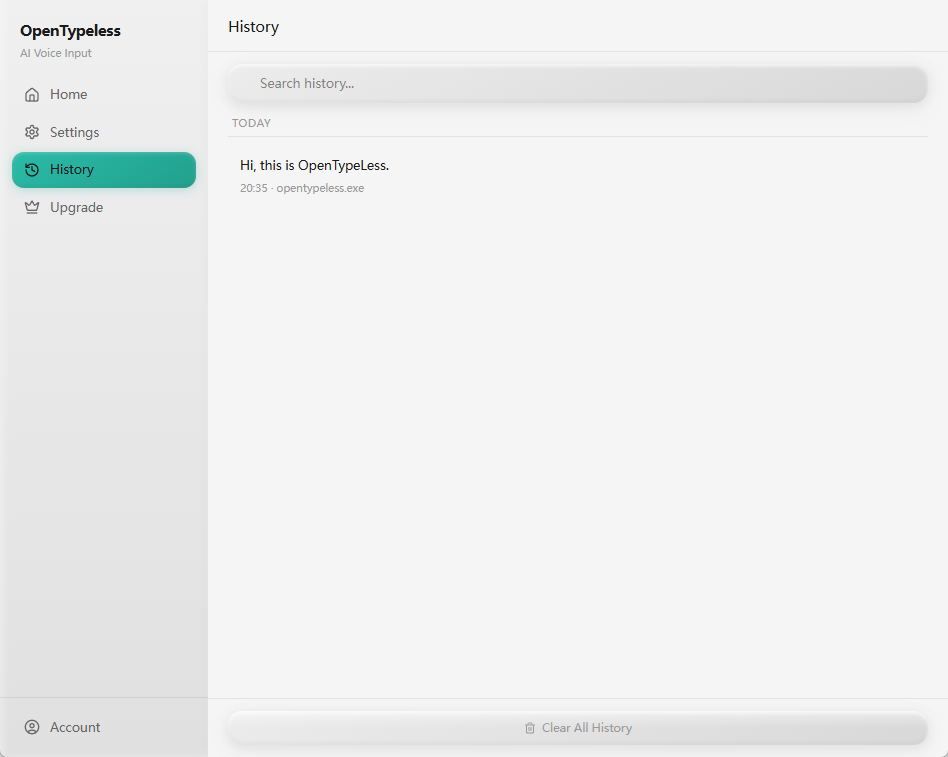
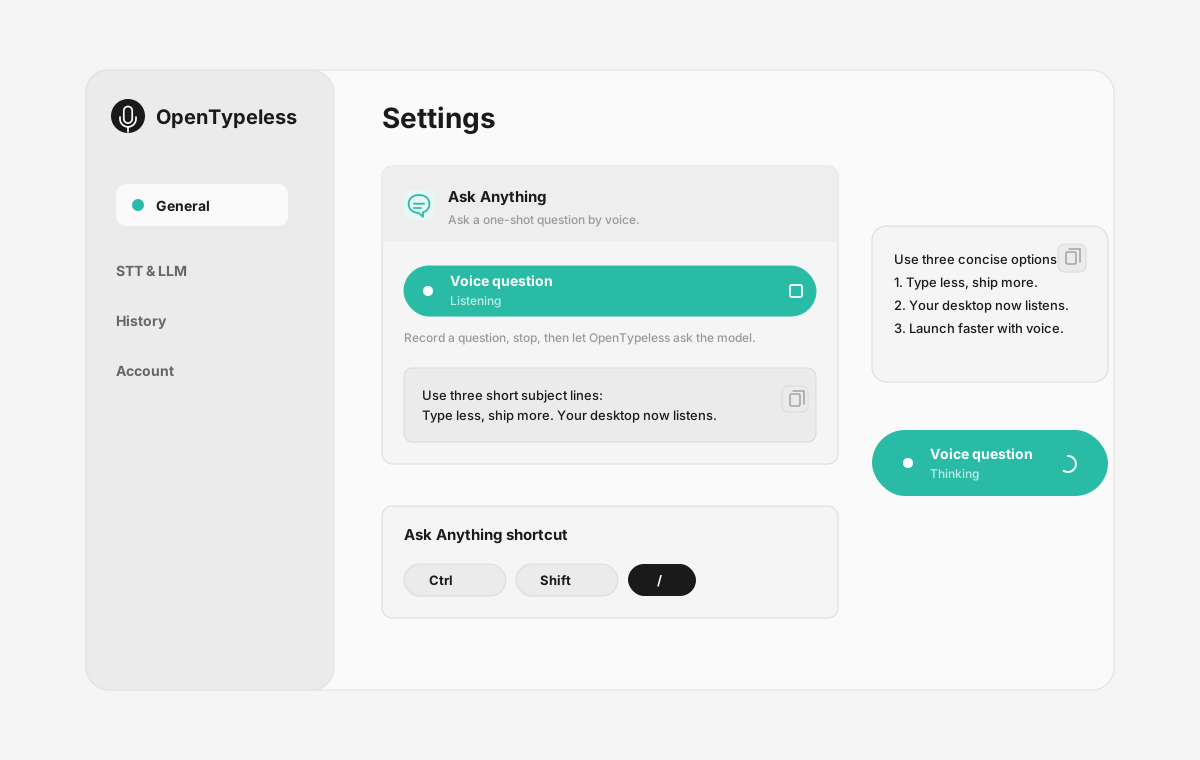
| 段階 | 製品上の根拠 | 重要な理由 |
|---|---|---|
| デスクトップ入力 | 抽象的な説明ではなく、実際の録音画面を表示します。 | Talon Voice と比較するユーザーが、OpenTypeless の日常利用シーンを把握できます。 |
| プロバイダー管理 | STT と LLM の設定を同じ場所で確認できます。 | BYOK、ローカル、クラウドの各ワークフローを画面上で理解できます。 |
| 出力確認 | 履歴画面で過去の音声入力結果を確認できます。 | 一度きりの処理ではなく、結果を見直せるワークフローとして伝わります。 |
| Ask Anything | 音声で質問し、チャットアプリを開かずに回答パネルで確認できます。 | 単なる音声入力だけでなく、声で質問して答えを読む流れも比較できます。 |
機能比較
OpenTypeless vs Talon Voice
| 機能 | OpenTypeless | Talon Voice |
|---|---|---|
| 料金 | 永久無料 | Free (community-driven) |
| プラットフォーム | Windows / macOS / Linux | Windows / macOS / Linux |
| オープンソース | MITライセンス | はい |
| STTプロバイダー | 6プロバイダー(BYOK) | 1プロバイダー |
| LLMプロバイダー | 11プロバイダー(BYOK) | なし |
| 対応言語 | 99 languages | English primarily |
| カスタム辞書 | はい | はい |
| オフラインモード | Ollamaで完全オフライン | はい |
| AIテキスト整形 | 11のLLMプロバイダー | いいえ |
Talon Voiceの代わりにOpenTypelessを選ぶ理由
主な利点
プロバイダーの自由度
Talon Voiceには1つのSTTプロバイダーがあります。OpenTypelessは6つに対応——速度、精度、コストのバランスを自分で選べます。
AIテキスト整形
Talon VoiceにはAI整形機能がありません。OpenTypelessは11のLLMプロバイダーを使って音声を整形——フィラーワードの除去、文法修正、テキストのフォーマットを行います。
完全オープンソース
MITライセンス。すべてのコードがGitHubで監査可能。Talon Voiceもオープンソースですが、OpenTypelessはより多くのプロバイダーを選べます。
クロスプラットフォーム
Windows、macOS、Linuxに対応。Talon VoiceはWindows, macOS, Linuxに対応しています。
Talon Voiceからの乗り換え
簡単移行
If you use Talon for coding commands, keep it. But for writing comments, docs, emails, and messages, switch to OpenTypeless. They complement each other — Talon for control, OpenTypeless for content.
Talon Voiceについてのユーザーの声
競合を尊重します
Full computer control by voice (mouse, keyboard, navigation)
Excellent for hands-free coding with precise commands
Active and passionate community
Free and open source
Works on all platforms
Requires learning complex command grammar — steep learning curve
Only supports English well
No AI text polishing — raw command output only
Designed for code control, not general dictation
よくある質問
OpenTypelessはTalon Voiceの代わりになりますか?
はい。OpenTypelessはTalon Voiceの主要な音声入力機能を網羅しつつ、クロスプラットフォーム対応(Windows、macOS、Linux)、6つのSTTプロバイダー、AIテキスト整形用の11のLLMプロバイダー、カスタム辞書、完全なローカルオフラインモードを追加しています——すべてMITライセンスで無料です。
OpenTypelessとTalon Voiceの料金を比較すると?
OpenTypelessはMITライセンスで永久無料です。APIキーは自分で用意——一般的な利用で月額1ドル未満。オプションのProプラン(月額4.99ドル)にはクラウドクレジット付き。Talon Voiceの料金はFree (community-driven)です。
OpenTypelessはTalon Voiceと同様にすべてのプラットフォームで動作しますか?
OpenTypelessはWindows、macOS、Linuxで動作します。Talon VoiceはWindows, macOS, Linuxに対応しています。OpenTypelessはより幅広いデスクトップ環境をカバーします。
OpenTypelessはオフラインで使えますか?
はい。Ollamaをローカルにインストールすれば、STT(ローカルWhisper)とLLM整形の両方をオフラインで利用できます。音声データはデバイスから送信されません。Talon Voiceもオフライン利用に対応していますが、OpenTypelessはより多くのオフラインプロバイダーを選べます。