“Win+H is okay for quick stuff but the output always needs editing. OpenTypeless with Deepgram + Claude gives me text I can actually send without touching it.”
— Windows Insider community member
OpenTypeless 产品界面
在比较功能清单前,先看看用户从 Windows Voice Typing 切换过来后会操作的界面和语音流程。


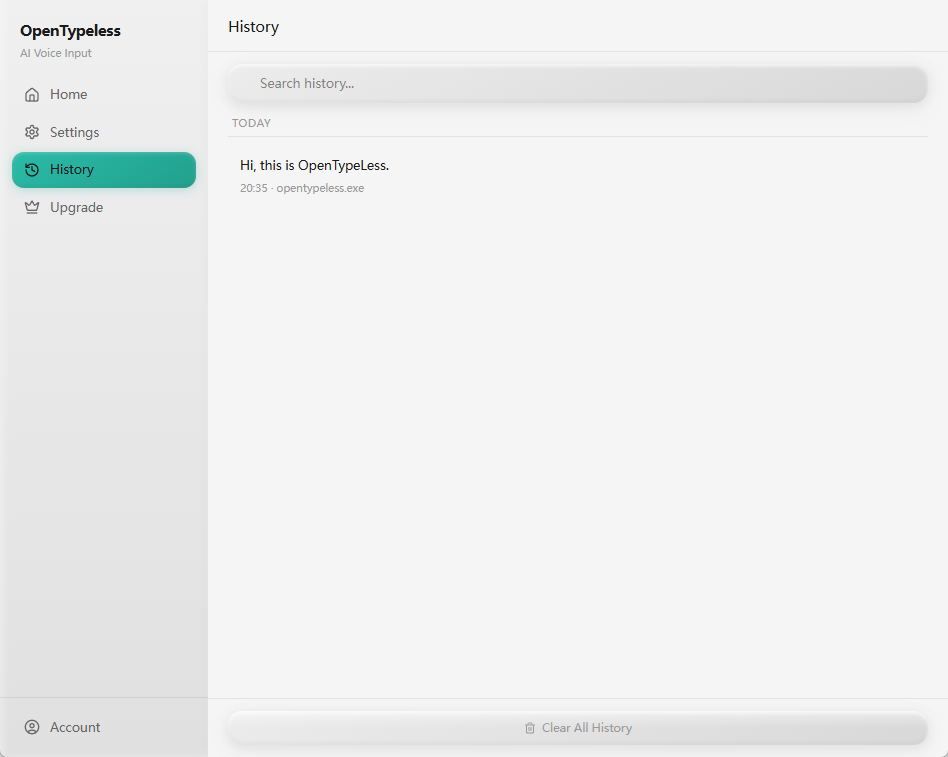
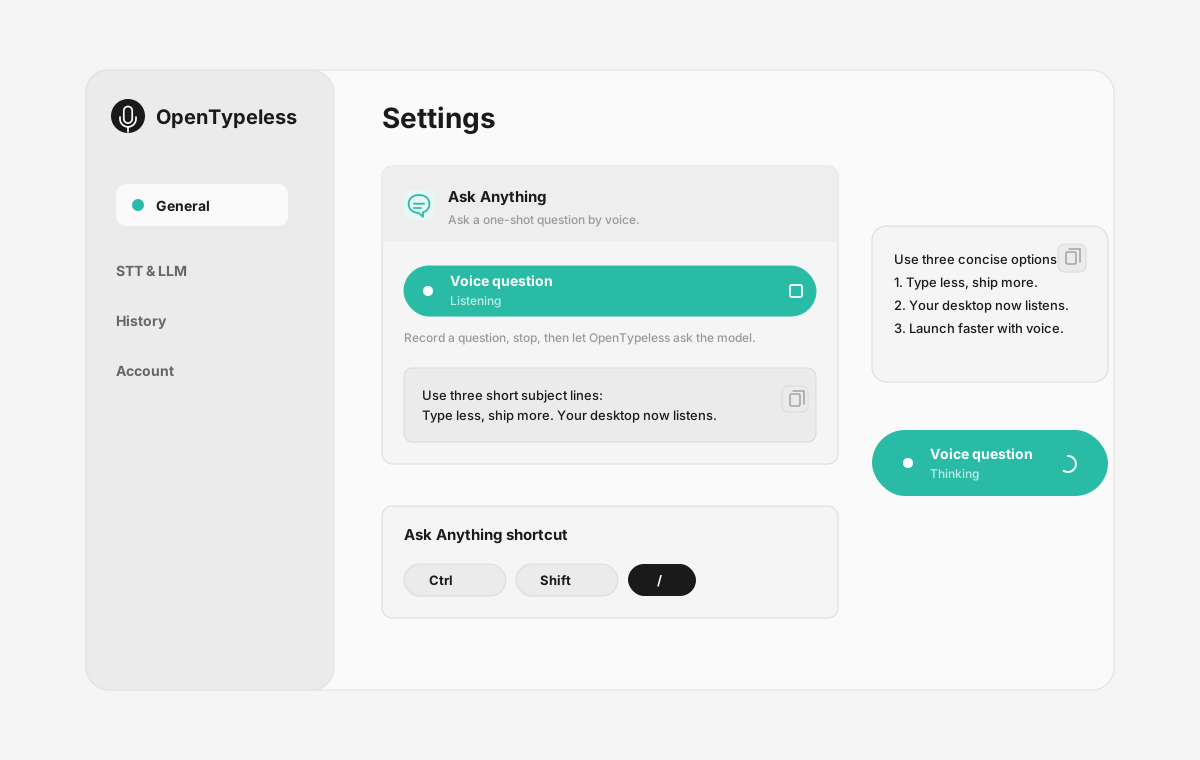
| 环节 | 产品证据 | 为什么重要 |
|---|---|---|
| 桌面录音 | 页面展示真实录音界面,而不是抽象功能描述。 | 正在比较 Windows Voice Typing 的用户能更快理解 OpenTypeless 如何进入日常输入流程。 |
| 模型配置 | 设置页把 STT 和 LLM 选择放在同一个地方。 | BYOK、本地模型和云端调用这些能力都有可见的配置入口。 |
| 结果回看 | 历史记录可以查看之前的语音输入结果。 | 用户能检查输出结果,而不是只能依赖一次性的黑盒处理。 |
| Ask Anything | 独立弹窗承载语音提问结果,不需要打开聊天应用。 | 用户比较的不只是听写,也包括用声音提问并直接看到答案的第二条工作流。 |
功能对比
OpenTypeless 对比 Windows Voice Typing
| 功能 | OpenTypeless | Windows Voice Typing |
|---|---|---|
| 价格 | 永久免费 | Free (built into Windows) |
| 平台 | Windows / macOS / Linux | Windows |
| 开源 | MIT 许可证 | 闭源 |
| STT 供应商 | 6 个供应商 (BYOK) | 1 个供应商 |
| LLM 供应商 | 11 个供应商 (BYOK) | 无 |
| 语言 | 99 languages | Limited |
| 自定义词典 | 是 | 否 |
| 离线模式 | 通过 Ollama 完全离线 | 否 |
| AI 文本润色 | 11 个 LLM 供应商 | 否 |
为什么选择 OpenTypeless 而不是 Windows Voice Typing
核心优势
供应商自由
Windows Voice Typing 有 1 个 STT 供应商。OpenTypeless 支持 6 个 — 按需选择速度、准确率和成本的最佳平衡。
AI 文本润色
Windows Voice Typing 没有 AI 润色功能。OpenTypeless 使用 11 个 LLM 供应商来优化你的语音 — 删除语气词、修正语法、格式化文本。
完全开源
MIT 许可证。每一行代码都可在 GitHub 上审计。你的语音输入流程中没有任何黑盒。
跨平台
支持 Windows、macOS 和 Linux。Windows Voice Typing 仅支持 Windows。
从 Windows Voice Typing 切换
快速迁移
Install OpenTypeless and remap the hotkey to Win+H if you want the same muscle memory. Or keep both — use Win+H for quick notes and OpenTypeless for anything that needs to look professional.
大家怎么说 Windows Voice Typing
我们尊重竞争对手
Free and built into Windows 10/11
Zero setup — just press Win+H
Convenient for quick messages
No additional software needed
No AI text polishing — raw transcription only
Windows only — no macOS or Linux
Requires internet connection
Limited language support
常见问题
OpenTypeless 是 Windows Voice Typing 的好替代品吗?
是的。OpenTypeless 覆盖了 Windows Voice Typing 的核心语音输入功能,同时增加了跨平台支持(Windows、macOS、Linux)、6 个 STT 供应商、11 个 LLM 供应商用于 AI 文本润色、自定义词典和完全本地离线模式 — 全部在 MIT 许可证下免费提供。
OpenTypeless 和 Windows Voice Typing 相比费用如何?
OpenTypeless 在 MIT 许可证下永久免费。你使用自己的 API 密钥 — 典型使用费用不到 $1/月。可选的 Pro 计划($4.99/月)包含预配置的云额度。Windows Voice Typing 收费 Free (built into Windows)。
OpenTypeless 能像 Windows Voice Typing 一样在所有平台上运行吗?
OpenTypeless 可在 Windows、macOS 和 Linux 上运行。Windows Voice Typing 可在 Windows 上运行。OpenTypeless 提供更广泛的桌面覆盖。
OpenTypeless 可以离线使用吗?
可以。本地安装 Ollama 即可同时使用 STT(本地 Whisper)和 LLM 润色。你的音频永远不会离开你的设备。Windows Voice Typing 不支持离线使用 — 它需要网络连接。