Ask Anything by Voice
Record a question, stop recording, and let OpenTypeless turn your speech into a one-off AI answer. No chat thread, no extra input box, just the result you asked for.
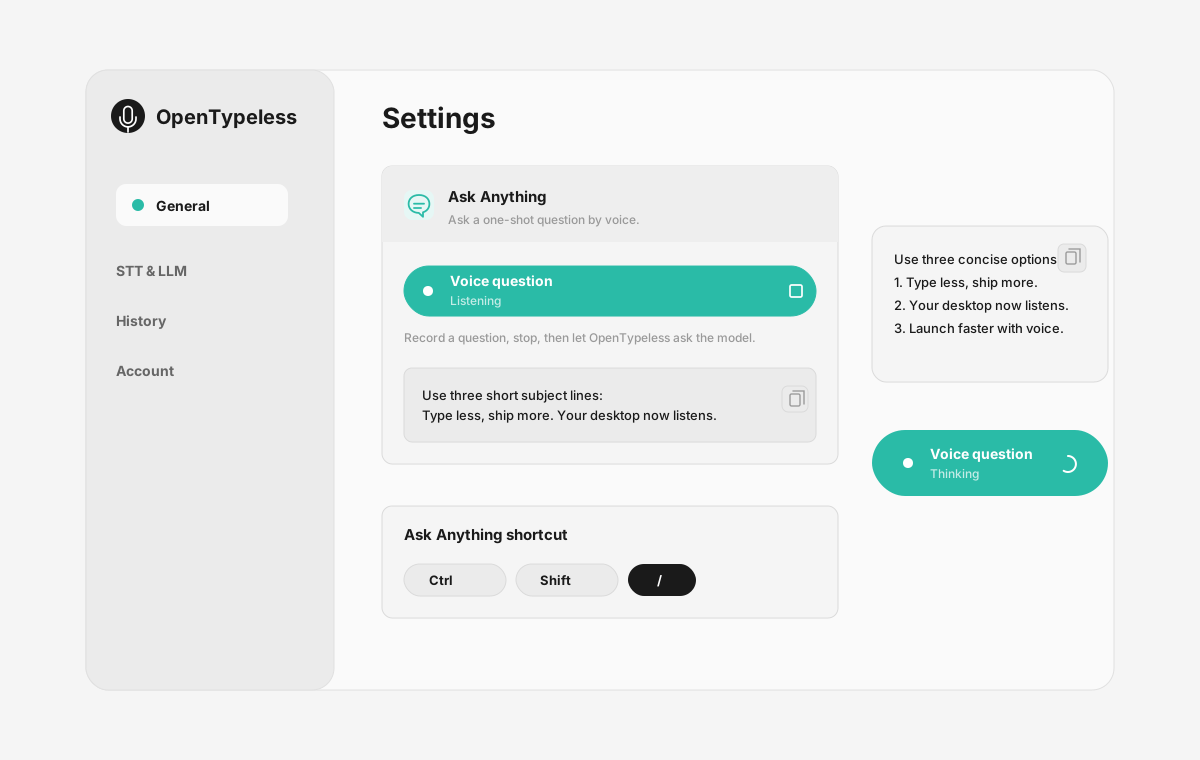
Ask Anything is a focused voice Q&A workflow inside OpenTypeless. You trigger the feature, speak a question, stop recording, and OpenTypeless transcribes the audio before sending that single question to your configured LLM. The final answer appears in a result panel so you can read it, copy it, or continue your work.
Reviewed with OpenTypeless Ask Anything product spec on 2026-06-30.
How to decide
Choose based on the job, not only the keyword.
One-off by design
Use it for quick questions that should not become a long chat history or a new document.
Voice first
The workflow starts with recording, then transcription, then model response. You do not type the question into a prompt box.
Provider flexible
Use cloud providers for convenience, bring your own API keys, or configure local/private paths where supported.
Product-specific details
Each section is written around a distinct user job so the page does not become a thin keyword variant.
What happens after you press the shortcut
OpenTypeless starts a front-end recording session and shows recording state so you know the app is listening. When you stop, the audio is transcribed and the transcript is treated as the question.
The question is sent as a single prompt to your configured model. The feature does not need a visible input box because the spoken question is the input.
When Ask Anything is useful
Use it when you want a quick explanation, rewrite, command suggestion, debugging direction, or summary without opening a separate AI chat tab.
It pairs well with developer work because you can ask about an error, a terminal command, or a code change while staying in your current desktop workflow.
How credits and usage work
When Ask Anything uses hosted cloud speech-to-text or hosted LLM calls, that usage should count against the same cloud entitlement model as other cloud features.
If you use BYOK or local providers, provider cost and privacy depend on your own configuration. The pricing and docs pages should explain this clearly before users rely on the feature heavily.
Ask Anything vs opening a chat app
The goal is not to replace long-running AI chat. It is to make quick voice questions faster from the desktop.
| Decision point | Option | What to know |
|---|---|---|
| Input | Chat app | Type or paste a question into a chat interface. |
| Ask Anything | Speak the question and let the app transcribe it. | |
| Context | Chat app | Good for multi-turn context and long conversations. |
| Ask Anything | Best for one-off questions where the spoken prompt is enough. | |
| Workflow | Chat app | Switch windows, type, send, and return to work. |
| Ask Anything | Stay in the desktop flow and get a focused answer panel. |
Use Ask Anything in four steps
The page mirrors the product flow users should expect in the desktop app.
Trigger Ask Anything
Use the configured shortcut or menu action to start the voice question flow.
Speak the question
Ask one focused question, such as a rewrite request, command explanation, or debugging prompt.
Stop recording
OpenTypeless transcribes the audio and prepares the transcript as a single model prompt.
Read the answer
The result appears in a focused panel without requiring another send action.
FAQ
Short answers for users comparing tools and workflows.
Does Ask Anything keep chat context?
It is designed for one-off questions. The spoken question is transcribed and sent as a single prompt, so users should not expect long chat memory unless a future workflow explicitly adds it.
Does Ask Anything use cloud quota?
It should count when hosted cloud STT or hosted LLM providers are used. BYOK and local provider setups depend on the user configuration and provider billing.
What happens if no speech is detected?
The product should return a clear error instead of staying in a thinking state. The troubleshooting guide should cover microphone input, permissions, timeout, and provider failures.
Can I use Ask Anything for coding questions?
Yes. It is especially useful for quick questions about commands, errors, code comments, PR wording, or debugging direction.
Related pages
Continue through the strongest internal-link path.
Download OpenTypeless
Install the desktop app for Windows, macOS, or Linux.
Pricing and cloud quota
Understand free, BYOK, local, and cloud usage before using AI workflows heavily.
Ask Anything docs
Read the expected recording, STT, LLM, and result-panel flow.
Ask Anything troubleshooting
Debug silence, timeout, thinking state, and missing popup cases.
Voice dictation for ChatGPT
Speak longer prompts and AI questions with a desktop workflow.
Voice input for Cursor
Use voice for developer prompts, comments, and debugging notes.
Try the desktop voice input workflow
Start with the default setup, then tune providers, shortcuts, local mode, and Ask Anything as your workflow becomes clearer.