OpenClaw: The 235K-Star Open Source Personal AI Assistant — And How It Complements OpenTypeless
The rise of open-source AI has reached a tipping point. Projects like OpenClaw are proving that you don't need to surrender your data to big tech companies to get a world-class AI assistant. With over 235,000 stars on GitHub, OpenClaw has become the fastest-growing open-source AI project in history — and for good reason. It gives you a personal AI assistant that you fully own and control, running on your own infrastructure if you choose.
What Is OpenClaw?
OpenClaw is an open-source personal AI assistant built in TypeScript. Its Gateway architecture can connect to hosted LLM providers, local models through Ollama, or compatible APIs. Actual conversation, key, storage, and network paths depend on the Gateway, provider, logging, and deployment configuration; verify those paths for the intended setup.
What sets OpenClaw apart from other open-source chatbots is its scope. It's not just a chat interface — it's a full personal AI agent platform. It supports voice interaction through ElevenLabs integration, multi-platform messaging (Telegram, Discord, WhatsApp, Slack), tool use and function calling, memory and context management, and a plugin system for extending functionality. The 'own your data' philosophy runs deep: every conversation, every preference, every piece of context is stored locally under your control.
Why OpenClaw Matters for Voice Input
One of OpenClaw's most compelling features is its voice interaction system. Through its ElevenLabs integration, OpenClaw supports Voice Wake mode — you can say a wake word and start talking to your AI assistant hands-free. The Talk Mode feature enables natural, flowing conversations where you speak and the AI responds with synthesized speech. It's the open-source answer to Siri, Alexa, and Google Assistant, but with the intelligence of GPT-4 or Claude behind it.
OpenClaw can be part of a configurable voice workflow, but self-hosting alone is not a privacy guarantee. OpenTypeless sends audio through the selected route; use a Custom Whisper-compatible endpoint for local or self-hosted STT, and use Ollama only for the separate LLM step. OpenClaw integrations may add other endpoints, so verify the complete configuration and network traffic.
OpenClaw vs Cloud AI Assistants
The AI assistant market is dominated by cloud services: ChatGPT, Gemini, Copilot, and Siri. These services are polished and convenient, but they come with significant trade-offs that matter to privacy-conscious users and organizations. Let's examine how OpenClaw compares across the dimensions that matter most.
Data Ownership
With ChatGPT or Gemini, your conversations are processed on their servers. Even with enterprise plans, you're trusting a third party with sensitive data. OpenClaw flips this model: you host the gateway yourself, your conversations live in your own database, and the LLM API calls go directly from your infrastructure to the provider — no middleman storing copies of your prompts. For businesses handling sensitive customer data, proprietary code, or regulated information (HIPAA, GDPR), this self-hosted approach is increasingly becoming a compliance requirement rather than a preference.
Multi-Platform Messaging
Unlike ChatGPT which lives in its own app and website, OpenClaw meets you where you already are. It integrates with Telegram, Discord, WhatsApp, Slack, and web interfaces. You can message your AI assistant the same way you message a friend — from any platform, any device, any time. This multi-platform presence makes OpenClaw feel less like a tool and more like a genuine assistant that's always available.
Extensibility
Cloud AI assistants offer limited customization. You can set a system prompt and maybe upload some files. OpenClaw's plugin architecture lets you build custom tools, connect to your own APIs, integrate with your internal services, and create specialized agents for specific tasks. Want your AI to check your build pipeline, query your database, or file support tickets? Write a plugin. The codebase is TypeScript — the most widely-used language in web development — so contributing and customizing is accessible to a massive developer community.
- Telegram — Full bot integration with inline mode and commands
- Discord — Server bot with channel management and slash commands
- WhatsApp — Direct messaging through the WhatsApp Business API
- Slack — Workspace integration with threaded conversations
- Web UI — Self-hosted web interface with chat history
- API — RESTful API for custom integrations and automation
How OpenTypeless Complements OpenClaw
Here's where it gets interesting. OpenClaw and OpenTypeless serve fundamentally different purposes in your workflow, but together they create a complete voice-powered AI workspace. OpenClaw is your conversational AI — you talk to it, ask questions, assign tasks, and it responds intelligently. OpenTypeless is your system-level voice input method — it captures your speech, transcribes it, polishes the text, and types it wherever your cursor is.
Think of it this way: when you want to have a conversation with AI — brainstorm ideas, get code reviews, ask questions — you use OpenClaw. When you want to type an email, write documentation, compose a message, or write code comments using your voice — you use OpenTypeless. OpenClaw replaces your AI chatbot. OpenTypeless replaces your keyboard (when you want it to).
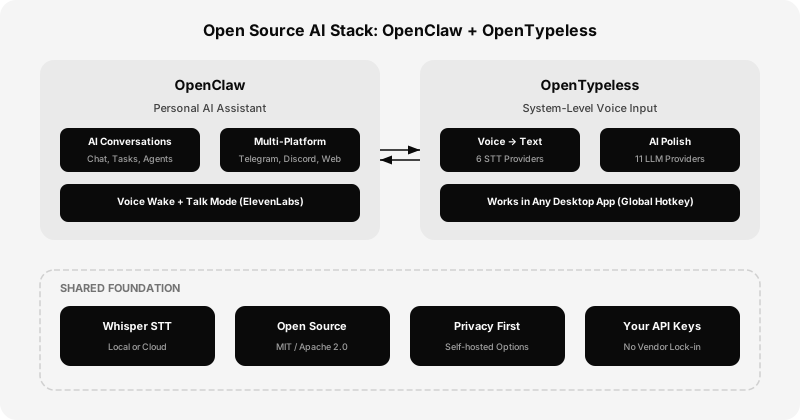
The Open Source AI Stack
OpenClaw handles conversational tasks and automation, while OpenTypeless supplies system-wide voice input to desktop applications. In a local or self-hosted configuration, point OpenTypeless at a Custom Whisper-compatible endpoint for STT and use Ollama only for the separate LLM text-polishing stage. OpenClaw has its own model and integration routes, so inspect every endpoint before deciding how the combined workflow handles data.
This workflow can be assembled with self-hosted components, but its actual data routes depend on the endpoints, OpenClaw integrations, model downloads, and update services you configure. Account for local compute and any provider charges, inspect network behavior, and complete the security and compliance review required for your organization.
- Deepgram: inspect current model, data, language, and billing documents before testing.
- OpenAI Whisper API — hosted Whisper route; verify the current language, region, and data-handling documentation
- Groq Whisper: confirm current response, data, and billing terms for the chosen model.
- Configurable local route: a Custom Whisper-compatible endpoint handles STT, while Ollama handles the separate LLM text-polishing stage. Verify both endpoints and any OpenClaw integrations.
- GLM-ASR — candidate for Chinese-language recognition; validate the current model with representative speech
- AssemblyAI: validate required features, retention settings, and current billing terms.
Setting Up OpenClaw with Voice
Getting started with OpenClaw is straightforward. The project provides Docker images for easy deployment, or you can run it directly with Node.js. Clone the repository, configure your LLM provider credentials, and connect your messaging platforms. For voice interaction, you'll need an ElevenLabs API key for speech synthesis. The setup guide walks you through configuring Voice Wake mode so you can activate your AI assistant with a custom wake word.
# Clone and run OpenClaw
git clone https://github.com/openclaw/openclaw.git
cd openclaw
npm install
cp .env.example .env
# Edit .env with your provider keys
npm run start
Once OpenClaw is running, set up OpenTypeless alongside it. Download OpenTypeless from opentypeless.com, configure your preferred STT provider, and enable AI text polishing. Now you have two complementary tools: use OpenClaw's chat interface or voice mode for AI conversations, and use OpenTypeless's global hotkey for voice typing in any application. The combination covers every voice-to-AI scenario you'll encounter in a typical workday.
The Future of Personal AI
The trends driving OpenClaw's explosive growth aren't slowing down. Privacy regulations are tightening globally. Enterprises are demanding on-premises AI solutions. Open-source LLMs are closing the quality gap with proprietary models. And the multi-agent paradigm — where specialized AI agents collaborate to solve complex tasks — is making self-hosted AI not just viable but preferable for many use cases.
Voice can be a practical interface for a personal AI assistant. Evaluate the setup with representative audio, inspect the STT and LLM routes separately, and verify network, storage, and retention behavior for every configured dependency. Local hardware is one deployment option, not an automatic privacy guarantee.
OpenClaw and OpenTypeless are early pieces of this puzzle. They prove that open-source, privacy-first AI tools can match — and in some ways exceed — what the tech giants offer. The difference is that with open source, you're not the product. You're the owner.