Introducing TalkMore: the Cloud SaaS Behind OpenTypeless
TalkMore is the cloud SaaS layer behind OpenTypeless. It gives users an optional managed path for hosted speech-to-text, AI polishing, cloud words, account licensing, and AppSumo lifetime access, while the desktop app keeps its BYOK and local-first workflows for people who want full provider control.
Why OpenTypeless Needs a Cloud Layer
OpenTypeless started as a desktop voice input app for people who wanted choice: pick your own STT provider, route AI polishing through your own LLM key, and keep the workflow inspectable. But many users also want a simpler managed option that works without collecting API keys from several providers. TalkMore exists to serve that hosted path without replacing the local and BYOK modes.
The cloud service handles authenticated proxy requests, quota accounting, license state, and provider routing. The desktop app still owns microphone capture, global hotkeys, local configuration, and text insertion. That split keeps OpenTypeless useful as a standalone app while giving paid and lifetime users a reliable SaaS-backed path when they prefer managed cloud words.
- Hosted STT proxy for users who do not want to manage provider keys
- AI polishing and Ask Anything requests routed through controlled server-side limits
- Cloud words and token accounting for free, Pro, and lifetime plans
- License and subscription status that the desktop app can understand
- BYOK and local-first desktop modes preserved for users who want direct provider control
Why I Built TalkMore
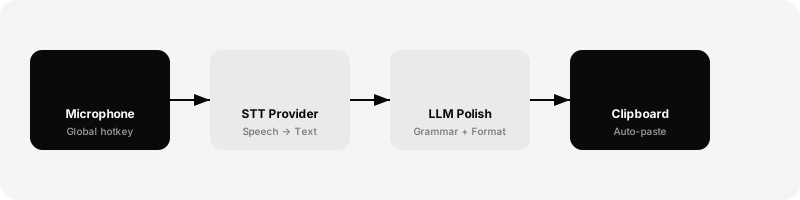
I needed a tool that let me choose my own providers, automatically cleaned up my speech, and worked in any application on my desktop. Not a web app, not a browser extension — a proper native desktop application that could capture audio globally and paste polished text anywhere. The key insight was that voice input is really a pipeline problem: microphone capture, speech-to-text conversion, AI text polishing, and clipboard output. Each stage should be independently configurable.
Architecture Deep Dive
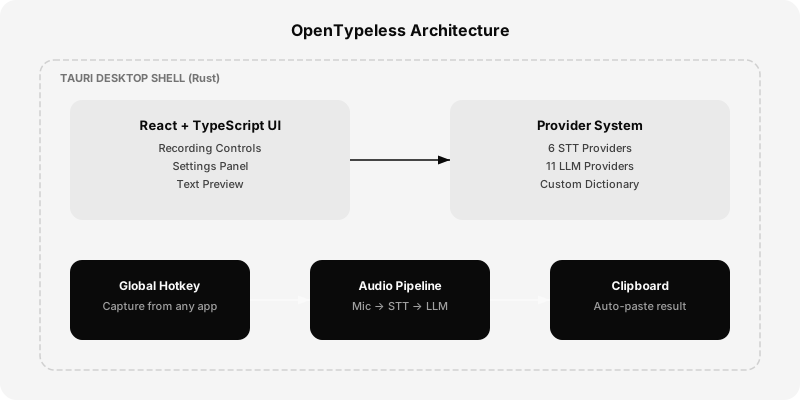
OpenTypeless is built on a modern desktop stack designed for performance and extensibility. The architecture separates concerns cleanly: the native shell handles system integration, the UI layer handles user interaction, and the provider system handles all external API communication.
Tauri Desktop Shell
Tauri provides the native desktop shell — Rust for the backend means excellent performance, tiny binary size (under 10MB), and robust security. Unlike Electron, Tauri uses the system's native webview instead of bundling Chromium, resulting in dramatically lower memory usage. The Rust backend handles audio capture, global hotkey registration, clipboard management, and system tray integration. These are all operations that need native OS access and benefit from Rust's performance characteristics.
React + TypeScript Frontend
The UI is built with React and TypeScript, providing a familiar development experience with full type safety. The frontend handles the recording controls, settings panel, text preview, and provider configuration. State management is straightforward — React's built-in hooks handle local state, and Tauri's IPC bridge communicates with the Rust backend for system operations.
The Provider System
The provider system is OpenTypeless's most important architectural decision. Instead of hardcoding a single STT engine or LLM, OpenTypeless defines a clean interface that any provider can implement. Adding a new provider means implementing a simple adapter — the rest of the pipeline doesn't change.
OpenTypeless supports cloud STT routes through Deepgram, OpenAI Whisper, Groq Whisper, GLM-ASR, AssemblyAI, and SiliconFlow. A local or self-hosted STT route uses a configured Custom Whisper-compatible endpoint. Text polishing is a separate LLM stage with cloud providers and local options such as Ollama. Review each configured endpoint and its current documentation to understand network and data handling.
AI Text Polishing
Raw speech-to-text output is messy by nature. People say 'um', 'like', 'you know' — and that's fine in conversation, but terrible in written text. OpenTypeless's AI polishing step sends the raw transcription to your chosen LLM with a carefully crafted prompt that fixes grammar, adds punctuation, removes filler words, and formats the text naturally. The custom dictionary feature ensures technical terms are preserved exactly as you define them.
Privacy by Design
Privacy for OpenTypeless depends on the selected route. The Desktop client, each configured STT and LLM endpoint, and the TalkMore managed service have separate data flows, logging, and retention behavior. Review the exact configuration before use.
Open Source Philosophy
OpenTypeless is MIT licensed and free forever. I believe great tools should be accessible to everyone. The open-source model means the community can contribute providers, fix bugs, and extend functionality. It also means you're never locked in — if OpenTypeless disappears tomorrow, you still have the code. Several contributors have already added provider adapters and UI improvements, and the project welcomes pull requests from anyone.
If you're tired of voice input that doesn't quite work, give OpenTypeless a try. Download it from our website, bring your own API keys, and start typing with your voice — anywhere. Check out our guide on choosing the right STT provider to get the best results for your language and use case.