How to Choose the Right STT Provider for OpenTypeless
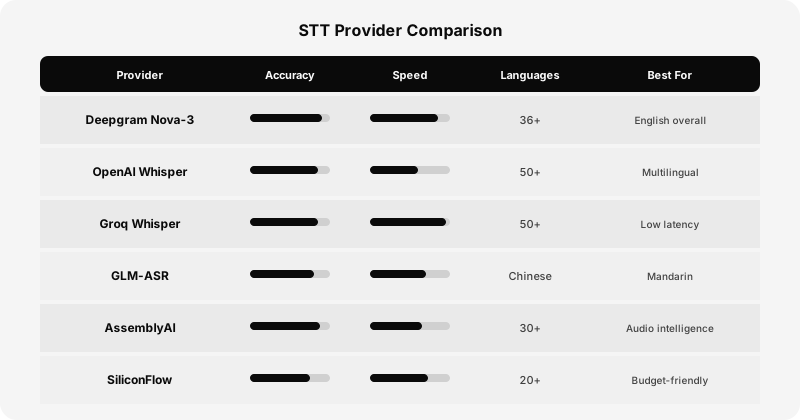
OpenTypeless supports named BYOK speech-to-text providers, each with different strengths in accuracy, speed, language coverage, and pricing. Choosing the right one can dramatically improve your voice input experience. This guide provides a detailed comparison to help you pick the best provider for your specific use case.
How Speech-to-Text Works
Before diving into providers, it helps to understand what happens when you speak into OpenTypeless. Your microphone captures audio, which is compressed and sent to the STT provider's API. The provider runs the audio through a neural network trained on thousands of hours of speech data, producing a text transcription. Different providers use different model architectures, training data, and optimization strategies — which is why accuracy and speed vary significantly between them.
The key metrics to consider are: word error rate (WER) — the percentage of words transcribed incorrectly; latency — how quickly you get results back; language support — which languages and dialects are supported; and pricing — cost per minute of audio processed. There's no single 'best' provider — the right choice depends on your primary language, latency requirements, and budget.
Deepgram Nova-3
Deepgram test: use a reference recording and log errors, formatting, model, and documentation date.
If formatting during transcription or partial results matter, first check Deepgram's current model and API documentation for the selected route. Then test representative recordings and score punctuation, proper nouns, numbers, partial-result behavior, and time to usable final text against your acceptance thresholds.
- Measure Deepgram English accuracy with representative recordings instead of relying on a fixed ranking.
- Confirm the selected Deepgram route’s current streaming behavior in official documentation and an end-to-end test.
- Review Deepgram’s current billing terms for the exact model and region before choosing the route.
- Verify required languages and dialects in Deepgram’s current model documentation, then test real speakers.
OpenAI Whisper
OpenAI Whisper test: score required languages, noise, terminology, and recording lengths.
Confirm the selected OpenAI Whisper route’s current response and streaming modes in official documentation. Measure full-route latency with both short and long representative recordings.
- Verify each required language in current OpenAI Whisper model documentation and with representative speakers.
- Compare noisy recordings using the same scoring method rather than assuming a fixed robustness ranking.
- Test domain terminology and proper nouns from your own workflow, then record the recurring errors.
- Confirm current response and streaming behavior for the selected OpenAI Whisper route.
Groq Whisper
Groq route review: confirm the model, response mode, data terms, and billing terms.
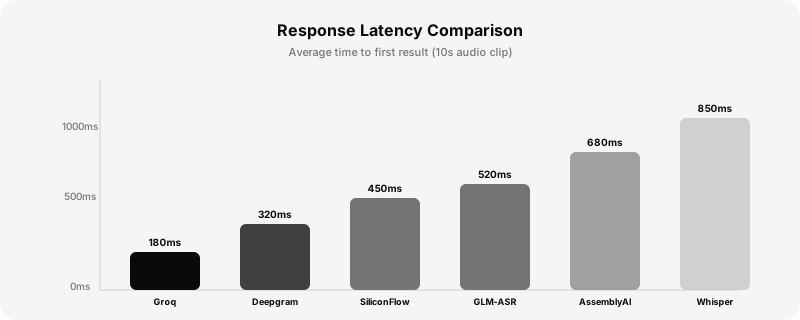
Groq measurement: record complete response time and transcript errors for several audio lengths.
- Check Groq's current terms and billing conditions
- Check OpenAI's current terms and billing conditions
- Run the identical reference set through Groq and every other shortlisted route.
- Summarize the Groq route's measured quality, latency, data terms, and current cost
GLM-ASR
GLM-ASR test: include Mandarin, dialect, mixed-language, names, and domain vocabulary.
When evaluating GLM-ASR for Chinese or mixed Chinese-English speech, check the selected model's current documentation and test representative speakers. Score tone-sensitive terms, homophones, character segmentation, embedded English vocabulary, punctuation, and time to usable text with the same reference set used for other routes.
- Measure Mandarin and dialect transcription with representative speakers instead of relying on a fixed accuracy label.
- Test Chinese-English code-switching with the technical terms and names in your workflow.
- Review Zhipu’s current GLM-ASR model, data, and billing documentation before deployment.
AssemblyAI
AssemblyAI review: validate needed audio-intelligence features and current processing terms.
If speaker separation or other audio analysis matters, check AssemblyAI's current documentation to determine which capabilities apply to the selected model and route. Test representative audio, then review measured output, billing, retention, and audio-processing terms before choosing it for OpenTypeless.
SiliconFlow
SiliconFlow review: record model and region, then run the shared audio test set.
How to Switch Providers
Switching providers in OpenTypeless takes about 10 seconds. Open Settings, go to the STT tab, select your new provider from the dropdown, and enter your API key. OpenTypeless validates the key immediately and you're ready to go. Your previous provider's API key is saved, so you can switch back anytime without re-entering credentials.
Settings → STT Provider → Select provider → Enter API key → DoneOur Recommendation
There is no universal winner. Identify the language and vocabulary you need, decide what latency is acceptable on your connection, then compare providers with the same representative sample. Check formatting, data policy, and current terms as well. OpenTypeless lets you change the STT route while keeping the rest of the workflow intact.