A Whisper GUI for people who want to dictate, not manage scripts
Whisper provides speech recognition models. OpenTypeless turns Whisper-compatible transcription into a desktop workflow with a GUI, global hotkey, configurable endpoint, AI polishing, and text insertion.

Whisper is a model. Daily dictation needs a workflow.
Many people search for a Whisper GUI because the raw model or API is not enough for daily writing. They do not want to run a Python command, copy JSON, or manually move transcript text into another app.
OpenTypeless focuses on the end-to-end job: capture speech, transcribe it with a Whisper-compatible or alternative STT provider, polish the text, and insert it where the cursor already is.
Which kind of Whisper GUI do you need?
Batch transcription tools and live dictation tools solve different jobs.
You process recordings after the fact
Podcast, meeting, interview, and subtitle workflows often need file upload, timestamps, speaker labels, and export formats.
You want to speak into current apps
Desktop dictation needs a shortcut, fast feedback, text insertion, and post-processing that makes the text immediately usable.
You want more than one STT engine
Compare configurable STT routes with representative audio, current documentation, and the endpoint requirements of the deployment you intend to use.
How to use Whisper-style dictation in OpenTypeless
Start simple, then decide whether local Whisper is worth the setup for your machine.
Install the desktop app
Download OpenTypeless for your operating system and open the main app.
Pick a Whisper-compatible provider
Configure the Custom Whisper STT endpoint you intend to use, record its host and model, and test representative audio before enabling a separate cloud or Ollama LLM polishing route.
Enable AI polishing
Turn raw transcript text into a cleaner final version with punctuation, grammar, and tone improvements.
Use it where you write
Trigger the hotkey in your browser, document editor, code editor, email client, or chat app.
Raw Whisper vs OpenTypeless
The model solves speech recognition. The app solves the daily input loop around it.
| Need | Default path | OpenTypeless path |
|---|---|---|
| Interface | API, command line, or third-party wrappers | Desktop GUI with recording state, settings, history, and shortcuts |
| Text insertion | Usually copy and paste from output | Designed to insert polished text into the active app |
| Polishing | Raw transcript unless you build another step | Optional LLM cleanup built into the flow |
| Provider flexibility | One Whisper path at a time | Whisper plus other STT providers when latency or cost matters |
| Vocabulary help | Manual prompting or post-editing | Custom dictionary for repeated names and domain words |
What the workflow looks like in the product UI
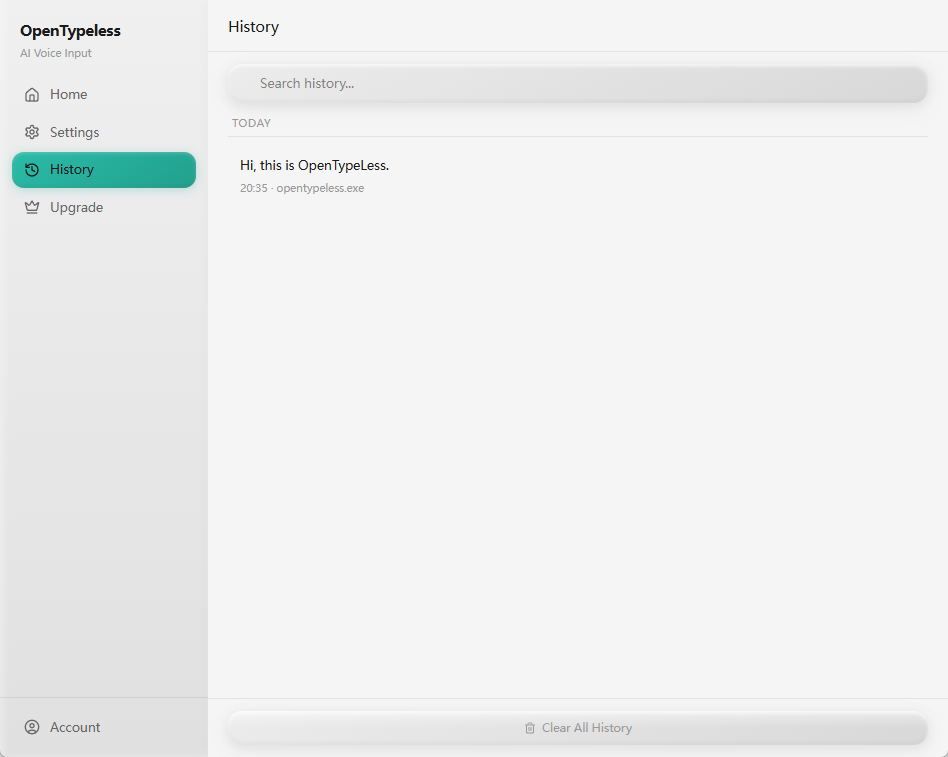
The page is not just a feature list: these are the product UI surfaces users touch when they dictate, configure, review output, and ask by voice.

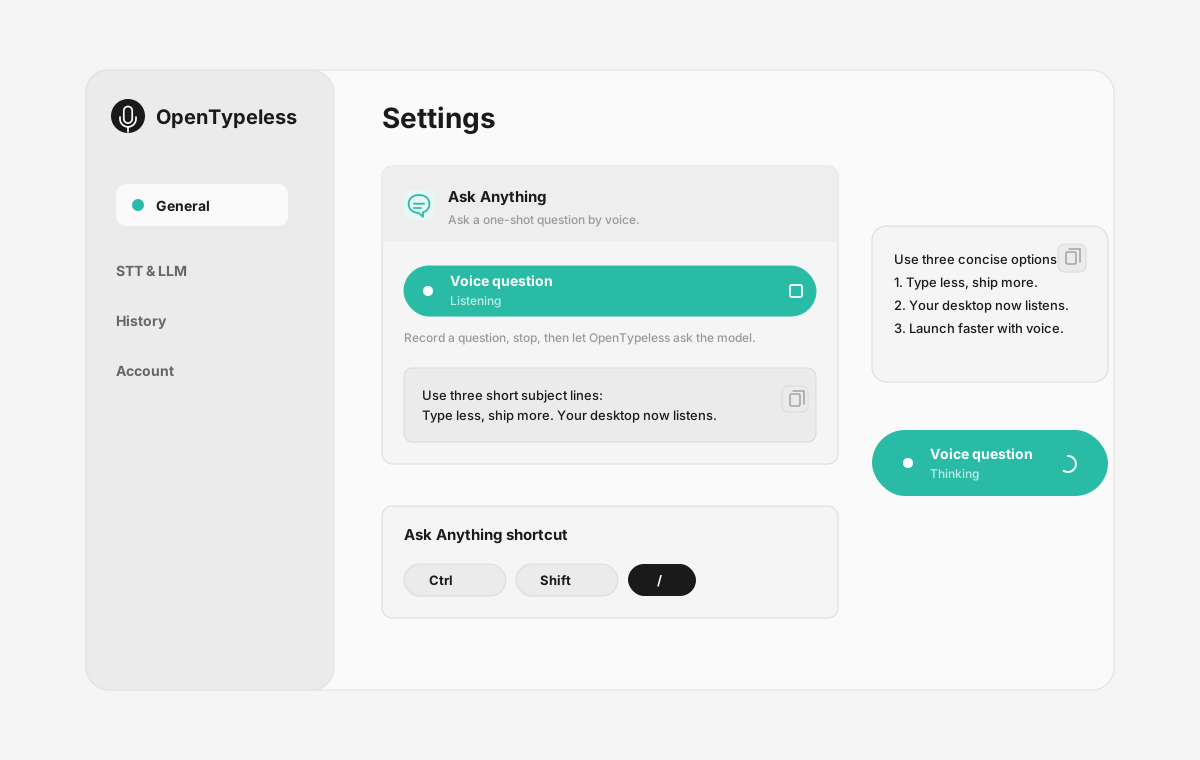
| Workflow point | Product evidence | Why it matters |
|---|---|---|
| Ask Anything | Voice question panel | Ask a question by voice, wait while it is processed, and read the final answer in a small floating note. |
| Settings you can understand | Capture and insert | Switch providers, configure keys, choose language behavior, and manage the input workflow without editing scripts. |
| History for recovery | Provider settings | A desktop history view helps recover recent transcription results when a target app loses focus or a paste fails. |
| Custom dictionary | History and review | Keep recurring terms consistent instead of correcting the same word again and again. |
What the GUI adds around Whisper
The value is not only recognition accuracy. It is the work saved after recognition.
Settings you can understand
Switch providers, configure keys, choose language behavior, and manage the input workflow without editing scripts.
History for recovery
A desktop history view helps recover recent transcription results when a target app loses focus or a paste fails.
Custom dictionary
Keep recurring terms consistent instead of correcting the same word again and again.
Local when needed
A local setup requires two explicit routes: a Custom Whisper-compatible endpoint for STT and Ollama for LLM polishing, with hardware and endpoint tradeoffs for each.
FAQ
Short answers for users comparing tools.
Is OpenTypeless an official OpenAI Whisper app?
No. OpenTypeless is an independent open-source desktop app that can work with Whisper-compatible providers and other STT engines.
Is this for audio files or live dictation?
OpenTypeless is primarily for desktop voice input and live dictation into other apps. File transcription tools may be better for long recordings, subtitles, or speaker-labeled transcripts.
Can Whisper run locally?
Whisper can run behind a local Custom Whisper-compatible STT endpoint. Validate its model, hardware, dependencies, and audio path directly; Ollama is a separate option for local LLM polishing, not the speech engine.
Why not just use Whisper from the terminal?
Terminal workflows are fine for developers and batch tasks. Daily writing usually needs a hotkey, GUI, text insertion, settings, history, and cleanup.
Related guides
Useful next pages for the same search journey.
Try the desktop voice input workflow
Start with the default setup, then tune providers, prompts, shortcuts, and local mode as your workflow becomes clearer.
Choose a Whisper interface for the task you actually need
OpenTypeless provides a desktop dictation workflow that can connect to a Whisper-compatible endpoint. It does not bundle every Whisper model, file-transcription workflow, subtitle editor, or batch-processing feature that a general Whisper GUI search may require.
- Choose live text insertion, file transcription, or subtitle editing as the primary task.
- For OpenTypeless, install or select the speech endpoint independently and configure its URL and model.
- A Custom Whisper-compatible STT endpoint handles speech recognition; Ollama handles only the optional local LLM polishing route.
- Test the target application and inspect the actual network destination before daily use.