OpenTypeless vs Google Docs Voice Typing
Use Tools → Voice typing for a Docs-only task. OpenTypeless is relevant when the same dictation workflow must extend to other editable desktop fields. Keep the Docs command and organization-policy limitations in view.
OpenTypeless product UI
Before comparing feature lists, see the product UI states users touch when switching from Google Docs Voice Typing.


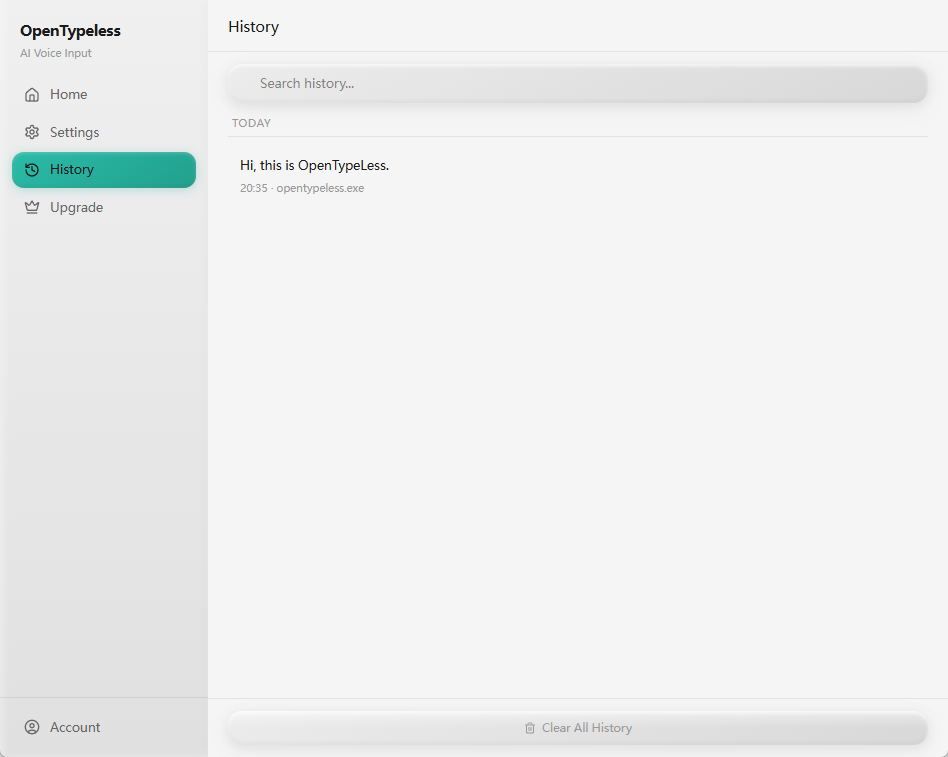
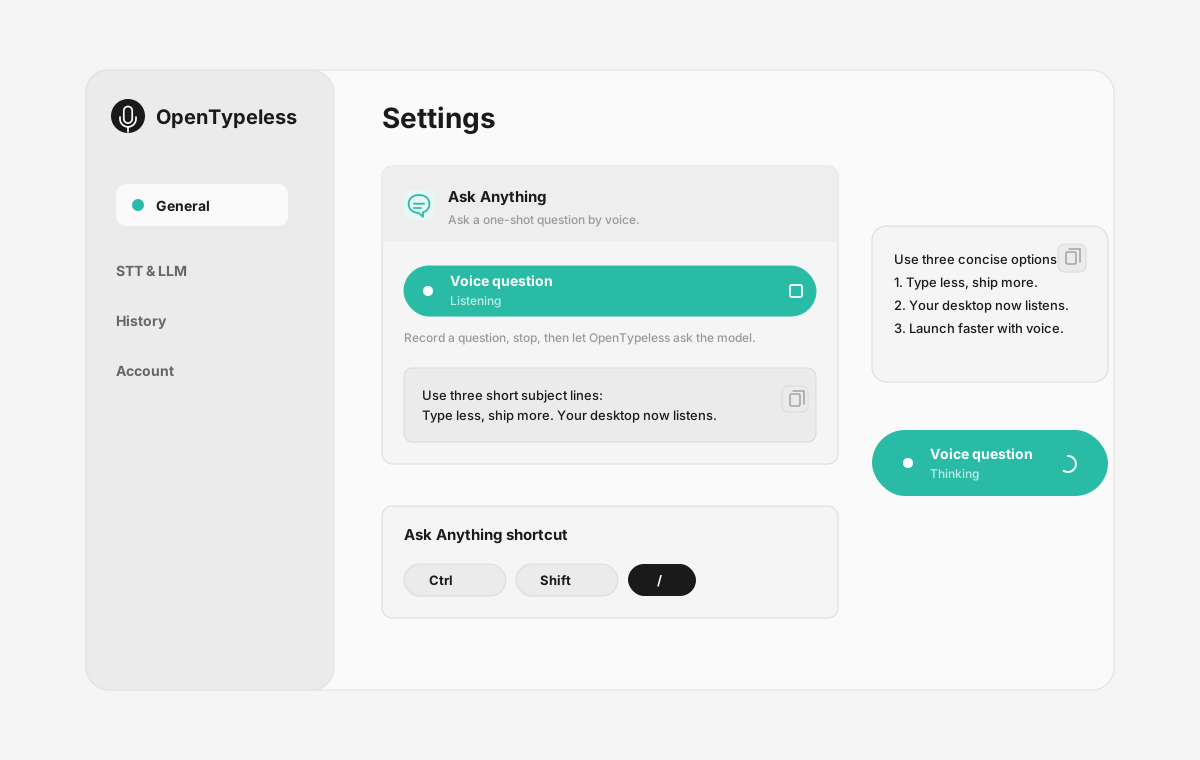
| Stage | Evidence | Why it matters |
|---|---|---|
| Desktop capture | A visible recording surface instead of a generic feature claim. | Users comparing Google Docs Voice Typing can see where OpenTypeless fits into daily typing. |
| Provider control | Settings expose STT and LLM choices in one place. | The page shows the concrete control behind BYOK, local, and cloud workflows. |
| Output review | History gives users a place to check previous voice input results. | This makes the workflow feel inspectable instead of a one-shot black box. |
| Ask Anything | A small floating answer note handles voice questions without opening a chat app. | Users can compare not only dictation, but the second workflow: ask by voice and read the result. |
Compare the same writing task
Match your platform, transcript, correction time, and data requirements before choosing.
- Use the same device, microphone, passage, language, and editable field in both products.
- Compare the usable final transcript after punctuation, terminology, and correction work; raw recognition speed alone is insufficient.
- Record the models and plans used. Include provider charges, setup time, and any required network or local-model configuration.
- Check where audio and transcript text are sent separately, and choose the workflow that meets your requirements.
Official documentation checked 2026-10-08. Edition and configuration limits are stated per row. No controlled speed or accuracy winner is claimed.
Feature Comparison
OpenTypeless vs Google Docs Voice Typing
| Feature | OpenTypeless | Google Docs Voice Typing |
|---|---|---|
| Price and plan | MIT desktop app; provider and managed-service costs are separate | Available inside Google Docs; account and organization policies still applySource |
| Platform | Windows / macOS / Linux | Current Chrome, Edge, and Safari; Docs and Slides workflowsSource |
| Source and license | MIT License | A Google Docs feature; no selectable app source license in this guideSource |
| Speech recognition | 7 named BYOK STT providers | The browser controls speech processing and passes text to Docs or SlidesSource |
| Text processing | 11 providers (BYOK) | Editing and formatting commands in Docs; no configurable LLM route describedSource |
| Languages | 99 languages | Multiple languages and accents; voice commands require English account and document settingsSource |
| Custom vocabulary | Yes | Selection, correction, formatting, and navigation commands are documentedSource |
| Data and processing route | A Custom Whisper-compatible endpoint is the local or self-hosted STT path; whether audio leaves the machine depends on the configured endpoint and network. Ollama is a local LLM provider for text polishing and other LLM work. | Speech processing depends on the web browser; a universal data-path claim is unsupportedSource |
| Primary workflow | Desktop dictation, optional transcript polishing, insertion, and one-off voice questions | Docs documents and Slides notes/captions; it is not a general desktop input layerSource |
Choose by workflow
Use Tools → Voice typing for a Docs-only task. OpenTypeless is relevant when the same dictation workflow must extend to other editable desktop fields. Keep the Docs command and organization-policy limitations in view.
Speech recognition route
The browser controls speech processing and passes text to Docs or Slides
Text processing
Editing and formatting commands in Docs; no configurable LLM route described
Source and license
A Google Docs feature; no selectable app source license in this guide
Platform fit
Current Chrome, Edge, and Safari; Docs and Slides workflows
Switching from Google Docs Voice Typing
Quick Migration
Use Tools → Voice typing for a Docs-only task. OpenTypeless is relevant when the same dictation workflow must extend to other editable desktop fields. Keep the Docs command and organization-policy limitations in view.
When Google Docs Voice Typing fits
We respect the competition
Docs documents and Slides notes/captions; it is not a general desktop input layer
The browser controls speech processing and passes text to Docs or Slides
Use Tools → Voice typing for a Docs-only task. OpenTypeless is relevant when the same dictation workflow must extend to other editable desktop fields. Keep the Docs command and organization-policy limitations in view.
Frequently Asked Questions
When should I choose Google Docs Voice Typing?
Use Tools → Voice typing for a Docs-only task. OpenTypeless is relevant when the same dictation workflow must extend to other editable desktop fields. Keep the Docs command and organization-policy limitations in view.
What does Google Docs Voice Typing cost?
Available inside Google Docs; account and organization policies still apply
Where can I use Google Docs Voice Typing?
Current Chrome, Edge, and Safari; Docs and Slides workflows
How should I compare the data path?
Speech processing depends on the web browser; a universal data-path claim is unsupported. A Custom Whisper-compatible endpoint is the local or self-hosted STT path; whether audio leaves the machine depends on the configured endpoint and network. Ollama is a local LLM provider for text polishing and other LLM work.
Ready to Try OpenTypeless?
Free, open-source, and works on Windows, macOS, and Linux. Set up in under 5 minutes.