OpenTypeless vs OpenAI Whisper
OpenAI Whisper is a raw speech-to-text API and model — not a desktop dictation application. OpenTypeless is free, open-source, and runs on Windows, macOS, and Linux — with 6 STT providers, 11 LLM providers, and AI text polishing.
What OpenAI Whisper Looks Like
We respect what they have built
OpenAI Whisper Interface
github.comNo visible user interface — Whisper is a raw API/Python library. The only "UI" is a terminal command output showing JSON transcription results. Requires running Python scripts with model downloads. There is no hotkey, no floating overlay, no polished text output — just raw JSON with timestamps.
OpenTypeless
Free forever“Whisper is amazing technology, but I don't want to write Python code every time I need to dictate an email. I need a hotkey, not a script.”
— Hacker News commenter
OpenTypeless product UI
Before comparing feature lists, see the product UI states users touch when switching from OpenAI Whisper.


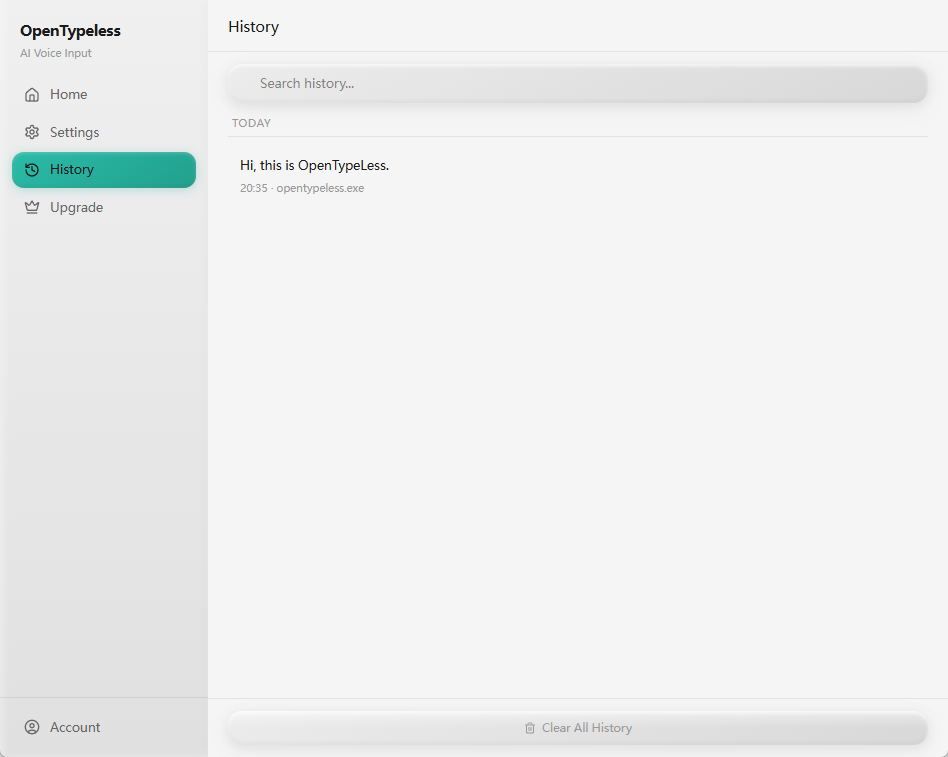
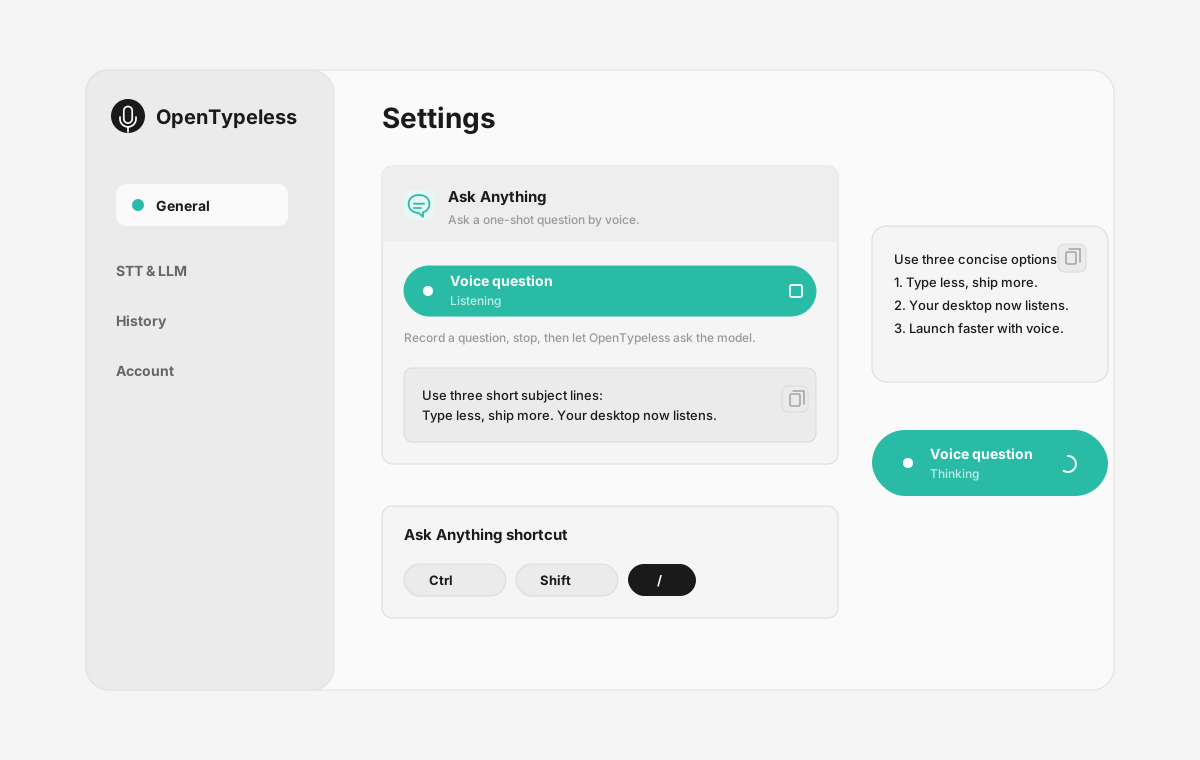
| Stage | Evidence | Why it matters |
|---|---|---|
| Desktop capture | A visible recording surface instead of a generic feature claim. | Users comparing OpenAI Whisper can see where OpenTypeless fits into daily typing. |
| Provider control | Settings expose STT and LLM choices in one place. | The page shows the concrete control behind BYOK, local, and cloud workflows. |
| Output review | History gives users a place to check previous voice input results. | This makes the workflow feel inspectable instead of a one-shot black box. |
| Ask Anything | A small floating answer note handles voice questions without opening a chat app. | Users can compare not only dictation, but the second workflow: ask by voice and read the result. |
Feature Comparison
OpenTypeless vs OpenAI Whisper
| Feature | OpenTypeless | OpenAI Whisper |
|---|---|---|
| Price | Free forever | $0.006/min (API) or Free (local) |
| Platform | Windows / macOS / Linux | API / Local (via Python) |
| Open Source | MIT License | Yes |
| STT Providers | 6 providers (BYOK) | 1 provider(s) |
| LLM Providers | 11 providers (BYOK) | None |
| Languages | 99 languages | 99 |
| Custom Dictionary | Yes | No |
| Offline Mode | Full offline via Ollama | Yes |
| AI Text Polishing | 11 LLM providers | No |
Why Choose OpenTypeless Over OpenAI Whisper
The key advantages
Provider Freedom
OpenAI Whisper has 1 STT provider(s). OpenTypeless supports 6 — choose the speed, accuracy, and cost tradeoff you need.
AI Text Polishing
OpenAI Whisper has no AI polishing. OpenTypeless uses 11 LLM providers to clean up your speech — removing fillers, fixing grammar, and formatting text.
Fully Open Source
MIT License. Every line auditable on GitHub. OpenAI Whisper is also open source, but OpenTypeless offers more provider choices.
Cross-Platform
Works on Windows, macOS, and Linux. OpenAI Whisper only supports API and Local (via Python).
Switching from OpenAI Whisper
Quick Migration
OpenTypeless uses Whisper models under the hood via Ollama, so you get the same accuracy. But you also get a global hotkey, AI polishing, a custom dictionary, and a GUI — no Python setup required.
What People Say About OpenAI Whisper
We respect the competition
Best multilingual accuracy (99 languages)
Open-source model — fully transparent
Free when run locally via Python/Ollama
Industry standard for speech-to-text research
Raw API — requires developer skills to integrate
No desktop application or GUI
No global hotkey for instant voice input
No AI text polishing — outputs raw transcription
Related setup guides
More practical guides for the same voice input workflow.
Whisper GUI workflow
How to turn Whisper-style transcription into a desktop dictation workflow.
Read guideOpen-source dictation app
How provider choice, local options, and open source change the trust model.
Read guideVoice typing in any app
Why a desktop voice input workflow can go beyond one browser extension.
Read guideFrequently Asked Questions
Is OpenTypeless a good replacement for OpenAI Whisper?
Yes. OpenTypeless covers the core voice input features of OpenAI Whisper while adding cross-platform support (Windows, macOS, Linux), 6 STT providers, 11 LLM providers for AI text polishing, a custom dictionary, and a fully local offline mode — all free under the MIT License.
How much does OpenTypeless cost vs OpenAI Whisper?
OpenTypeless is free forever under the MIT License. You bring your own API keys — typical usage costs less than $1/month. An optional Pro plan ($4.99/month) includes pre-configured cloud credits. OpenAI Whisper charges $0.006/min (API) or Free (local).
Does OpenTypeless work on all platforms like OpenAI Whisper?
OpenTypeless runs on Windows, macOS, and Linux. OpenAI Whisper runs on API, Local (via Python). OpenTypeless provides broader desktop coverage.
Can I use OpenTypeless offline?
Yes. Install Ollama locally for both STT (local Whisper) and LLM polishing. Your audio never leaves your machine. OpenAI Whisper also supports offline use, but OpenTypeless gives you more provider choices for offline mode.
Ready to Try OpenTypeless?
Free, open-source, and works on Windows, macOS, and Linux. Set up in under 5 minutes.