Whisper Voice Input for Korean: Open-Source Desktop Dictation with OpenTypeless
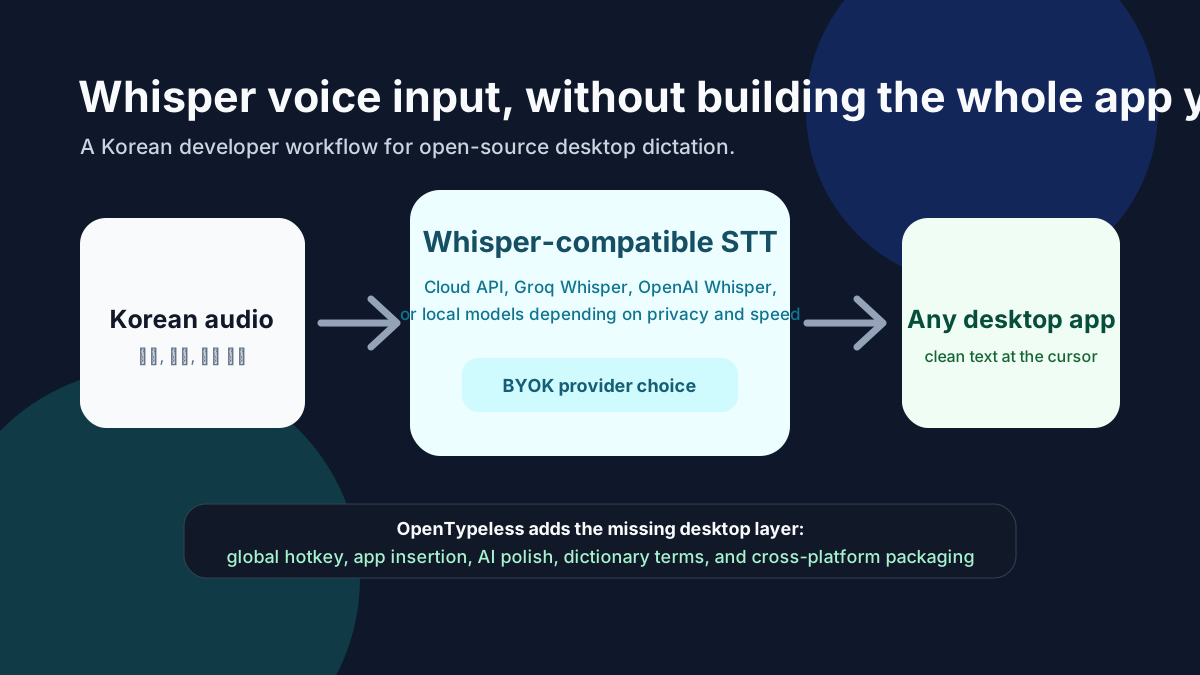
Whisper made high-quality multilingual speech recognition feel accessible, including Korean. But a model is not the same thing as a daily writing app. To use voice input every day, you still need microphone capture, shortcuts, provider configuration, AI cleanup, dictionary terms, and reliable output into the current desktop app.
Whisper Is the Engine, Not the Whole Workflow
A developer can wire together a microphone recorder, a Whisper-compatible API, and a text box. That proves transcription works. But daily dictation requires a smoother loop: press a hotkey, speak, transcribe, polish, insert, review, and continue writing without switching contexts.
- Audio capture and permissions
- Global hotkey behavior
- STT provider selection
- Prompt-based text polishing
- Custom dictionary support
- Test the output step in each required application and operating system
Why Korean Voice Input Has Special Edges
Korean writing often mixes Hangul, English product names, model names, code terms, and company names. A raw transcript can be impressive and still require cleanup. The value of an AI dictation workflow is not only recognition accuracy; it is the final text quality after punctuation, spacing, and tone are handled.
OpenTypeless as the Desktop Layer
OpenTypeless adds the missing desktop layer around Whisper-style STT. It lets users connect providers, use BYOK keys, run a global hotkey, polish raw transcripts with an LLM, and insert the result into the app they are already using. The project is open source, so developers can inspect the workflow instead of treating it as a black box.
Provider Options to Compare
- Groq Whisper when you want fast Whisper-style cloud transcription.
- OpenAI Whisper when you already use the OpenAI API stack.
- For sensitive audio, evaluate a local or self-hosted Custom Whisper-compatible endpoint and verify its host, dependencies, and actual network behavior.
- Deepgram or other STT providers when latency and production speech APIs matter more than model familiarity.
A Korean Developer Test Plan
Before judging any provider, test the complete workflow with content that resembles your actual work. Use one bug report, one pull request comment, one README paragraph, and one mixed Korean-English technical note.
- Add project names, API names, and model names to the custom dictionary.
- Use a polish prompt that preserves technical terms.
- Ask the LLM to keep Korean professional but not overly formal.
- Test output inside GitHub, Slack, an IDE, and a notes app.
- Compare at least two STT providers using the same microphone.
What Open Source Changes
Open source matters here because voice input touches sensitive surfaces: microphone audio, clipboard behavior, text insertion, API keys, and provider routing. With OpenTypeless, the workflow can be inspected, forked, and adapted for Korean-specific needs instead of being locked inside one vendor UX.